


Restoring bookmarks

When I do this:
Click the menu button Fx89menuButton to open the menu panel. Click Bookmarks and then click the Manage bookmarks bar at the bottom. In the Library window, click the Import and Backup button and then select Restore.
I get a blank slate. No files listed.
When I go into the Profile, I see C:\Users\whatt\AppData\Roaming\Mozilla\Firefox\Profiles\shgdgxn6.default-release-1752271533405\bookmarkbackups
How do I restore bookmarks from that file?
Wšykne wótegrona (8)
Hi
If you are trying to recover data lost after a Firefox update, this support article may help:
https://support.mozilla.org/en-US/kb/recover-user-data-missing-after-firefox-update
I see what looks like bookmark files in C:\Users\whatt\AppData\Roaming\Mozilla\Firefox\Profiles\shgdgxn6.default-release-1752271533405\bookmarkbackups
But when I click Manage Bookmarks, nothing shows up. Not even a blank page.
How do I move that file to the right place?
How do I choose a file? I know where my bookmark backups are located.
When I click Manage Bookmarks, I get a page but it does not allow me to choose a file. Just a blank format.
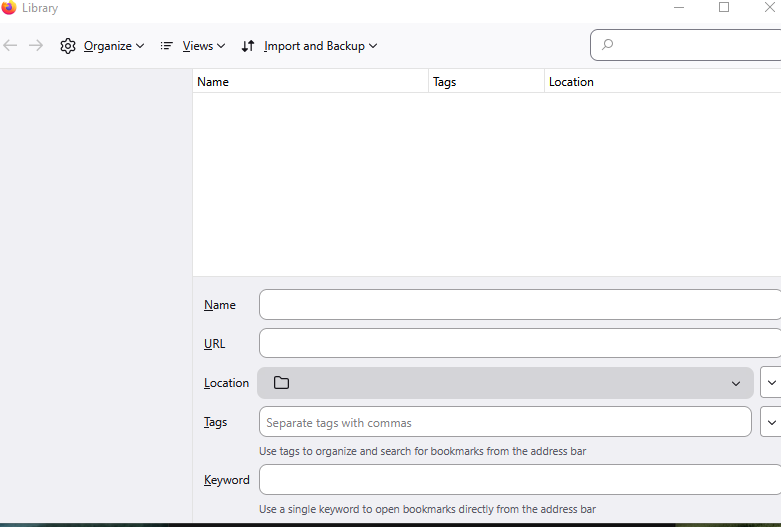
I assume if you check the
Help > More Troubleshooting Information
page, the Profile Folder path there matches the one you found in disk. When you look in that bookmarkbackups folder, do you see one or more files named along the following lines:
bookmarks-2025-12-19_1234_gibberish=.jsonlz4
Those are the files Firefox should display on the Restore menu. If the Restore fly-out menu won't populate, hmm, do you at least get the "Choose File..." option, or is it completely non-operable?
When bookmarks are missing, new bookmarks cannot be saved, and bookmark backups cannot be restored, one possible reason is that Firefox has lost access to the Places database (a pair of files that store URLs, visit history, bookmarks, and site icons). Here are some things to try in that situation:
In case this was caused by a locked file:
You can try the following:
(1) Exit/Quit Firefox and after 30 seconds or so start it back up again. This would hopefully work around any process that runs at Windows startup which might be checking the files (I'm looking at you, CCleaner and friends).
(2) For nerdier users: I found a post describing how to use Windows' Resource Monitor to try to figure out what program has opened a "handle" on the file (filter by places): https://superuser.com/a/643312
(3) Sometimes you may need to do a normal shutdown and/or restart of your system. Restarting Windows can help by freeing up locked files, completing any deferred updates, and resolving temporary file permission issues.
Check for a corrupted file:
If that didn't help, could you let us know what you get when you run the "Verify Integrity" diagnosis and repair function. That's here:
Open Firefox's Troubleshooting Information page using any of these methods:
- "3-bar" menu button > Help > More Troubleshooting Information
- (menu bar) Help > More Troubleshooting Information
- type or paste about:support in the address bar and press Enter
Near the bottom, there is a section titled Places Database -- that's the file which stores history and bookmarks. Click the button labeled Verify Integrity. There may be a 10-15 second delay before results appear.
If all is well, the report that appears below the button should start with:
> Task: checkIntegrity
+ The places.sqlite database is sane
+ The favicons.sqlite database is sane
> Task: checkCoherence
+ The database is coherent
> Task: expire
+ Database cleaned up
et cetera
Does yours say the databases are sane and coherent, or something else? You can select and copy the report, and then paste it into a reply for review and comment.
When you look in that bookmarkbackups folder, do you see one or more files named along the following lines:
bookmarks-2025-12-19_1234_gibberish=.jsonlz4
Yes. I see a series of files. Latest one is 12/14
Restore fly-out menu won't populate, do you at least get the "Choose File..." Yes. No response given to Choose File.
Resource Monitor/Associated: no files brought up by xq_service.jar
Oh sorry, when you do the file handle search, you are looking for places (or places.sqlite).
I don't know why the menu isn't working, but as a general question about the health of the Places database, are you able to save a new bookmark? If not, I suggest proceeding with the steps for a corrupted file.