


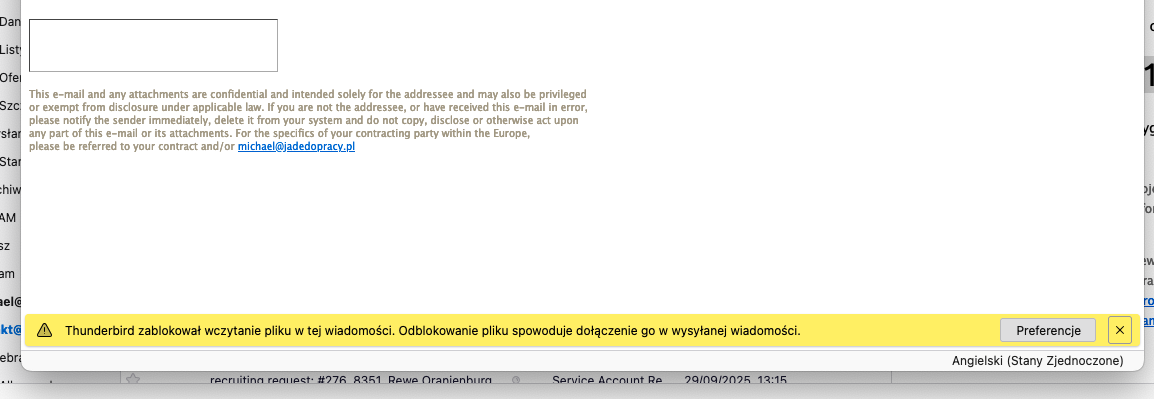
Thunderbird has blocked the file from loading in this message - templates - HELP

Hello,
I have saved message templates that I use. Each one also has a footer (which I save as an .html file).
When I use this template to send a message, the image in the footer doesn't load and I get the message: Thunderbird has blocked the file from loading in this message.
When I click UNBLOCK, nothing happens. The image still doesn't get added. It's a very small image from my footer/signature. 'When I compose a new message, I don't have this problem' – the image in the footer loads and is sent to the recipient. This problem occurs when I try to send a message saved in the templates. There's no way to "unblock the image" and send it.
Wubrane rozwězanje
After a long search, I have finally gotten to the root of the problem - I believe it's simply a BUG in Mozilla Thunderbird.
When you add subfolders to the TEMPLATES folder, the NAME of the subfolder IS SIGNIFICANT.
If the name is "TWO-PART"(If the name contains a space) (or consists of two words), then the PROBLEM occurs.
EXAMPLE:
Messages prior - problem exist MessagesPrior - problem doesn't exist
Toś to wótegrono w konteksće cytaś 👍 0Wšykne wótegrona (2)
In templates I got subfolders and the best thing is: when I try to send message from main "templates" folder - image from my footer/signature is perfectly working. The issue only appears when I want to send message from subfolder...
michael715 powiedział
Hello, I have saved message templates that I use. Each one also has a footer (which I save as an .html file). When I use this template to send a message, the image in the footer doesn't load and I get the message: Thunderbird has blocked the file from loading in this message. When I click UNBLOCK, nothing happens. The image still doesn't get added. It's a very small image from my footer/signature. 'When I compose a new message, I don't have this problem' – the image in the footer loads and is sent to the recipient. This problem occurs when I try to send a message saved in the templates. There's no way to "unblock the image" and send it.
Wubrane rozwězanje
After a long search, I have finally gotten to the root of the problem - I believe it's simply a BUG in Mozilla Thunderbird.
When you add subfolders to the TEMPLATES folder, the NAME of the subfolder IS SIGNIFICANT.
If the name is "TWO-PART"(If the name contains a space) (or consists of two words), then the PROBLEM occurs.
EXAMPLE:
Messages prior - problem exist MessagesPrior - problem doesn't exist