


Windows 10 reached EOS (end of support) on October 14, 2025. If you are on Windows 10, see this article.

Pomoc pśepytaś

Glědajśo se wobšudy pomocy. Njenapominajomy was nigda, telefonowy numer zawołaś, SMS pósłaś abo wósobinske informacije pśeraźiś. Pšosym dajśo suspektnu aktiwitu z pomocu nastajenja „Znjewužywanje k wěsći daś“ k wěsći.

Dalšne informacije

IMAP Sync Clarification

  • 2 wótegronje
  • 0 ma toś ten problem
  • 144 naglědow
  • Slědne wótegrono wót skdajnfgsdgew
  • Archiwěrowany

Mozilla's documentation on IMAP Synchronization Mozilla's documentation on IMAP Synchronization indicates

"Non-synchronized messages are still accessible within Thunderbird. The only difference is that rather than downloading the entire message, only the message "headers" are downloaded. (Message headers contain information like the sender, recipient(s), subject, etc - everything except the body of the message.) The message body is not downloaded until you click on the message in the message list"

Under what settings (e.g. Sync messages checked or unchecked) does this behavior apply?

Thanks.

[https://support.mozilla.org/en-US/kb/imap-synchronization Mozilla's documentation on IMAP Synchronization] Mozilla's documentation on IMAP Synchronization indicates "Non-synchronized messages are still accessible within Thunderbird. The only difference is that rather than downloading the entire message, only the message "headers" are downloaded. (Message headers contain information like the sender, recipient(s), subject, etc - everything except the body of the message.) The message body is not downloaded until you click on the message in the message list" Under what settings (e.g. Sync messages checked or unchecked) does this behavior apply? Thanks.

Wšykne wótegrona (2)

In account settings
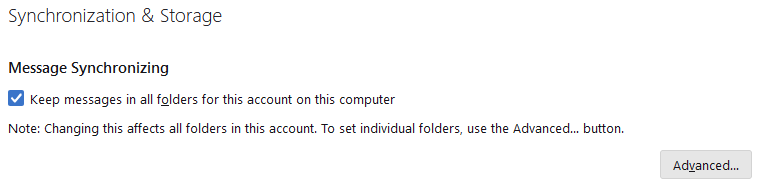
Thanks. RE: "Non-synchronized messages are still accessible..." So there are still non-synchronized messages, when that option is enabled?

Seems like the actual message state of synchronized/not-synchronized is decoupled from the setting.