


Windows 10 reached EOS (end of support) on October 14, 2025. If you are on Windows 10, see this article.

Pomoc pśepytaś

Glědajśo se wobšudy pomocy. Njenapominajomy was nigda, telefonowy numer zawołaś, SMS pósłaś abo wósobinske informacije pśeraźiś. Pšosym dajśo suspektnu aktiwitu z pomocu nastajenja „Znjewužywanje k wěsći daś“ k wěsći.

Dalšne informacije
Toś ta nitka jo se archiwěrowała. Pšosym stajśo nowe pšašanje, joli trjebaśo pomoc.
Archiwěrowany

Screenshot copied to clipboard.

N.Aumond wótegronjony
user313868032363809252401627907042370052022

Hi,

The "Take a Screenshot" function is excellent.

When I take a screenshot and click "Copy" to copy it to the clipboard, a pop-up above the taskbar is shown: "Shot Copied Your shot has been copied to the clipboard. Press CTRL-V to paste."

It is displayed for approx. 10 seconds unless the X in the top-right corner of the pop-up is clicked. Is there a way to perform this function but suppress the pop-up (e.g. in about:config)?

Thank you.
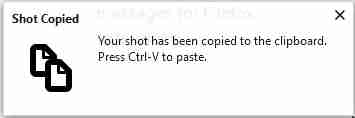
Hi, The "Take a Screenshot" function is excellent. When I take a screenshot and click "Copy" to copy it to the clipboard, a pop-up above the taskbar is shown: "Shot Copied Your shot has been copied to the clipboard. Press CTRL-V to paste." It is displayed for approx. 10 seconds unless the X in the top-right corner of the pop-up is clicked. Is there a way to perform this function but suppress the pop-up (e.g. in about:config)? Thank you.
Pśipowjesone fota wobrazowki

Wšykne wótegrona (1)

I have the same issue, I know I can temporarily turn off the notifications by going to the Tools / Options / Privacy & Security / Notifications / and check the "Pause notifications until Firefox restarts" box.

But that works until Firefox restarts, so I must repeat the turning off notification every time...

Why in hell does that splash notification has no option to be turned off forever!

It's been since 2018 this issue has been reported?