


Windows 10 reached EOS (end of support) on October 14, 2025. If you are on Windows 10, see this article.

Pomoc pśepytaś

Glědajśo se wobšudy pomocy. Njenapominajomy was nigda, telefonowy numer zawołaś, SMS pósłaś abo wósobinske informacije pśeraźiś. Pšosym dajśo suspektnu aktiwitu z pomocu nastajenja „Znjewužywanje k wěsći daś“ k wěsći.

Dalšne informacije

Delay in PDF attachment download/open

  • 1 wótegrono
  • 1 ma toś ten problem
  • 97 naglědow
  • Slědne wótegrono wót christ1

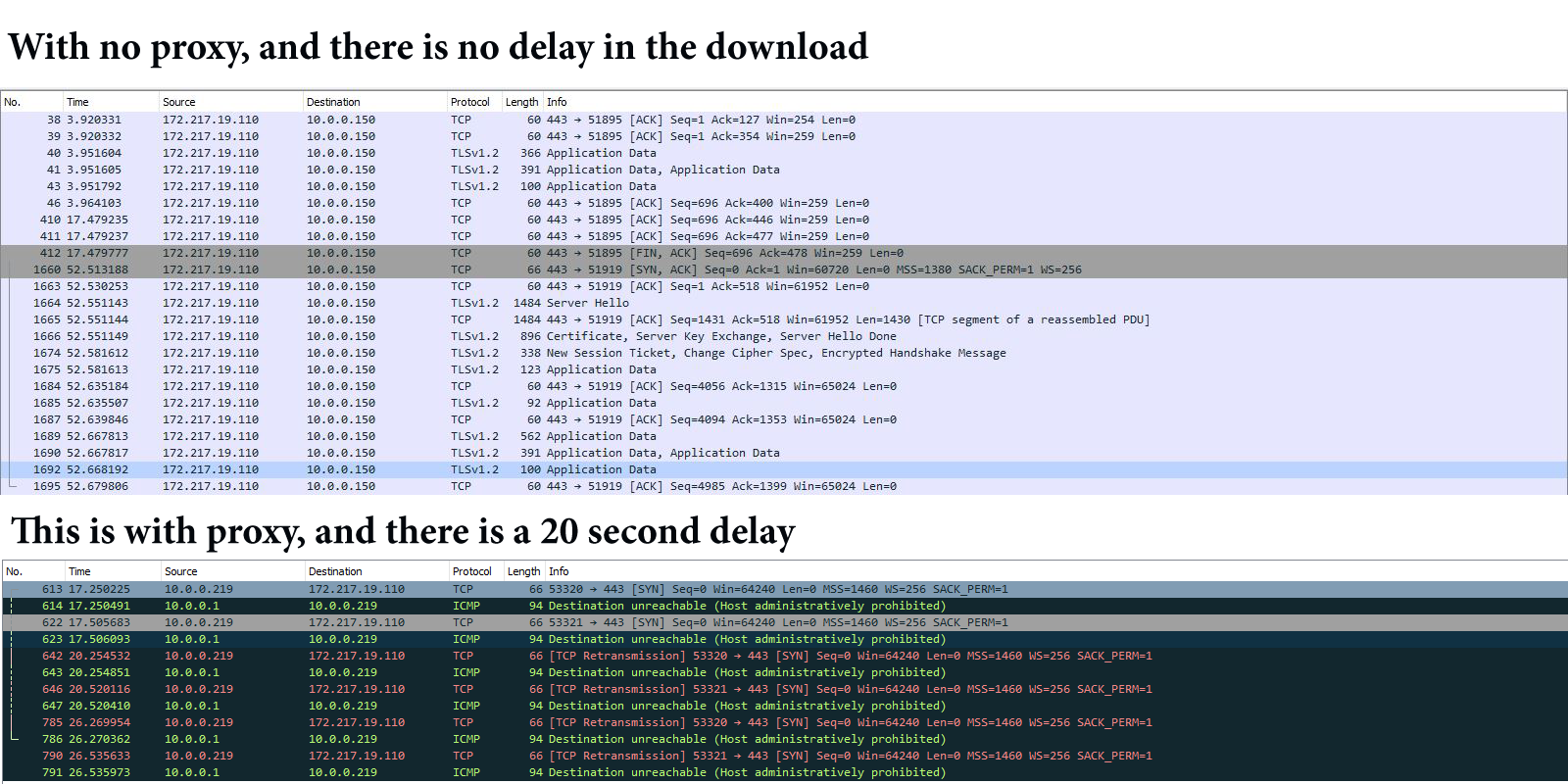
We are using Thunderbird for a couple of years. About week ago we started havin problems with the pdf files... yes.... and only the pdf files. When i try to download/open a pdf file from the attachment, i have to wait about 20 second for 100 kb pdf file, and this problem is not from the size of the attachment because i have tried with a 50 mb pdf file with the same result. The problem is that we are using proxy for network filtering and with the help of the Wireshark i have found, that every time you try to open or download a pdf file in thunderbird, a communication is started with this IP 172.217.19.110 . It seems that you have to wait until it gets a time out, and after that you can open/download your pdf file.

As you can see in the picture, if i disable the proxy filter for my ip everything is working like it should.
We are using Thunderbird for a couple of years. About week ago we started havin problems with the pdf files... yes.... and only the pdf files. When i try to download/open a pdf file from the attachment, i have to wait about 20 second for 100 kb pdf file, and this problem is not from the size of the attachment because i have tried with a 50 mb pdf file with the same result. The problem is that we are using proxy for network filtering and with the help of the Wireshark i have found, that every time you try to open or download a pdf file in thunderbird, a communication is started with this IP 172.217.19.110 . It seems that you have to wait until it gets a time out, and after that you can open/download your pdf file. As you can see in the picture, if i disable the proxy filter for my ip everything is working like it should.
Pśipowjesone fota wobrazowki

Wšykne wótegrona (1)

Then may be something has changed on the proxy, and it doesn't allow mail protocols anymore? This doesn't look like a Thunderbird problem.