


I cannot get to account settings in normal mode I can in safe mode

When I click on account setting I get a small box labeled account settings with one button with a drop down arrow which works and gives a selection of: Add an account mail account, add chat account, add feed account,add other account or remove account. I cannot see any other settings
Wubrane rozwězanje
Yes, I see the screen.I clicked on it and yes, it worked. Thank you very much.
Wšykne wótegrona (3)
Can you provide a screenshot of this "account setting" control you are using?
I'd go to Tools|Account Settings in the menu in the Windows version of Thunderbird. I'm not sure what you're using.
Wót Zenos změnjony
I am using win10 home 64bit on destop with I7 4790 and 16 gb of ram and 500gb hd. thunderbird ver 52.6.0 32bit every thing appears normal in safe mode But I do not find an option to 'reset toolbars and controls' I have trued to send a screen shot but I get an error no image received I can send by e-mail if i have an e-mail to send to first image is normal second is safe
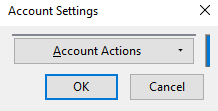
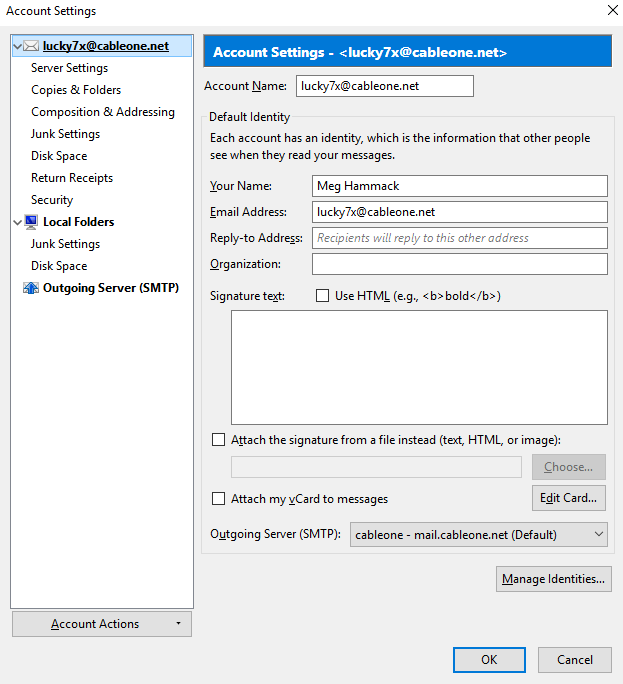
Wót lucky7x změnjony
Wubrane rozwězanje
Yes, I see the screen.I clicked on it and yes, it worked. Thank you very much.