


On the FedEx website certain pages that were available and are available on Chrome show up as Page Not Found on firefox

All of a sudden certain links on the FedEx shipping website now go to a page that says "Page Not Found". These pages do exist and are available on Chrome.
Wubrane rozwězanje
Restarting in safe mode would not even load the FedEx home page. BUT, refreshing seems to have solved the problem.
Toś to wótegrono w konteksće cytaś 👍 1Wšykne wótegrona (3)
Hello,
Try Firefox Safe Mode to see if the problem goes away. Firefox Safe Mode is a troubleshooting mode that temporarily turns off hardware acceleration, resets some settings, and disables add-ons (extensions and themes).
If Firefox is open, you can restart in Firefox Safe Mode from the Help menu:
- Click the menu button
 , click Help
  and select Restart with Add-ons Disabled.
If Firefox is not running, you can start Firefox in Safe Mode as follows:
- On Windows: Hold the Shift key when you open the Firefox desktop or Start menu shortcut.
- On Mac: Hold the option key while starting Firefox.
- On Linux: Quit Firefox, go to your Terminal and run firefox -safe-mode
(you may need to specify the Firefox installation path e.g. /usr/lib/firefox)
When the Firefox Safe Mode window appears, select "Start in Safe Mode".
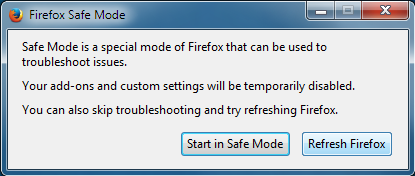
If the issue is not present in Firefox Safe Mode, your problem is probably caused by an extension, theme, or hardware acceleration. Please follow the steps in the Troubleshoot extensions, themes and hardware acceleration issues to solve common Firefox problems article to find the cause.
To exit Firefox Safe Mode, just close Firefox and wait a few seconds before opening Firefox for normal use again.
Wubrane rozwězanje
Restarting in safe mode would not even load the FedEx home page. BUT, refreshing seems to have solved the problem.
Could you please confirm that this solved by returning and marking this as solved under the solution that helped you, Thank You
Wót Shadow110 změnjony