


Firefox shortcut doesn't work; tried creating new one but it still doesn't work, only way to open it is from Firefoxes root folder (..Program files\Firefox...).

Hello.
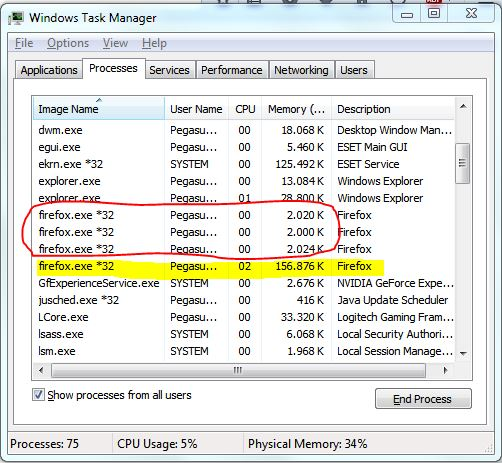
Since I updated Firefox non of the shortcuts seem to work, desktop or quick-bar. Only way to star it is from the root folder of Firefox, I tried creating new shortcut from there but it doesn't work. Funny thing is that no matter how many times I try to open the Firefox via shortcuts they are shown in the Task manager, all of them, but non of them open the program, they are all around 2.000 K in size but the one that works goes from 75.000 K up.
Any help would be much appreciated.
Wubrane rozwězanje
Hey Cor-el, thanks for your help. I did try everything you suggested earlier and it didn't work, I tried with clean install with no profiles, created a new one, didn't work, deleted xulstore.json, also didn't work. I've tried everything all of you suggested but didn't fix the problem, but, on a higher note, this 44.0.2 update fixed the problem. I don't know what they changed, but it worked.
Once again, thank you all for help on this matter, FredMcD and cor-el, best regards to you.
Toś to wótegrono w konteksće cytaś 👍 0Wšykne wótegrona (20)

The Firefox window is opening outside of your view.
Right click on the icon and select Open New Window. Sometimes this works. If it opens, close it by Menu > File > Exit.
Try to rename (or delete) the xulstore.json file in the Firefox profile folder.
- C:\Users\<user>\AppData\Roaming\Mozilla\Firefox\Profiles\<profile>\
"AppData" (XP: Application Data; Mac: ~/Library; Linux: ~/.mozilla) is a hidden folder.
FredMcD said
The Firefox window is opening outside of your view. Right click on the icon and select Open New Window. Sometimes this works. If it opens, close it by Menu > File > Exit.
Thanks for the reply but you misunderstood me, I see Firefox in Task manager not in the Task bar..
Wót Pegasus_Prime změnjony
Thanks again Fred, but still nothing... I do have NOD32 installed so it's not a malware or something of that kind.. It simply doesn't open via any shortcut. It's not a big problem it's just annoying.. :)
Create a new shortcut. Now right click on it and select Properties. Find the URL and post it here.
"C:\Program Files (x86)\Mozilla Firefox\firefox.exe"
That should have worked. Try this; C:\PROGRA~2\MOZILL~1\firefox.exe
Thanks again but still nothing, it's just a shorter path, but tried it anyway. This is what happens in the Task manager; the circled ones are from shortcuts and the highlighted is the one working, started from the root folder of the Firefox.
I've called the big guys to help you. Good luck.
Thank You for all your help Fred, I appreciate it.
Best regards.
Please check these two settings:
- Please check the properties of the shortcut by right clicking on them. Can you please make sure that there is no -new-instance in the url?
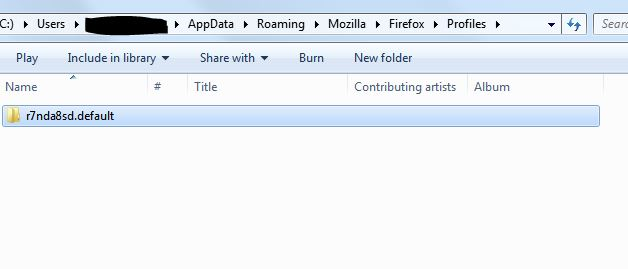
- Please check to see if each time you open a shortcut if there is another listed profile in the profile folder: Profiles - Where Firefox stores your bookmarks, passwords and other user data
Troubleshoot Firefox issues caused by malware and try a profile with no add ons or extensions.
Thank You for reply. I've tried everything on the list, I even uninstalled Firefox a few times, erased all data from all the folders still left on the computer (after using Revo Uninstaller advanced uninstall), reinstalled, no add-ons, extensions, not even bookmark restoration and still I can open it only as already described.
Here are some screenshots, I'll provide anything You need.
Thanks for Your effort.
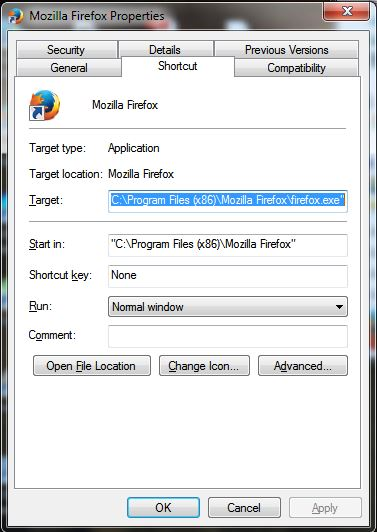
Hold on, please. In the first picture, the first quotation mark is missing. Look at Target.
"C:\Program Files (x86)\Mozilla Firefox\firefox.exe"
Sorry, the line is too long, it is there..
"C:\Program Files (x86)\Mozilla Firefox\firefox.exe"
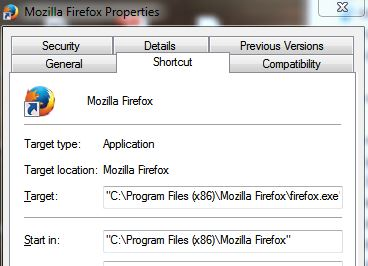
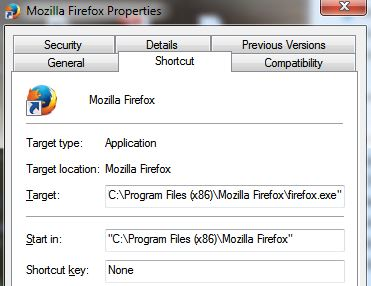
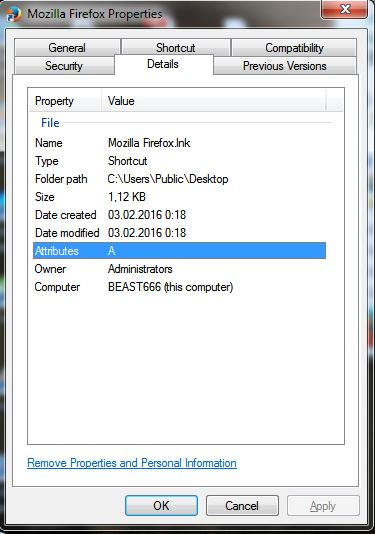
The second screenshot of three in above reply shows Administrators as the owner. I don't know if that makes a difference.
Does Firefox start when you run the application as administrator?
Boot the computer in Windows Safe Mode with network support (press F8 on the boot screen) to see if that helps.
Hey. Nope, starting it as admin doesn't work, I am the only user, and admin, starting in safe mode had no impact on the matter, but thank you for trying. If it comes to the point that it starts to bug me a lot, I'll install the previous version (43...) which worked without a glitch.
Feel free to post any other ideas, I'd be happy to try them out.
Best regards.
O.K. So I accidentally right-clicked the quick bar shortcut and left-clicked the 'Open new window' tab and it opened Firefox without any problems. It's not a solution but it's something.
Once again, thank You for all and any future ideas about this problem and feel free to write up any other ideas to try out.
Many thanks.
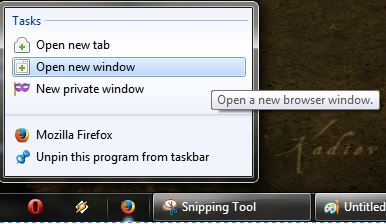
Did you try to close the not working window to see if that has effect?
Did you try to delete the xulstore.json file like I suggested above?
Create a new profile as a test to check if your current profile is causing the problem.
See "Creating a profile":
- https://support.mozilla.org/kb/profile-manager-create-and-remove-firefox-profiles
- http://kb.mozillazine.org/Standard_diagnostic_-_Firefox#Profile_issues
If the new profile works then you can transfer files from a previously used profile to the new profile, but be cautious not to copy corrupted files to avoid carrying over problems.
Wubrane rozwězanje
Hey Cor-el, thanks for your help. I did try everything you suggested earlier and it didn't work, I tried with clean install with no profiles, created a new one, didn't work, deleted xulstore.json, also didn't work. I've tried everything all of you suggested but didn't fix the problem, but, on a higher note, this 44.0.2 update fixed the problem. I don't know what they changed, but it worked.
Once again, thank you all for help on this matter, FredMcD and cor-el, best regards to you.