


How do I change the skin in the new message pane?

The newest release just doesn't look right. The message To: and Subject: fields are harder to see at a glance. Is there a was to roll back the way it looks, graphically speaking, to the old look without rolling back to the previous version. I personally like a look that has more contrast.
Wšykne wótegrona (2)
Yes it can be changed but you need to follow the instructions written by 'Anje' comment 8 at this link:
How to locate Profile folder
make hidden files and fodlers visible:
In Thunderbird Help > Troubleshooting Information click on 'show Folder' button
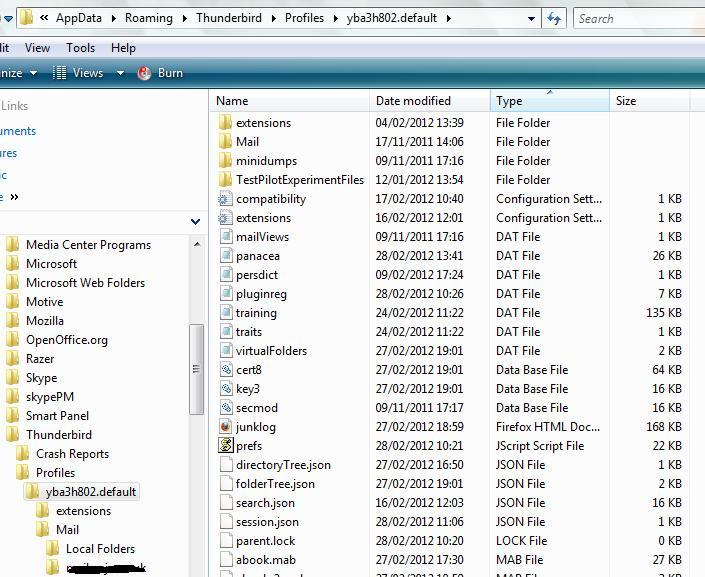
a new window opens showing profile folders - It will look similar to first image below.
Close Thunderbird now - this is important - before you start to do what it says at the link.
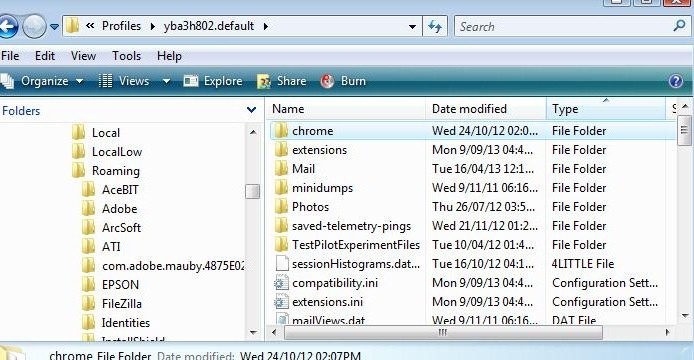
Then create a new folder called chrome - note the spelling. So it Profile folder looks like the second image below.
Open Notepad Copy paste all the contents shown at the link into notepad and then save the file as userChrome.css (note the spelling) in the chrome folder.
Restart thunderbird.
Please note that you can add your vote to thr bug: