I can't see any sent messages, the alert message is Unab;e to open the summary file for sent. Please advise - Karen

Hi .. I am not able to see any messages in my sent folder. The following alert message is showing on my screen
Alert Unable to open the summary file for sent. Perhaps there was an error on disk, or the full path is too long
Please advise
Many thanks
Karen
Wšykne wótegrona (9)
try to rebuild the index file. Right click on Sent folder and select 'Properties' click on 'Repair folder' button click on OK
close and reopen Thunderbird.
It may also be possible that there are a lot of sent messages in the file.
If rebuilding the index gets you access:
- Delete any emails you do not want.
- Archive all other emails or at least anything older than a month.
- right click on folder and select 'Compact'
see how to set up Archiving options:
Is this a Pop or IMAP mail account folder?
Hi ... doing what you suggested is what caused the alert message in the first place . ... have tired it again and nothing has changed ... any other ideas ... ?
Is this a Pop or IMAP mail account folder?
Hi .. its an IMAP
Check settings are pointing to the correct folder:
'Tools' > 'Account Settings' > 'Copies & folders' for the imap mail account Select: 'place a copy in' select: 'Other' and choose the Sent folder on the imap mail account click on OK to save changes.
Close and restart Thunderbird
HI
I am still getting the same error message
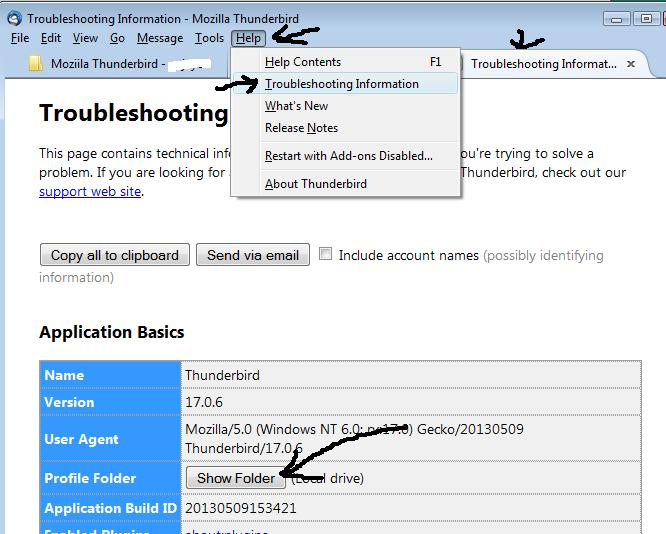
Help menu (ALt+H) > troubleshooting information Click the show folder button. close Thunderbird Open in explorer to the imapmail folder Now open the folder for your mail accounts server name. Delete sent.msf restart Thunderbird.
Hi .. you have totally confused me now ... I don't seem to have a show folder button ..??
This image may help: