Por qué los videos de You tube se cortan o se quedan estancados?
Los videos de You tube se atascan Tienen mucho anuncios Aveces no cargan o no reproducen Paralizan el celular en ocaciones
Offen


Los videos de You tube se atascan Tienen mucho anuncios Aveces no cargan o no reproducen Paralizan el celular en ocaciones
I'm on a Mac desktop, Mac Tahoe 26.6.2, using the latest version of Firefox, although this frequently happened in previous versions. Audio often disappears from videos an… (Lesen Sie mehr)
I'm on a Mac desktop, Mac Tahoe 26.6.2, using the latest version of Firefox, although this frequently happened in previous versions. Audio often disappears from videos and reels. When I refresh the page, nothing happens. To get sounds working again, I have to quit Firefox and restart, but by then I've lost the reels I was watching. This is a big issue for me as I am a musician. Any ideas on how to fix this permanently?
I get 'you browser cannot play this video" when I try to watch NFL Sunday Ticket on Youtube; what causes this? I use Linux Mint on my laptop. I also have Opera browser … (Lesen Sie mehr)
I get 'you browser cannot play this video" when I try to watch NFL Sunday Ticket on Youtube; what causes this? I use Linux Mint on my laptop.
I also have Opera browser installed; I get the same error using Opera.
Please help. Thanks.
Good afternoon recently i tried just realise my firefox can't played HEVC streaming video like twitch etc. (1st pictures) i check on other browser such as Chrome, Edge, e… (Lesen Sie mehr)
Good afternoon
recently i tried just realise my firefox can't played HEVC streaming video like twitch etc. (1st pictures)
i check on other browser such as Chrome, Edge, etc. it's played normal i check on google all about config
like media.wmf.hevc.enabled , media.hevc.enabled , dom.media.webcodecs.h265.enabled all set to true. checking on about:support i found it's not supported (2nd screenshot)
i check on Powershell are like this :
C:\WINDOWS\system32> Get-AppxPackage | Where-Object {$_.Name -like "*HEVC*"}
Name : Microsoft.HEVCVideoExtension
Publisher : CN=Microsoft Corporation, O=Microsoft Corporation, L=Redmond, S=Washington, C=US
Architecture : X64
ResourceId :
Version : 2.5.33.0
PackageFullName : Microsoft.HEVCVideoExtension_2.5.33.0_x64__8wekyb3d8bbwe
InstallLocation : C:\Program Files\WindowsApps\Microsoft.HEVCVideoExtension_2.5.33.0_x64__8wekyb3d8bbwe
IsFramework : False
PackageFamilyName : Microsoft.HEVCVideoExtension_8wekyb3d8bbwe
PublisherId : 8wekyb3d8bbwe
IsResourcePackage : False
IsBundle : False
IsDevelopmentMode : False
NonRemovable : False
IsPartiallyStaged : False
SignatureKind : Store
Status : Ok
Capabilities : inProcessMediaExtension,
uniqueAppPackageCapability
in summary it's installed and running.
i will be happy if you can guide me on how to enable it. because tbh Firefox are my daily drive
thanks before
Has anybody else experienced a similar problem? Or can you help me trouble shoot this issue please? I'm busy playing audio in a tab of the browser. The sound quality is g… (Lesen Sie mehr)
Has anybody else experienced a similar problem? Or can you help me trouble shoot this issue please?
I'm busy playing audio in a tab of the browser. The sound quality is good (rich, full, deep). Next, I open a new window by any means (Ctrl+N / Open link in new window / Menu > New window) As the new window appears, the current audio playback becomes tinny / lower quality. After a 3 seconds, the normal good sound quality starts again.
I'm currently using Bluetooth connected headphones and this happens on different headphones. I have to find some wired headphones first before I can try that. This happens with every new window that I open, regardless of the number of open tabs in current windows or how many previous open windows I already have. This happens regadless if audio enhancements of the output device are enabled or not. Spatial sound is set to off. Windows is set to 'do nothing' & will not adjust the volumes of different sounds when I'm using my PC to place or receive telephone calls.
OS: Windows 11 with latest patches Firefox: latest & older builds Hardware drivers: All manufacturer drivers applied
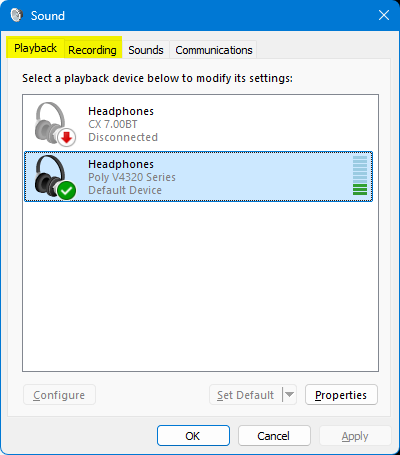
PS I can replicate this issue by changing between the 'Playback' & 'Recording' tab in the Sound Control Panel applet. That is to say, the same decrease in audio quality happens when I change from the Playback tab to the Recording tab. Audio quality improves again when I change from the Recording tab to the Playback tab https://assets-prod.sumo.prod.webservices.mozgcp.net/media/uploads/images/2026-09-12-15-38-23-1accad.png
PPS My new windows are set to open on 'about:support'
PPPS Can't reply to previously archived question : https://support.mozilla.org/en-US/questions/1525613
I would like to be able to turn off preload of videos (and images) so that I can watch a page with a lot of videos and only load those that I want to see. This is importa… (Lesen Sie mehr)
I would like to be able to turn off preload of videos (and images) so that I can watch a page with a lot of videos and only load those that I want to see. This is important if you don't have a high bandwith or a lot of data. I am sure I have done this before but now I am not able to achieve that.
Thank you in advance, Virtually yours, David
When I'm on websites such as Reddit or Facebook, and I'm scrolling down, if I come across more than one post where there is a video, the screen will start to flicker. Onl… (Lesen Sie mehr)
When I'm on websites such as Reddit or Facebook, and I'm scrolling down, if I come across more than one post where there is a video, the screen will start to flicker. Only one video will play, but the screen flickers. If there is only one video on the screen, it is fine.
I can turn off Hardware Acceleration and this will resolve the issue, however, when I go to other sites such as Apple TV or GeoGuessr, the sites lag until I turn Hardware Acceleration back on.
The issue seems to be between Hardware Acceleration and when multiple videos are loading on a page.
My webpage is not working properly, the sound is impossible to control from the bar.
YouTube videos are often choppy and laggy in Firefox. They stutter and sometimes pause while playing. How can I fix this?
Hello, I am experiencing a serious display flickering/refresh issue in Firefox when opening DRM streaming websites such as Netflix, Amazon Prime Video and HBO/Max. My sys… (Lesen Sie mehr)
Hello,
I am experiencing a serious display flickering/refresh issue in Firefox when opening DRM streaming websites such as Netflix, Amazon Prime Video and HBO/Max.
My system:
GPU: NVIDIA GeForce RTX 3080 Monitor: LG 34GL750 Windows PC Latest NVIDIA driver installed
The problem:
When I open Netflix/Prime Video/HBO/Max in Firefox, the display repeatedly flickers or appears to restart. There is no "No Signal" message from the monitor. Closing Firefox sometimes makes the display recover. Unplugging/reconnecting the display cable has sometimes been necessary. The same problem does NOT occur in Brave, using the same PC, GPU, monitor and cable.
Troubleshooting already performed:
Updated to the latest NVIDIA driver, including the recent driver update that mentioned display-related issues. Tried a different display cable. Disabled Firefox hardware acceleration. Tested with Firefox Troubleshooting Mode — the problem still occurs. Disabled/enabled Firefox DRM/Widevine — the problem still occurs. Tested with a completely new Firefox profile — the problem still occurs. Disabled G-SYNC — the problem still occurs. Disabled uBlock — the problem still occurs. Checked about — there are no recent crash reports related to the problem.
Firefox about information:
GPU #1: NVIDIA GeForce RTX 3080 Active: Yes
In my normal Firefox profile: Compositing: WebRender (Software) HARDWARE_VIDEO_DECODING: runtime: unavailable Requires texture sharing Blocklisted; failure code FEATURE_FAILURE_BROKEN_TEXTURE_SHARING
In a completely new Firefox profile: HARDWARE_VIDEO_DECODING: default: available
However, the display problem still occurs in the new profile.
Thank you.
Hello, I am having trouble with my Simple Practice connection static and video not functioning for my sessions with clients on Firefox and would like to have this remedi… (Lesen Sie mehr)
Hello,
I am having trouble with my Simple Practice connection static and video not functioning for my sessions with clients on Firefox and would like to have this remedied...Maybe I just need an update but looked under Settings and didn't see that option. Please advise. Thank you!
I am running 155.0.1 latest version at the time of this writing. I am able to log into Netflix, but cannot play content. Part of their trouble shooting was to disable and… (Lesen Sie mehr)
I am running 155.0.1 latest version at the time of this writing. I am able to log into Netflix, but cannot play content. Part of their trouble shooting was to disable and re-enable DRM (widevine). The problem is that now that I have done so, I cannot get widevine installed again. Is there a manual way to get this installed, clean up what Netflix was so gallant about messing up on my computer? I have seen some old and sketchy posts on redit and other places that suggest ways to do this, but they scare me. I searched the forums here, and didn't see anything that directly affected my question, although I might have missed it.
Thanks all for the help.
This has happened on two different video sites already. While watching a video, it will go extremely dark and happens randomly. I also get a weird blank window frame spor… (Lesen Sie mehr)
This has happened on two different video sites already. While watching a video, it will go extremely dark and happens randomly. I also get a weird blank window frame sporadically. I've unjustly been reporting this to one of the video sites until I noticed the same thing on Youtube.
I am unable to make or receive video calls in Facebook and WhatsApp. I used to be able to in Facebook. The message I get is that my browser doesn't support video calls.… (Lesen Sie mehr)
I am unable to make or receive video calls in Facebook and WhatsApp. I used to be able to in Facebook. The message I get is that my browser doesn't support video calls. What is wrong?
Whenever I hold down the mouse button or space bar to speed up a video by 2x, it seems to let out a small crackle / pop, it wouldn't be as annoying if it only happened on… (Lesen Sie mehr)
Whenever I hold down the mouse button or space bar to speed up a video by 2x, it seems to let out a small crackle / pop, it wouldn't be as annoying if it only happened one time but it happens practically anytime I do it, sometimes it's when I first press it down, and sometimes it's when I let go.
I've been using Firefox for years and never had this issue until like 3-4 days ago I'd say, and it's a small thing but it adds up constantly and makes the experience fairly annoying, I tested the audio on google chrome extensively and it doesn't seem to happen there so I have to assume it's a Firefox issue.
Would love to see if there's a way to fix this.
It was working fine until the day before yesterday. The volume of the speaker got low before it stopped working. The PodCast and Vimeo are working fine. So it is not t… (Lesen Sie mehr)
It was working fine until the day before yesterday. The volume of the speaker got low before it stopped working. The PodCast and Vimeo are working fine. So it is not the problem of my computer speaker.
Please help me as i want to record some gameplay but it keeps getting squished & it is pissing me off. I have asked on reddit & people were unhelpful & tellin… (Lesen Sie mehr)
Please help me as i want to record some gameplay but it keeps getting squished & it is pissing me off. I have asked on reddit & people were unhelpful & telling me to just buy another computer. this is annoying as it is causing me when playing games it causes text to be unreadable at times. Thanks in advance.
Error "No video with supported format and MIME type found" when trying to play video in many third-party players in FireFox Nightly. There is no such error in Firefox/Bet… (Lesen Sie mehr)
Error "No video with supported format and MIME type found" when trying to play video in many third-party players in FireFox Nightly. There is no such error in Firefox/Beta; everything works normally. What should I do? I don't want to switch to Firefox; it doesn't have about:config. And in Firefox Beta, there are no options "Enable Isolated Processes with Zygote Preloading (requires restart)" and "Enable Isolated Content Process (requires restart)", which prevent tabs from being loaded in the background. Nightly updates don't help.
Lately, whenever I click into a youtube video from within youtube, instead of Firefox blocking autoplay, it mutes the video but lets it play. Initially, it was muting EV… (Lesen Sie mehr)
Lately, whenever I click into a youtube video from within youtube, instead of Firefox blocking autoplay, it mutes the video but lets it play.
Initially, it was muting EVERY video I pulled up, but messing with my settings has fixed the problem if I click into a youtube video from elsewhere (ex. a google search result), or if I refresh the page. It's super annoying to having navigating youtube be this non-functional right now, though, since everything just silently plays until I catch and unmute it! Any help would be super appreciated!
(I'll attach an image with my current autoplay settings.)