

Fragen zum Thema werden angezeigt:

los vídeos de YouTube se reproducen entrecortados constantemente o solo ocurre en determinados vídeos o momentos?

Los vídeos de YouTube se reproducen entrecortados en Firefox Al reproducir vídeos en YouTube, la imagen no se reproduce de manera fluida. El vídeo presenta pausas, peque… (Lesen Sie mehr)

Los vídeos de YouTube se reproducen entrecortados en Firefox Al reproducir vídeos en YouTube, la imagen no se reproduce de manera fluida. El vídeo presenta pausas, pequeños saltos o interrupciones durante la reproducción.

Cómo reproducirlo:

1. Abrir Firefox. 2. Entrar en YouTube. 3. Seleccionar cualquier vídeo. 4. Iniciar la reproducción. 5. Observar que el vídeo comienza a reproducirse de forma entrecortada

Pruebas realizadas

  • Reinicié Firefox.
  • Comprobé que el problema continúa.
  • Probé a reducir la calidad del vídeo.
  • [Indicar si también ocurre en una ventana privada].
  • [Indicar si ocurre con las extensiones desactivadas].
  • [Indicar si ocurre también en otro navegador].
    • Información técnica:**
  • Versión de Firefox: [indicar versión].
  • Sistema operativo: [Windows/macOS/Linux/Android/iOS y versión].
  • Dispositivo: [indicar dispositivo].
  • Extensiones instaladas: [indicar las relevantes].
Offen 1
youtube vertical full screen issues

While playing youtube vertical mini dramas I am facing issues with full screen view. It doesn't happens to go full screen after clicking/tapping for full screen mode. It … (Lesen Sie mehr)

While playing youtube vertical mini dramas I am facing issues with full screen view. It doesn't happens to go full screen after clicking/tapping for full screen mode. It onlyhappens full screen after rotation of the screen, which is not suitable to to see vertical dramas. Please clear this bugs which blocks the app to go full screen. Thanks.

Offen

Strange scrubbing issue between Firefox, webm/mp4 and Cachy

Hello, this is the basic problem: The short version is that there is a problem with Firefox not interacting with the scrub bar and volume bar. (all other controls work fi… (Lesen Sie mehr)

Hello, this is the basic problem:

The short version is that there is a problem with Firefox not interacting with the scrub bar and volume bar. (all other controls work fine) We know it's a Firefox thing because everything works with Brave. (or an interaction between Firefox and the OS at least, Firefox is heavily involved)

There is more detail and we have done some work on it here: CashyOS forum post

You can use the Firefox manifesto V0.2. video for an example, as it displays all the above problems for me.

I can get you guys whatever other data might be needed, but I kinda need an idea where to look to try and fix this, as all the other posts I have managed to find don't seem to have similar enough issues to work.

Offen 3

Sounds don't work consistently on videos and reels.

I'm on a Mac desktop, Mac Tahoe 26.6.2, using the latest version of Firefox, although this frequently happened in previous versions. Audio often disappears from videos an… (Lesen Sie mehr)

I'm on a Mac desktop, Mac Tahoe 26.6.2, using the latest version of Firefox, although this frequently happened in previous versions. Audio often disappears from videos and reels. When I refresh the page, nothing happens. To get sounds working again, I have to quit Firefox and restart, but by then I've lost the reels I was watching. This is a big issue for me as I am a musician. Any ideas on how to fix this permanently?

Offen

I get 'you browser cannot play this video" when I try to watch NFL Sunday Ticket on Youtube; what is the cause?

I get 'you browser cannot play this video" when I try to watch NFL Sunday Ticket on Youtube; what causes this? I use Linux Mint on my laptop. I also have Opera browser … (Lesen Sie mehr)

I get 'you browser cannot play this video" when I try to watch NFL Sunday Ticket on Youtube; what causes this? I use Linux Mint on my laptop.

I also have Opera browser installed; I get the same error using Opera.

Please help. Thanks.

Offen

My Firefox can't support HEVC

Good afternoon recently i tried just realise my firefox can't played HEVC streaming video like twitch etc. (1st pictures) i check on other browser such as Chrome, Edge, e… (Lesen Sie mehr)

Good afternoon

recently i tried just realise my firefox can't played HEVC streaming video like twitch etc. (1st pictures)

i check on other browser such as Chrome, Edge, etc. it's played normal i check on google all about config

like media.wmf.hevc.enabled , media.hevc.enabled , dom.media.webcodecs.h265.enabled all set to true. checking on about:support i found it's not supported (2nd screenshot)

i check on Powershell are like this :

C:\WINDOWS\system32> Get-AppxPackage | Where-Object {$_.Name -like "*HEVC*"}


Name  : Microsoft.HEVCVideoExtension Publisher  : CN=Microsoft Corporation, O=Microsoft Corporation, L=Redmond, S=Washington, C=US Architecture  : X64 ResourceId  : Version  : 2.5.33.0 PackageFullName  : Microsoft.HEVCVideoExtension_2.5.33.0_x64__8wekyb3d8bbwe InstallLocation  : C:\Program Files\WindowsApps\Microsoft.HEVCVideoExtension_2.5.33.0_x64__8wekyb3d8bbwe IsFramework  : False PackageFamilyName : Microsoft.HEVCVideoExtension_8wekyb3d8bbwe PublisherId  : 8wekyb3d8bbwe IsResourcePackage : False IsBundle  : False IsDevelopmentMode : False NonRemovable  : False IsPartiallyStaged : False SignatureKind  : Store Status  : Ok Capabilities  : inProcessMediaExtension,

                   uniqueAppPackageCapability


in summary it's installed and running.

i will be happy if you can guide me on how to enable it. because tbh Firefox are my daily drive

thanks before

Offen 7

Quality of audio output changes when starting a new window

Has anybody else experienced a similar problem? Or can you help me trouble shoot this issue please? I'm busy playing audio in a tab of the browser. The sound quality is g… (Lesen Sie mehr)

Has anybody else experienced a similar problem? Or can you help me trouble shoot this issue please?

I'm busy playing audio in a tab of the browser. The sound quality is good (rich, full, deep). Next, I open a new window by any means (Ctrl+N / Open link in new window / Menu > New window) As the new window appears, the current audio playback becomes tinny / lower quality. After a 3 seconds, the normal good sound quality starts again.

I'm currently using Bluetooth connected headphones and this happens on different headphones. I have to find some wired headphones first before I can try that. This happens with every new window that I open, regardless of the number of open tabs in current windows or how many previous open windows I already have. This happens regadless if audio enhancements of the output device are enabled or not. Spatial sound is set to off. Windows is set to 'do nothing' & will not adjust the volumes of different sounds when I'm using my PC to place or receive telephone calls.

OS: Windows 11 with latest patches Firefox: latest & older builds Hardware drivers: All manufacturer drivers applied

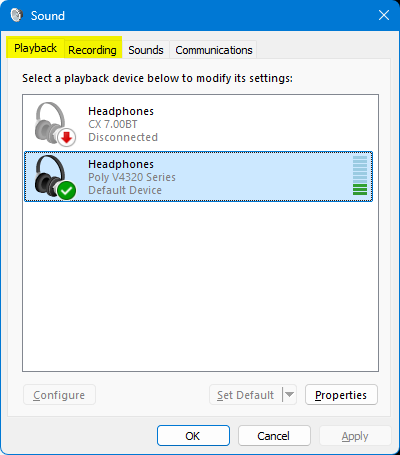
PS I can replicate this issue by changing between the 'Playback' & 'Recording' tab in the Sound Control Panel applet. That is to say, the same decrease in audio quality happens when I change from the Playback tab to the Recording tab. Audio quality improves again when I change from the Recording tab to the Playback tab https://assets-prod.sumo.prod.webservices.mozgcp.net/media/uploads/images/2026-09-12-15-38-23-1accad.png

PPS My new windows are set to open on 'about:support'

PPPS Can't reply to previously archived question : https://support.mozilla.org/en-US/questions/1525613

Gelöst 1