


Google Translate Widget fails to work on Firefox 19.0.2 on Mountain Lion OS

Using BrowserStack I viewed a website with a google translate widget:
Example: http://support.google.com/translate/?hl=en
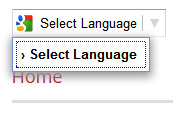
The dropdown fails to load any langauages and thus unusable. Is there a Bug report for this that I can make this official?
This seems to happen on the Mountain Lion and Lion OS systems with Firefox but work fine on Safari and Chrome.
Alle Antworten (4)
Start Firefox in Safe Mode to check if one of the extensions (Firefox/Tools > Add-ons > Extensions) or if hardware acceleration is causing the problem (switch to the DEFAULT theme: Firefox/Tools > Add-ons > Appearance).
- Do NOT click the Reset button on the Safe mode start window or otherwise make changes.
- https://support.mozilla.org/kb/Safe+Mode
- https://support.mozilla.org/kb/Troubleshooting+extensions+and+themes
Create a new profile as a test to check if your current profile is causing the problems.
See "Creating a profile":
- https://support.mozilla.org/kb/profile-manager-create-and-remove-firefox-profiles
- http://kb.mozillazine.org/Standard_diagnostic_-_Firefox#Profile_issues
If the new profile works then you can transfer some files from an existing profile to the new profile, but be careful not to copy corrupted files.
im using Firefox 21.0 and doesnt work either. My website is www.primamultisolusindo.com and there is google translate script that wont open up dropdown
Hi jembrat
Works fine here.
Reload web page(s) and bypass the cache to refresh possibly outdated or corrupted files.
- Hold down the Shift key and left-click the Reload button
- Press "Ctrl + F5" or press "Ctrl + Shift + R" (Windows,Linux)
- Press "Command + Shift + R" (Mac)
Start Firefox in Safe Mode to check if one of the extensions (Firefox/Tools > Add-ons > Extensions) or if hardware acceleration is causing the problem (switch to the DEFAULT theme: Firefox/Tools > Add-ons > Appearance).
- Do NOT click the Reset button on the Safe Mode start window or otherwise make changes.
Yes thank you. Its working now, after i clear cache from Firefox