Favicon missing in Firefox 20

I was using google chrome before and after i imported my bookmarks and history, lots of my favicons for the websites i bookmarked was gone, those icon were being shown in chrome, but not in firefox.
It came up a blank square as the favicon for the websites i bookmarked, i did search for solutions, but none of them work, what can i do right now without starting up a new profile?
Ausgewählte Lösung
nevermind, i decided to reset firefox and it fixed the problem, all i have to do is reinstall those addons again :(
Diese Antwort im Kontext lesen 👍 0Alle Antworten (7)
Added up an image to explain my concern due to my bad expression with english :(

Does the favicon come back if you click such a bookmark to open the page in a tab?
no it doesn't but if i removed the profile and start up a new one those websites's favicon are coming back out!
Problems with bookmarks and history not working properly can be caused by a corrupted places.sqlite database file.
You can check for problems with the places.sqlite database file in the Firefox Profile Folder.
it doesnt fix the problem i am facing...
Ausgewählte Lösung
nevermind, i decided to reset firefox and it fixed the problem, all i have to do is reinstall those addons again :(
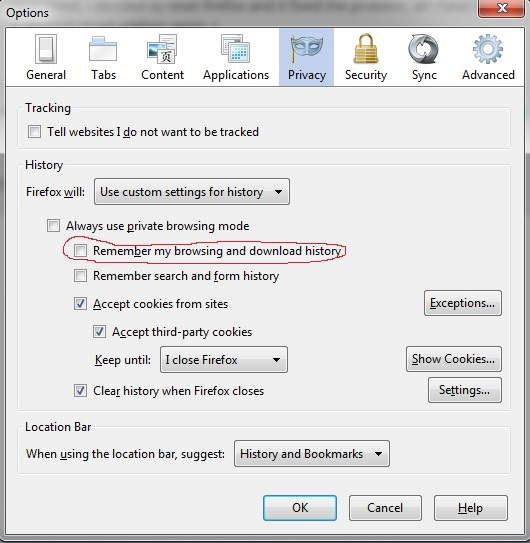
Had same problem, but only with some sites. Was using "custom settings for history' under Firefox - Options - Privacy settings. You need to enable "Remember my browsing and download history" (as you see in the attached image, I had it turned off). Once you enable that setting, you need to load each bookmark page that doesn't show a favicon and wait until the icon shows in the tab in order for the favicon to store with the bookmark. I think once they are all loaded, you can turn off the setting, but haven't tested that fully.