


When accessing my email on the Comcast homepage I cannot exit the preview email page.

I open the Firefox browser and my homepage opens as (My Comcast) which is normal. I open my email from this page and the preview page automatically opens for access to email, voice mail, etc. At this point I cannot retrieve or access anything from this preview page. I can exit to the home page but that is all. I tried technical support from comcast, but after 2 hours they could not help. They suggested the bug was some conflict between Firefox and the comcast email program.
Ausgewählte Lösung
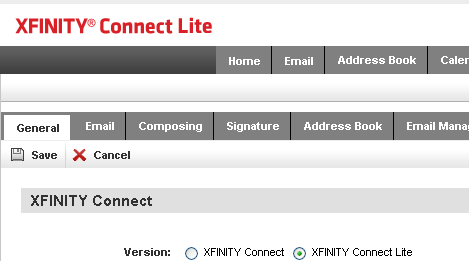
Change your Xfinity Connect preference to Connect Lite. If you can't open the Preferences from the Inbox Preview page using Firefox, make that change using IE.
It worked fine last spring when Comcast first rolled out the update from Comcast Zimbra to Xfinity Connect, but later during the summer they "fixed" something and broke that Inbox Preview page for Firefox users.
Diese Antwort im Kontext lesen 👍 1Alle Antworten (2)
Ausgewählte Lösung
Change your Xfinity Connect preference to Connect Lite. If you can't open the Preferences from the Inbox Preview page using Firefox, make that change using IE.
It worked fine last spring when Comcast first rolled out the update from Comcast Zimbra to Xfinity Connect, but later during the summer they "fixed" something and broke that Inbox Preview page for Firefox users.
Thanks edmeister! Your the man! That solved the problem. It's amazing the Xfinity tech could not resolve the problem.
P.S. Have you folks heard Xfinity is trying to sell a tech support service.................yeah, right!!