


How do I remove "bookmarks toolbar" from drop down bookmark list?

How do I remove it? I also want to get rid of "view bookmarks toolbar" and "show all bookmarks" if possible at all? I have tried playing around with userChrome.css and some code but havent had any such luck.
How do I remove it? I also want to get rid of "view bookmarks toolbar" and "show all bookmarks" if possible at all? I have tried playing around with userChrome.css and some code but havent had any such luck.
Ausgewählte Lösung
You can add this selector(s):
#BMB_bookmarksToolbar
#BMB_bookmarksToolbar+menuseparator
Make sure the the last entry doesn't have a comma before the '{'
Diese Antwort im Kontext lesen 👍 0Alle Antworten (3)
This code should work.
Add the code to userChrome.css below the @namespace line.
@namespace url("http://www.mozilla.org/keymaster/gatekeeper/there.is.only.xul"); /* only needed once */

#BMB_viewBookmarksToolbar,
#BMB_viewBookmarksToolbar+menuseparator,
#BMB_bookmarksShowAll,
#BMB_bookmarksShowAll+menuseparator {
display:none!important;
}
Thanks that worked, but... I still have "Bookmarks Toolbar" being displayed, which is right below"Subscribe to This Page..." Can I remove this "Bookmarks Toolbar" entry too??
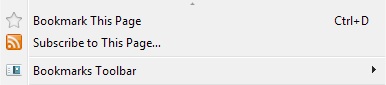
Ausgewählte Lösung
You can add this selector(s):
#BMB_bookmarksToolbar
#BMB_bookmarksToolbar+menuseparator
Make sure the the last entry doesn't have a comma before the '{'