


Super Tab Mode

I really like the reopen function Super Tab Mode offers, but at the same time, I do hate the Super Tab... It is really too BIG! Is there any way I can make the tab smaller under Super Tab Mode? Thanks all.
Alle Antworten (3)
You could change a hidden preference to specify a maximum tab width.
- Type about:config into the location bar and press enter
- Accept the warning message that appears, you will be taken to a list of preferences
- Locate the preference browser.tabs.tabMaxWidth and double-click on it to change its value (default is 250), it is the maximum width in pixels
The downside of this approach is the preference will no longer work in Firefox 4, you will need to use css to change the value in Firefox 4.
There are other add-ons that do similar things but also include an option to change the maximim tab width. For example Tab Utilities and Tab Mix Plus. The authors of these add-ons are updating them to work with Firefox 4.
Thanks. I have tried that and it seems it only changes the width, and becomes like this: https://support.mozilla.com/media/uploads/images/1_1.jpg. But, What I want is like this: https://support.mozilla.com/media/uploads/images/2.jpg. How can I achieve it? Thanks in advance.


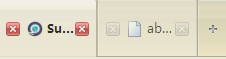

Would someone help me?555