Want open tabs & order to persist between Firefox / system restarts with clear cookies & history on
I read an article recently about 'session hijacking' and decided that every time I quit Firefox, I wanted to delete cookies & clear site data as well as browsing history.
However I wanted to know if it's possible to do that as well as all open tabs to be persist & be reopened through the quit and restart cycles (albeit logged out if it's website where I was logged in) but I can't get it to work as there appears to be a contradiction in all these options.
FF 159.0 macOS 10.15.8 Catalina (yes, ancient os I know) using the extension Tree Style Tab
I've been adding exceptions for some websites Privacy and security > Browsing data > Manage exceptions & History > Customise history > Choose what you want Firefox to remember > Advanced settings > Manage exceptions.
Home and startup > Startup > Open previous windows and tabs is checked but must be overridden by the other options.
Any advice on what settings will achieve what I want or even if it's possible? TIA
Alle Antworten (5)

You can keep your tabs open while clearing cookies and site data, but make sure Firefox isn't set to clear browsing history in a way that removes your session data too.
I'd try enabling Open previous windows and tabs, then go to Settings → Privacy & Security → History and select Use custom settings for history. Check which data is cleared on shutdown and test with cookies and site data enabled first. Keep in mind that clearing cookies will log you out of most websites.
As far as I know, you do not need to clear history to prevent session hijacking. The bastards are exfiltrating your cookies to another computer. The cookie file contains the site name, so what is or isn't in your history doesn't matter and would just be extra data to sift through for no reason.
Thanks both for your replies, I think I've got it working and yes, I've unchecked Clear history when Firefox closes as I was getting confused because this also has an exception list too and I'm managing exceptions for website where I don't want to have to keep re-logging into, in Browsing data.
Oh maybe not, just seen that I have Browsing data → Clear cookies and site data every time you close Firefox unchecked so I need to re-check that, restart and 🤞 the exceptions I've entered with Allow should still remain logged in. Unfortunately I don't have time to do this at the moment & will have to return to trying to get this setup like I want.
Geändert am von Pinky
Pinky said
Thanks both for your replies, I think I've got it working and yes, I've unchecked Clear history when Firefox closes as I was getting confused because this also has an exception list too and I'm managing exceptions for website where I don't want to have to keep re-logging into, in Browsing data. Oh maybe not, just seen that I have Browsing data → Clear cookies and site data every time you close Firefox unchecked so I need to re-check that, restart and 🤞 the exceptions I've entered with Allow should still remain logged in. Unfortunately I don't have time to do this at the moment & will have to return to trying to get this setup like I want.
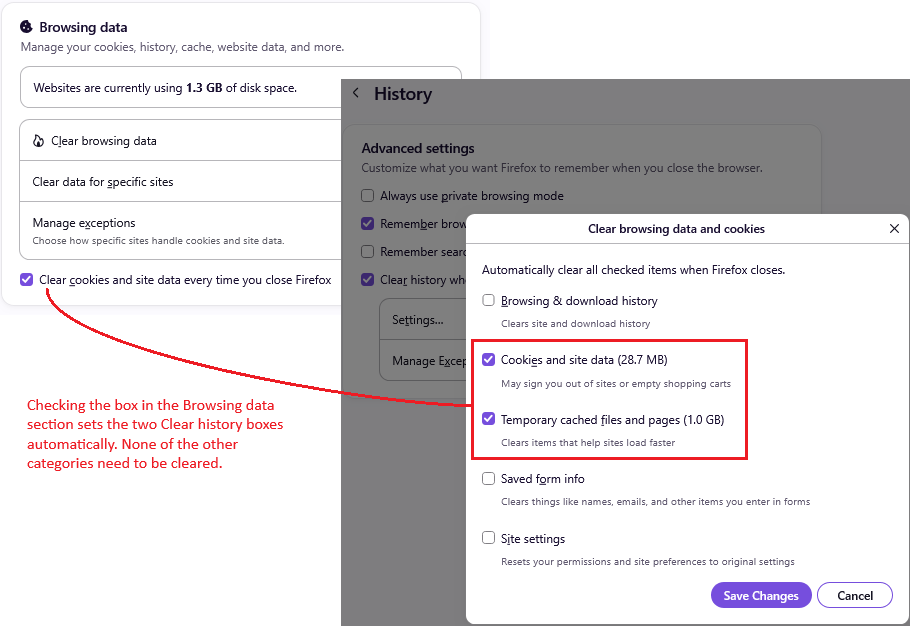
Yes, it is a little confusing. The relationship is:
Settings > Privacy and security > Browsing data section:
Checking the box for: [x] Clear cookies and site data every time you close Firefox
sets two specific boxes under
Settings > Privacy and security > History section > Customize history > Choose what you want Firefox remember
[x] Clear history when Firefox closes + Settings... with only two boxes checked:
- [x] Cookies and site data
- [x] Temporary cached files and page
Maybe the attached screenshot will be clearer.
One other note regarding "Allow" permission to preserve cookies at shutdown:
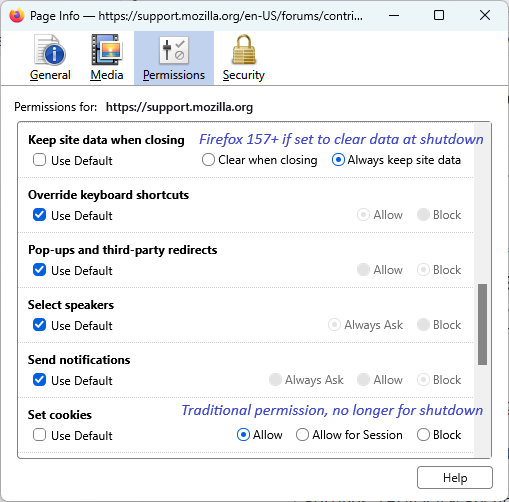
Until recently, cookie "Allow" permission did double-duty both during browsing and for "Clear history when Firefox closes" purposes. Now, there are two separate lists for those different functions. Existing cookie permissions were duplicated to the new list automatically to avoid disruption but any sites that weren't already on the Allow list have to be added directly to the new list.
You can do that using either:
(A) the Page Info dialog (screenshot attached)
- While you are on the site, call up the Page Info dialog (Ctrl+i)
- Click Permissions at the top, then scroll down to "Keep site data when closing" -- this option only appears if you have Firefox set to clear history when it closes
- Un-check the box for Use default and select "Always keep site data"
(B) Settings > Privacy and security > History > Choose what you want Firefox to remember > Manage Exceptions - for more control over the host/domain name you Allow
That is not an easy dialog to get to, but hopefully you don't need it too often.