


Thunderbird primary password reset

Does resetting your primary password in Thunderbird only delete the usernames and passwords in Thunderbird or does it also delete the usernames and passwords in Firefox?
Ausgewählte Lösung
I believe authentication needs to be OAUTH2, not normal password.
Alle Antworten (19)
This happens only for the thunderbird accounts.
Ok great. Thank you so much!
Hi, I’m trying to delete my primary password in Thunderbird. I’m going to the error console by hitting shift + control + J. My Thunderbird version is above 78. I am entering this command: openDialog(“chrome://pipki/content/resetpassword.xhtml ”)
I then hit enter because I do not see an evaluate button. I get an error message that says.:
Uncaught ReferenceError: RPMGetBoolPref is not defined < anonymous> chrome://global/content/aboutNetErrorHelpers.mjs:42
I do not have chrome installed on notebook. How can I delete my primary password altogether?
Geändert am von Ceil Brown

Not sure if this is causing the problem, but there should be no space in between resetpassword.xhtml and ”).
Thank you.
In the dialogue box, I did not type a space there. That was just a typo here. It’s giving an error that says ‘no chrome package registered’. I do not have Chrome on this notebook. I need to know what to type in if I don’t have chrome.
Geändert am von Ceil Brown
Ceil Brown said
Thank you. In the dialogue box, I did not type a space there. That was just a typo here. It’s giving an error that says ‘no chrome package registered’. I do not have Chrome on this notebook. I need to know what to type in if I don’t have chrome.
chrome://global/content/aboutNetErrorHelpers.mjs:42 is not about a browser. In Thunderbird and Firefox, chrome is "visual user interface elements around the main content area, including toolbars, menus, tabs, and buttons."
> My Thunderbird version is above 78
What is your actual version number, from Help > Troubleshooting Information?
Try openDialog("chrome://pippki/content/resetpassword.xhtml"), with two "p"s and use standard quotes, as documented at https://support.mozilla.org/en-US/kb/protect-your-thunderbird-passwords-primary-password
What are your results?
Geändert am von Wayne Mery
My version is 153.0.1
I typed in what you suggested and I didn’t get an error time. It says this: ChromeWindow about:blank (see screenshot)
I had a pop-up window at the top of the screen that gave me a warning about resetting my password, but I went ahead and clicked to reset it and then nothing happened.
Now what do I do?

Geändert am von Ceil Brown
Please step through the steps carefully. I didn't understand in detail what you did:
- Choose Tools > Developer Tools > Error Console
- Paste the expression:
openDialog("chrome://pippki/content/resetpassword.xhtml")
- then, press the Evaluate button. That will open a dialog asking you if you want to reset your password. If Evaluate is not seen, press enter key.
- When prompted, press the Reset button.
This removes all account passwords, which must then be reentered.
OK, I did that and I received a pop-up box that asked me if I wanted to reset my password. I clicked yes at that point the pop-up box disappeared. So now do I go back into Thunderbird and change my primary password? I would rather delete the primary password and not use it at all.
Are you stating that the primary password is still set? Please be specific. thank you
No, it is no longer set. I closed Thunderbird and reopened it and it is no longer asking for a primary password. Thank you all for this valuable help.
I now am back to my original email problem which is why I set a primary password which is I’m unable to log into my email account via Bell South. I receive an error that it says “login to server inbound.att.net with my username failed”. It’s not accepting my password. I contacted AT&T and they said I needed to contact Thunderbird helpdesk and they have never called me back. Is this anything that you would have experience in to help me with?
I am not familiar with AT&T but this URL may prove helpful.
https://support.mozilla.org/en-US/kb/thunderbird-and-yahoo
and here are three possibly useful ATT links: https://support.mozilla.org/en-US/kb/thunderbird-and-yahoo
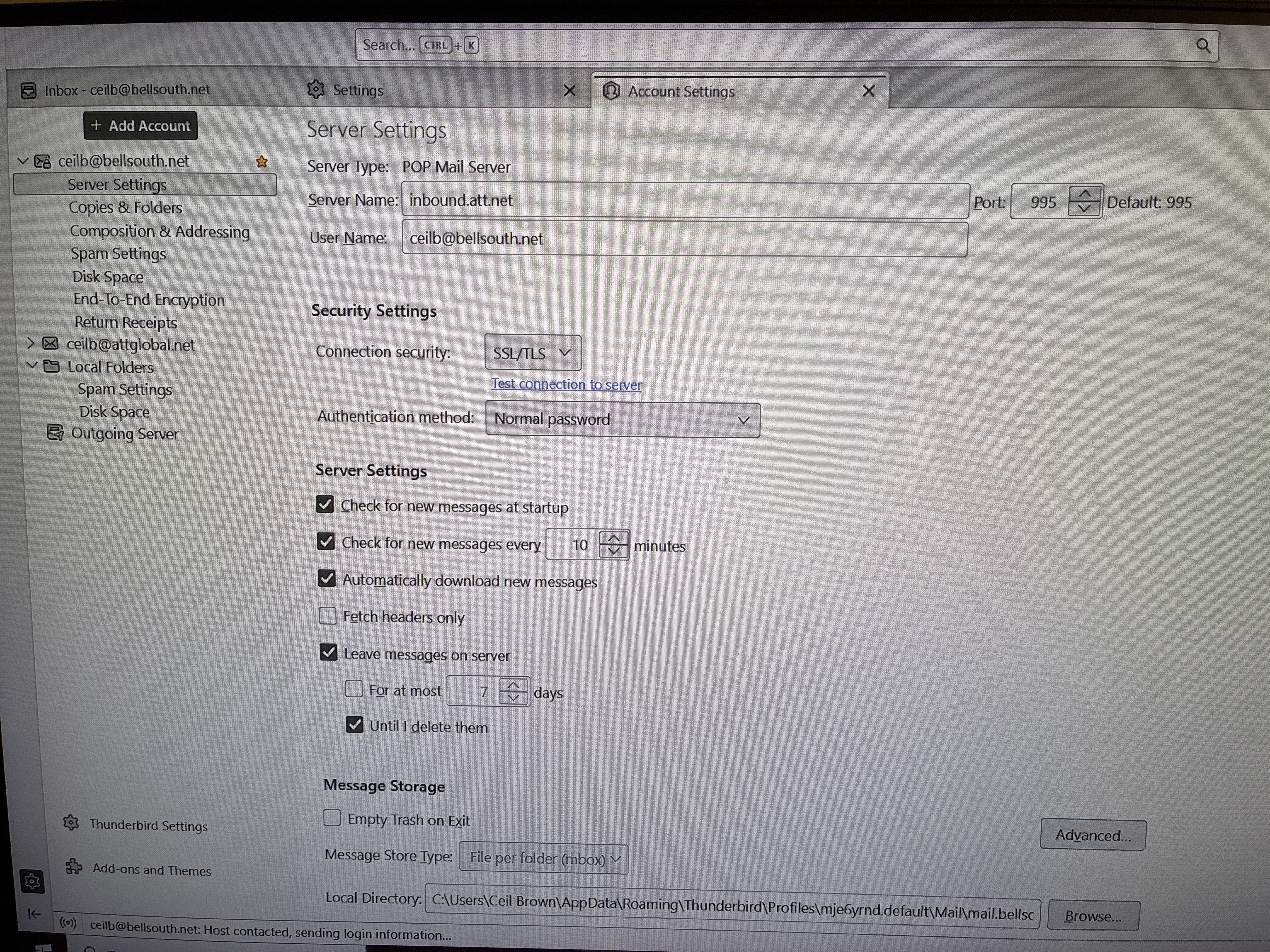
posting screenshot of your server settings pane is sometimes helpful, especially if there is an error in setting. be sure to use full email address.
OK, thank you. I will check into those links a little later when I have time. And below is a screenshot of the what I think is my server settings pane.
Ausgewählte Lösung
I believe authentication needs to be OAUTH2, not normal password.
Yes! Thank you so very much. That fixed my problem and I can now receive emails on my laptop. It made me sign in through Yahoo, which I’ve never had to do before but irregardless I can get my emails now. I really appreciate all of your help. This has been such a frustrating situation. I don’t know how that information got changed in my settings, but I have not been able to receive emails on my laptop since mid April but now it’s all working again. Again, I can’t thank you enough!!!!
You are very welcome. I do encourage you to do periodic backups to minimize future problems. :)
I do do regular backups. Thank you again for everything!