


Disable auto refresh on ios

How can I disable the auto refresh on iOS?
Ausgewählte Lösung
Thank you all for the help. I figured out the strict setting. I searched a recipe and read them on 3 different sites. That seemed to work! None of the sites refreshed while I was reading through the recipes. I didn’t try the reader mode, but in the past I would jump to the recipe and then hit print. I could read it there without actually printing.
Alle Antworten (9)
Hi b.dunkel,
I don't think we have auto-refresh on iOS. What may interfere with this is perhaps our pull to refresh feature which is currently enable for all users. If you want to propose having a setting to disable this feature, you may want to vote on the following idea in the Mozilla Connect platform -> https://connect.mozilla.org/t5/discus.../52559.
Hi Kiki. It auto refreshes when I am reading anything on any website. I am not pulling down to refresh. Just reading. When it refreshes most of the time it goes back to the top. It’s very aggravating. If it can’t be stopped the only solution is to try another web browser.
Does that happen only on a specific website? Or do you know what might've trigger it? Maybe it only happen when you move between tabs?
I couldn't think of a specific reason thay may have caused this and I'm not aware of other reports on iOS.
I've heard reports where badly written ad/tracking code on news sites caused similar refreshes, esp. during progressing further down the page as additional components were getting loaded.
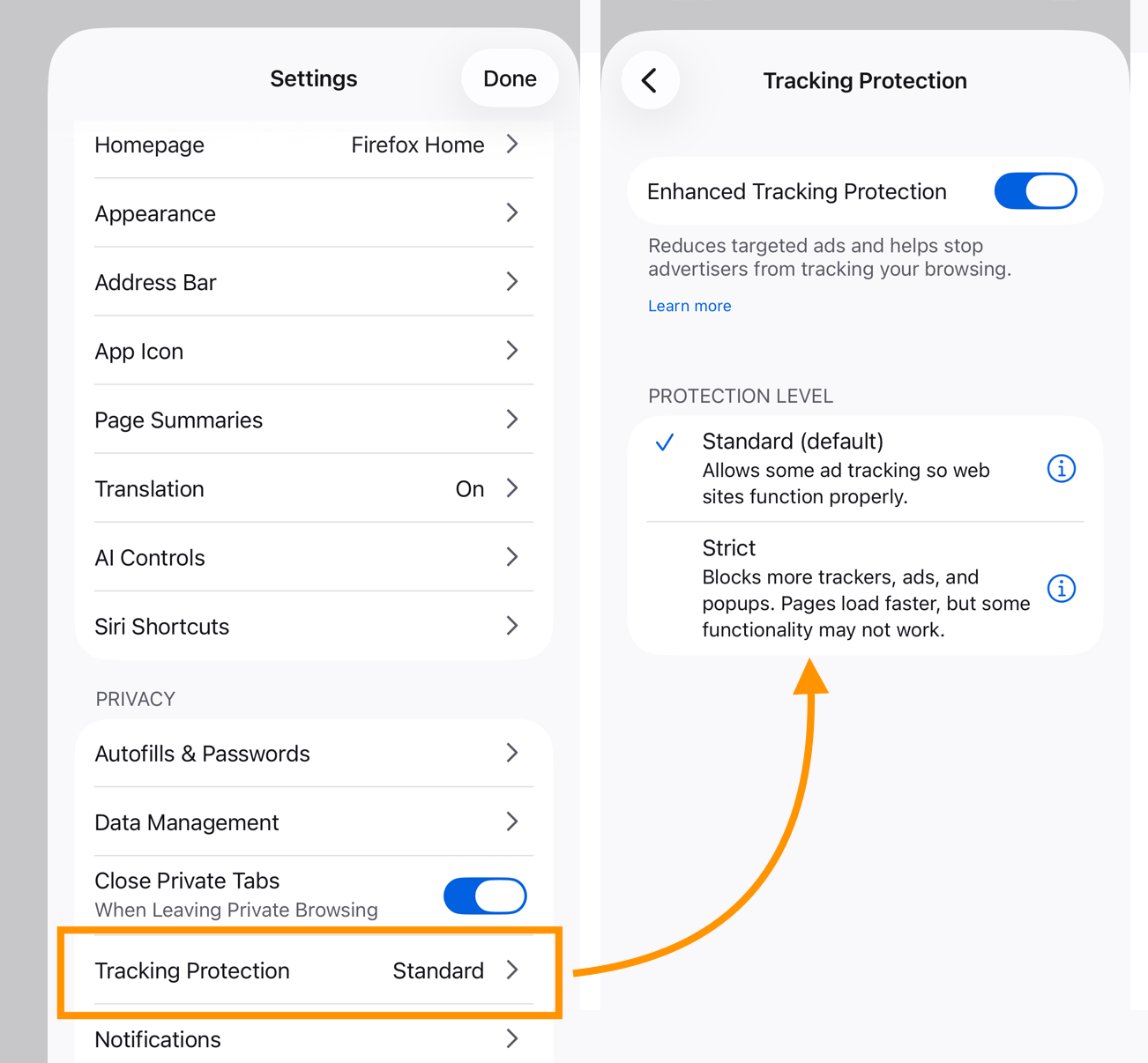
Would it perhaps improve for you if you went into the settings and chose "Strict" tracking protection instead of "Standard"?
OP, can you check this bug report and see if you can find similarities?
This does happen on a lot of sites with ads. How do I change it to strict? I tried to get to settings using “about: config”. I looked it up and tried that. But on the iPhone it defaults to a duck duck go search. The instructions for desktop are not the same as iOS. Thank you.
One workaround is using Reader Mode to eliminate all the disruptive scripting, if the reader works well for that site.
The tracking protection settings are here:
Ausgewählte Lösung
Thank you all for the help. I figured out the strict setting. I searched a recipe and read them on 3 different sites. That seemed to work! None of the sites refreshed while I was reading through the recipes. I didn’t try the reader mode, but in the past I would jump to the recipe and then hit print. I could read it there without actually printing.
Oh, that's cool. Thanks for sharing the fix with us. As a moderator, I'm going to mark your answer as a solution so others with the same issue can find the solution faster.
Thanks for reaching out to Mozilla Support and happy browsing!