


The new setting for selecting a search engine in the search box very inconvenient.

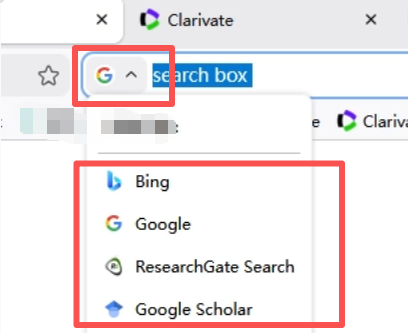
The latest version of Firefox appears to have updated a setting: When selecting a custom search engine in the address bar or search box, you now need to click the mouse three times (click the dropdown button on the left side of the box - select search engine - search); previously, after entering search terms in the search box, you only needed to move the mouse icon below the box to automatically display all search engines, and then click the desired engine to search directly, thus completing the search with just one click.
The old setting was very convenient; while the new setting forces me to click several times every time I want to search for a term in the search bar.
I hope the support team will address and improve this issue.
Alle Antworten (7)

I agree with the question. The search has become very inconvenient to use. Please restore it to how it was before.
Ausgewählte Lösung
See also:
- [/questions/1573162] What happened to the Search Box next to the website address?
cor-el 说
See also:
- [/questions/1573162] What happened to the Search Box next to the website address?
Solved! Thank u so much!!
Сергей К 说
I agree with the question. The search has become very inconvenient to use. Please restore it to how it was before.
Pls refer to the solution in the comment below
A control pref to enable/disable a new feature is usually only meant to be present during development of a new feature and the control pref and the old code can be removed once this feature is considered finished, it isn't guaranteed for how long it will be available.
Lakitas Meli said
Pls refer to the solution in the comment below
Thank you. But I didn't see the solution in the link. I figured it out myself. 1. I type about:config in the address bar. 2. I type browser.search.widget.new. 3. I change the value from true to false. And I brought back the old convenient search.
Hello
A space for users to give product feedback
https://connect.mozilla.org/t5/discussions/update-149-0-made-searching-more-difficult/td-p/120608