


Windows 10 reached EOS (end of support) on October 14, 2025. For more information, see this article.

Hilfe durchsuchen

Vorsicht vor Support-Betrug: Wir fordern Sie niemals auf, eine Telefonnummer anzurufen, eine SMS an eine Telefonnummer zu senden oder persönliche Daten preiszugeben. Bitte melden Sie verdächtige Aktivitäten über die Funktion „Missbrauch melden“.

Weitere Informationen

Displayed font size in composition window

  • 1 Antwort
  • 0 haben dieses Problem
  • Letzte Antwort von Ed

Weitere Optionen

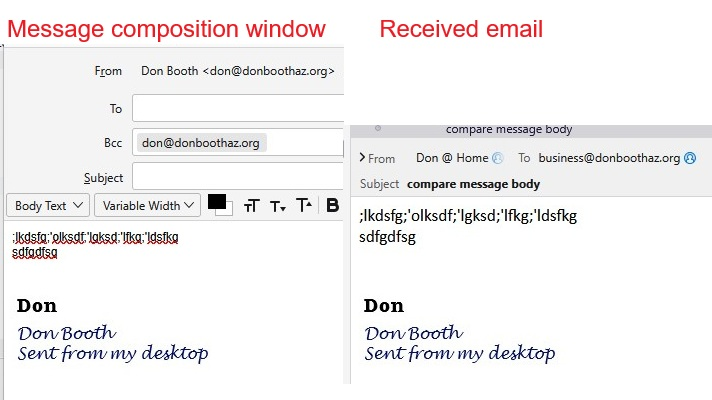
[DESKTOP VERSION] The font display size in the email composition window is at least 2 'clicks' smaller that what is actually displayed in the received email. When writing an email I need to do a double Ctrl+"+" in order for the text to be easy to ready. When I read the sent email (sometimes I need to send emails between accounts - I have 14 between my business domain and my personal domain), the text that I entered is the proper size. I can easily see this because of the graphic image in my signature, which is the same size in the composition window as it is in the received email. See attached composite graphic.
[DESKTOP VERSION] The font display size in the email composition window is at least 2 'clicks' smaller that what is actually displayed in the received email. When writing an email I need to do a double Ctrl+"+" in order for the text to be easy to ready. When I read the sent email (sometimes I need to send emails between accounts - I have 14 between my business domain and my personal domain), the text that I entered is the proper size. I can easily see this because of the graphic image in my signature, which is the same size in the composition window as it is in the received email. See attached composite graphic.
Angefügte Screenshots

Alle Antworten (1)

Weitere Optionen

This is how to adjust the fonts for viewing and composing messages:

- go to TB menu > Settings > General > Language & Fonts > Fonts > click 'Advanced' button

- at the top, set 'Fonts for:' to Latin if it isn't already

- change Proportional and Monospace fonts/sizes to your liking

- set Minimum font size to 14

- at the top, change set 'Fonts for:' to Other Writing Systems

- repeat the process of changing fonts/sizes

- at the bottom, make sure 'Allow messages to use other fonts' is disabled if desired > OK > close the popup

Stellen Sie eine Frage

Sie müssen sich mit Ihrem Benutzerkonto anmelden, um auf Beiträge zu antworten. Bitte stellen Sie eine neue Frage, wenn Sie noch kein Benutzerkonto haben.