


Windows 10 reached EOS (end of support) on October 14, 2025. For more information, see this article.

Hilfe durchsuchen

Vorsicht vor Support-Betrug: Wir fordern Sie niemals auf, eine Telefonnummer anzurufen, eine SMS an eine Telefonnummer zu senden oder persönliche Daten preiszugeben. Bitte melden Sie verdächtige Aktivitäten über die Funktion „Missbrauch melden“.

Weitere Informationen

Thunderbird 145 & 147 - frequent errors connecting to server "outlook..."

  • 1 Antwort
  • 0 haben dieses Problem
  • 6 Aufrufe
  • Letzte Antwort von Cronk

This just started 4 or 5 days ago ( 2026.1.23 ish). I did not update TB nor make any changes to the account in question (that I'm aware of). The errors show up every few minutes, with a 'beep' sound and notification pop-up showing up each time - is very annoying.

I was running v145 when it started. I saw there was an update to 147 and installed that; same issue. I restarted TB into Troubleshooting mode and am still getting the error.

This is running on MacOS 15.7.3. Hardware is MacMini (2024) with Apple M4 chip.

Generally I still seem able to received & send emails.

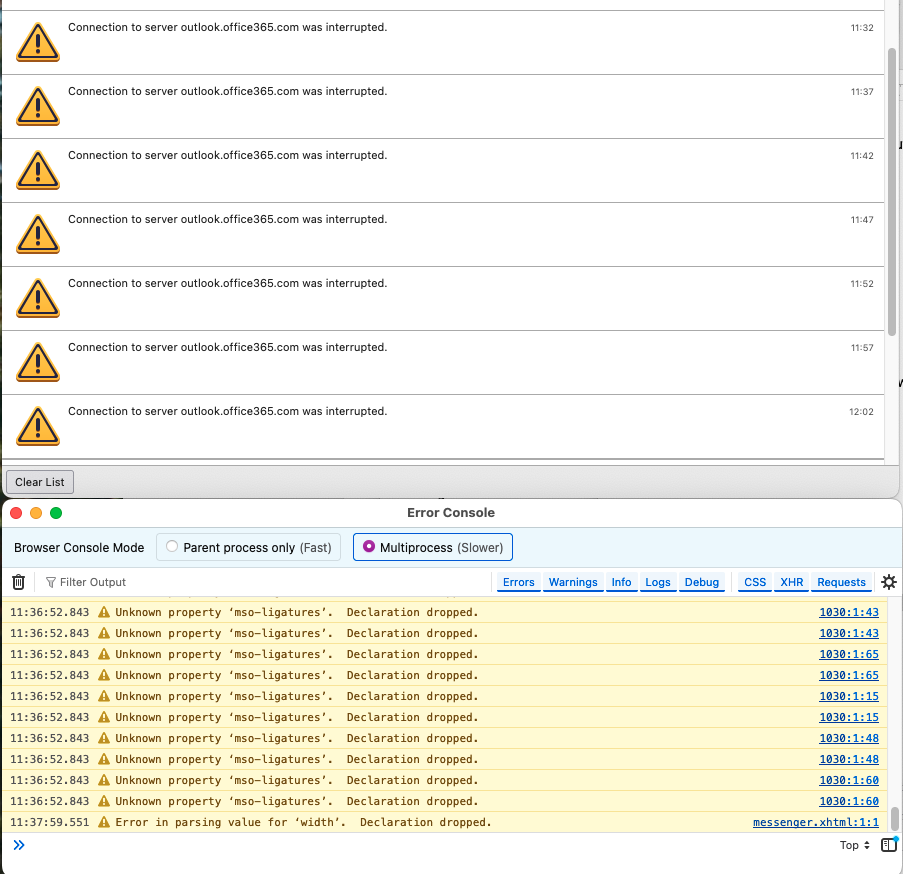
I opened Activity Manager and Error Console. Error console doesn't seem to have much (using 'Multiprocess', with Errors, Warnings, Logs, Debug enabled). Activity manager shows things such as:

<my account name>

   Connection to server outlook.office365.com was interrupted.    09:49
   Failed to connect to server outlook.office365.com.    09:52
   Authentication failure while connecting to server outlook.office365.com.    09:58
   Authentication failure while connecting to server outlook.office365.com.    10:03
   Connection to server outlook.office365.com was interrupted.    10:10
   Connection to server outlook.office365.com was interrupted.    10:14
   Connection to server outlook.office365.com was interrupted.    10:20

There was an error or log entry that I was able to find a few days ago that made me think it was Calendar related, but now I'm not finding that message.
This just started 4 or 5 days ago ( 2026.1.23 ish). I did not update TB nor make any changes to the account in question (that I'm aware of). The errors show up every few minutes, with a 'beep' sound and notification pop-up showing up each time - is very annoying. I was running v145 when it started. I saw there was an update to 147 and installed that; same issue. I restarted TB into Troubleshooting mode and am still getting the error. This is running on MacOS 15.7.3. Hardware is MacMini (2024) with Apple M4 chip. Generally I still seem able to received & send emails. I opened Activity Manager and Error Console. Error console doesn't seem to have much (using 'Multiprocess', with Errors, Warnings, Logs, Debug enabled). Activity manager shows things such as: <my account name> Connection to server outlook.office365.com was interrupted. 09:49 Failed to connect to server outlook.office365.com. 09:52 Authentication failure while connecting to server outlook.office365.com. 09:58 Authentication failure while connecting to server outlook.office365.com. 10:03 Connection to server outlook.office365.com was interrupted. 10:10 Connection to server outlook.office365.com was interrupted. 10:14 Connection to server outlook.office365.com was interrupted. 10:20 There was an error or log entry that I was able to find a few days ago that made me think it was Calendar related, but now I'm not finding that message.

Alle Antworten (1)

Errors continue, with TBird 147.0.1.

It happens at 5 minute intervals.

Stellen Sie eine Frage

Sie müssen sich mit Ihrem Benutzerkonto anmelden, um auf Beiträge zu antworten. Bitte stellen Sie eine neue Frage, wenn Sie noch kein Benutzerkonto haben.