


Moving Thunderbird to a new computer after export function is no longer possible on the old computer

Hi everyone - and big thanks in advance for considering my request: I have/ had windows 11 on my old machine and windows 11 on my new machine; because my 'old computer' is not running anymore at all (liquid damage), I can no longer start Thunderbird and follow the 'export tool function' (https://support.mozilla.org/en-US/kb/thunderbird-export) and thus can only do the manual transfer (https://support.mozilla.org/en-US/kb/moving-thunderbird-data-to-a-new-computer); I didn't think that I would need to go through the export tool steps when I saved the Thunderbird profile folder regularly as backup on the cloud; yet when I started Thunderbird on my new machine following the above steps by moving the Thunderbird profile folder manually, the result is that - although Thunderbird is 'running' and the mailbox is functioning properly - the key folders are empty (i.e. the sub-folder structure is completely lost, in fact there are no individual emails at all); the issue seems to be that the size of the Thunderbird profile folder is too large (the "Profiles" folder has a size of 20.5 GB) for doing this transfer via copy & paste of the Thunderbird profile folder from the cloud (I also tried USB) to the new machine; I understand that the size issue via the manual transfer could be 'overcome' just by starting Thunderbird on the 'old machine' and following the above steps explained under mozilla support; yet that's no longer an option; what could I do please?
Alle Antworten (16)
Size is no issue if manually copying. I suggest doing a screenshot of the copied profile, showing the folders where content does not appear after the transfer. That would at least be a starting point.
Thanks David - this 'Helsinki' folder is completely empty within Thunderbird - see attached screenshot please: what I labeled 'Level 0' shows you the different Thunderbird profiles below 'roaming' (that I had created after multiple re-installations and trials); then I go all the way down 'Level 1' is the screenshot showing the 'Helsinki' folder among the others; then 'Level 2' goes down and shows you what's within the 'Helsinki' folder; finally, the screenshot which I labeled 'Thunderbird open' shows you that there's nothing within the 'Helsinki' folder when I open the mail program; might I have already screwed up with the labeling/ indexing of the path ('Level 1' screenshot shows 'Thunderbird', 'Thunderbird_old', 'Thunderbird_old2'? THANKS!!!
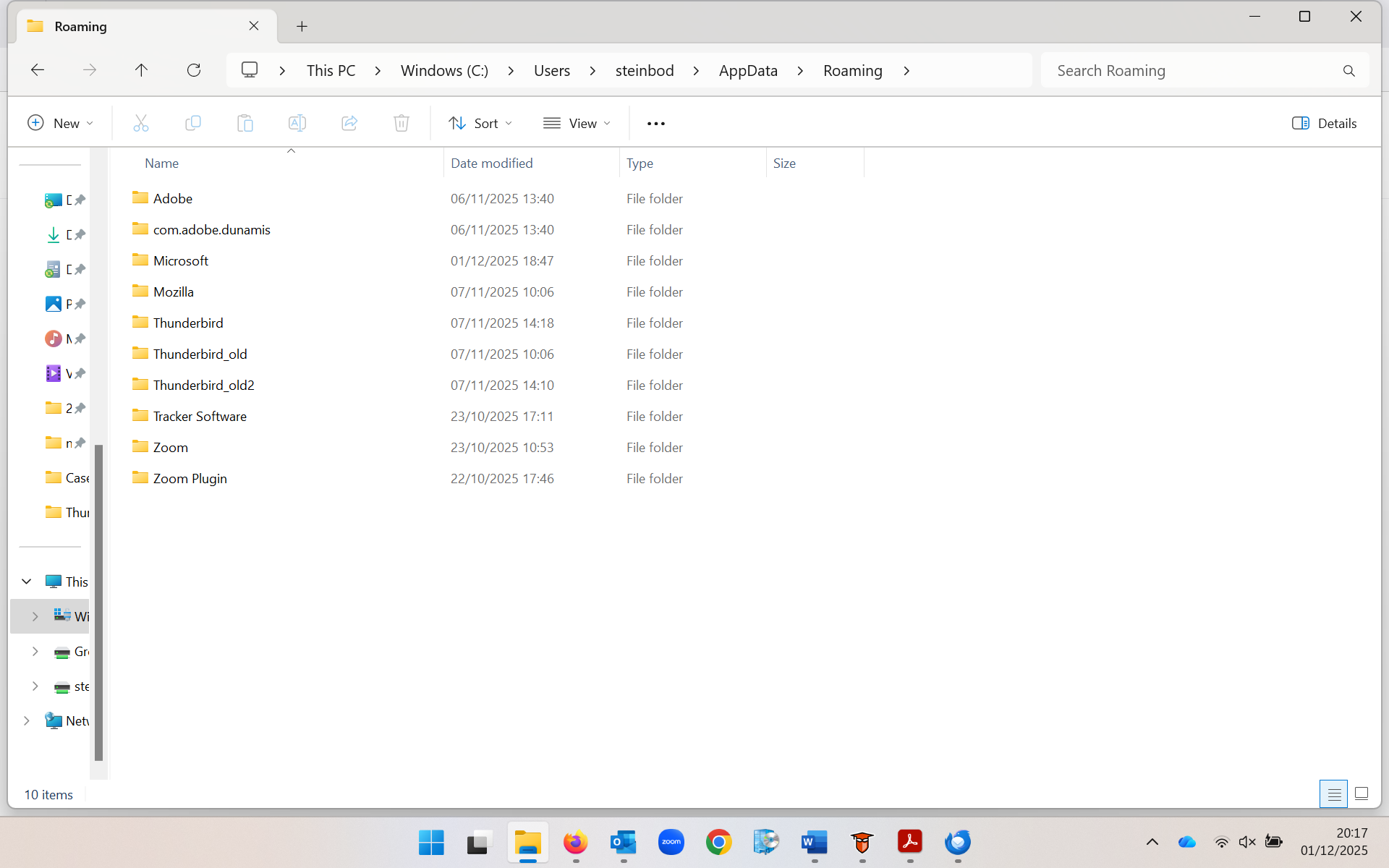
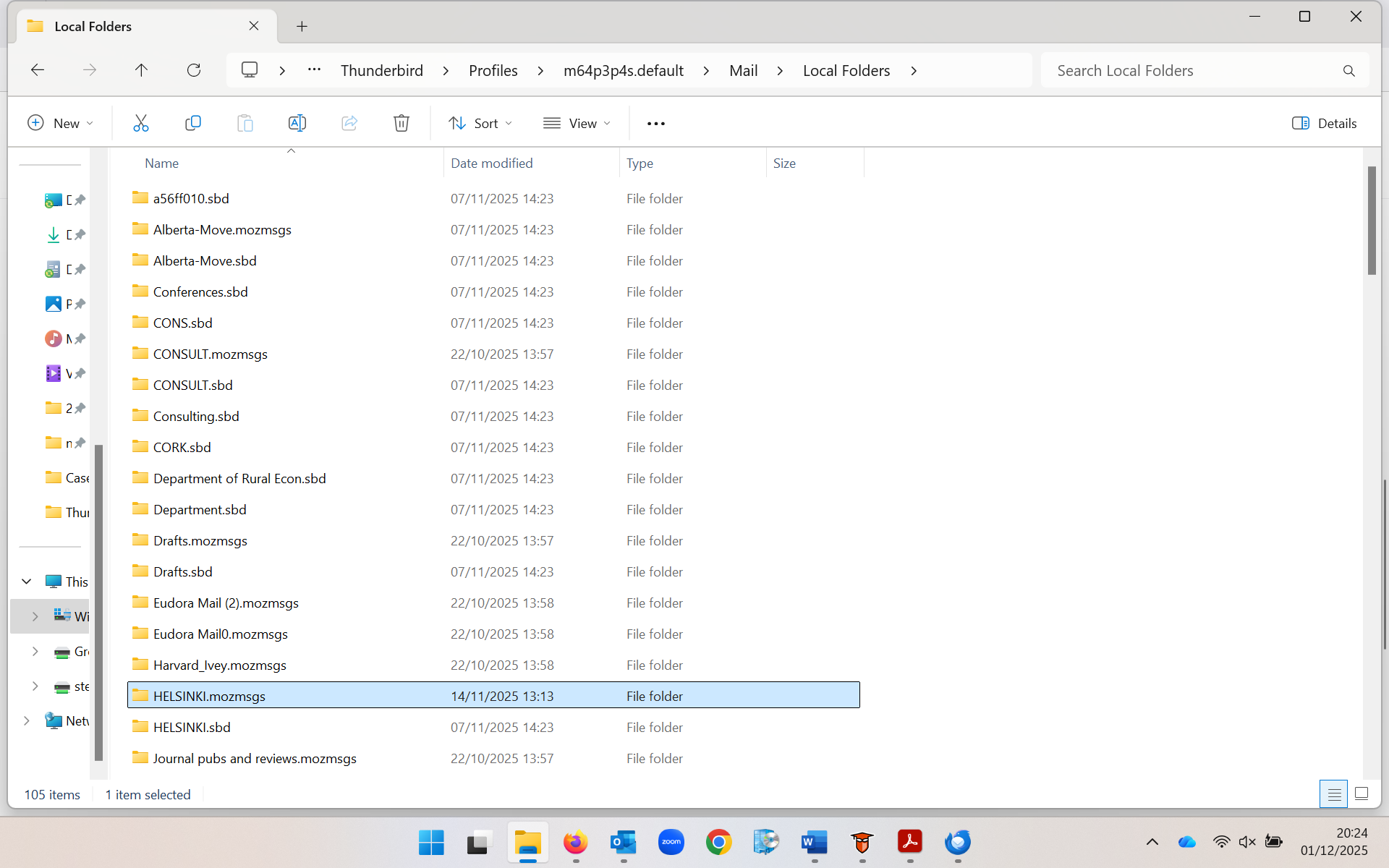
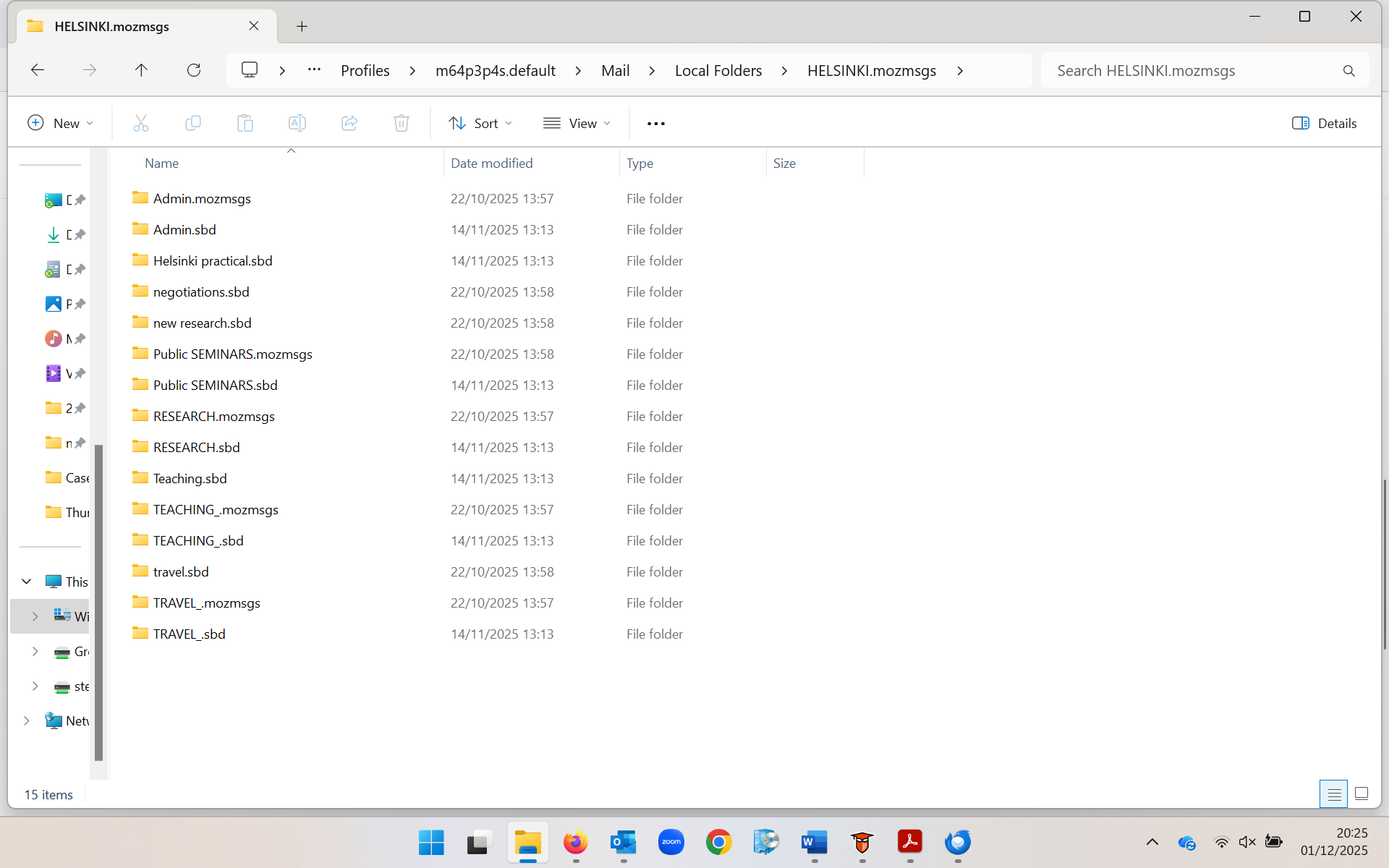
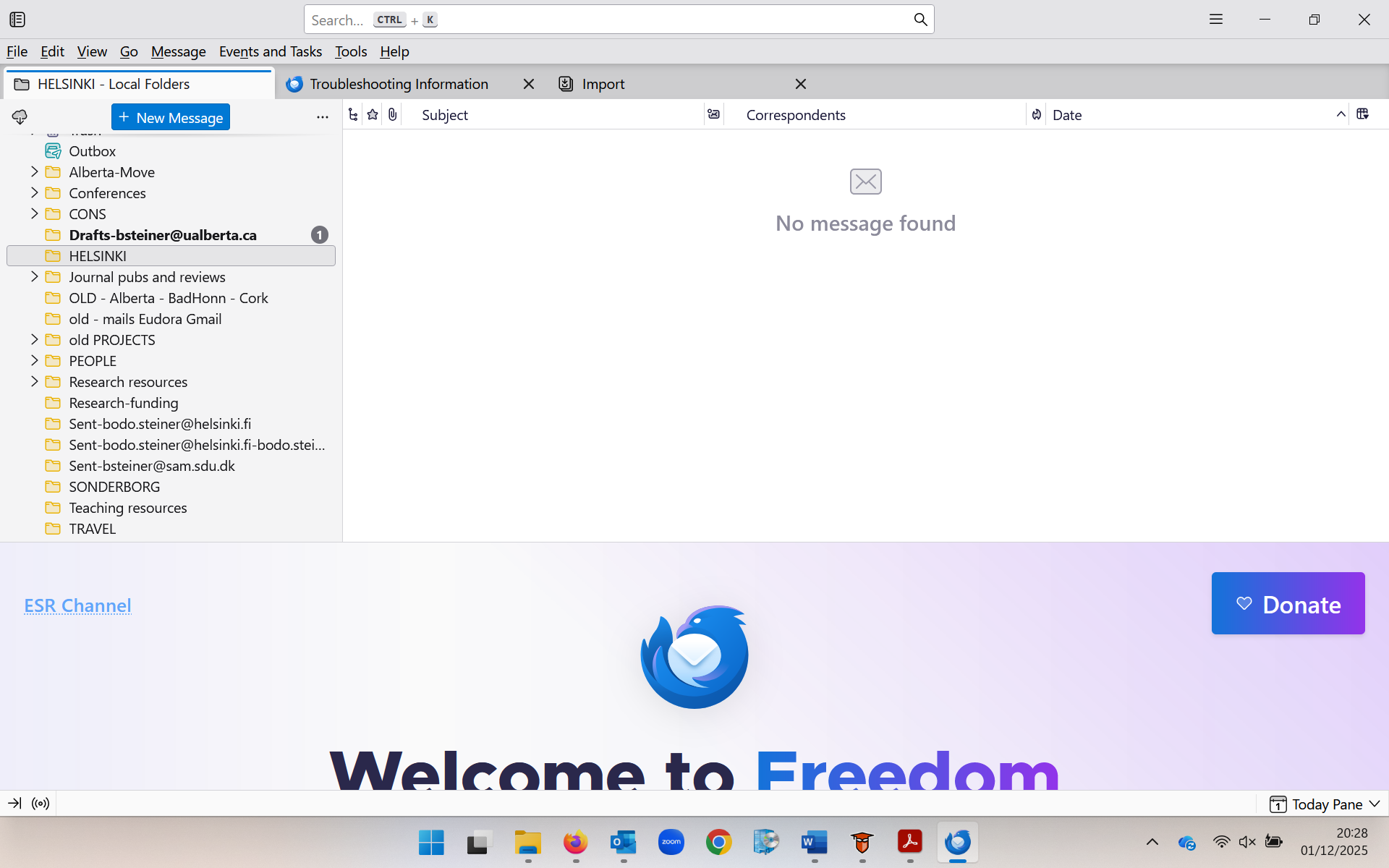

Which are the contents (screen shot) of the Helsinki.sbd file folder in Local Folders in the Thunderbird profile? Your image shows the contents of a Helsinki.mozmags folder but not of Helsinki.sbd!
Geändert am von Mapenzi
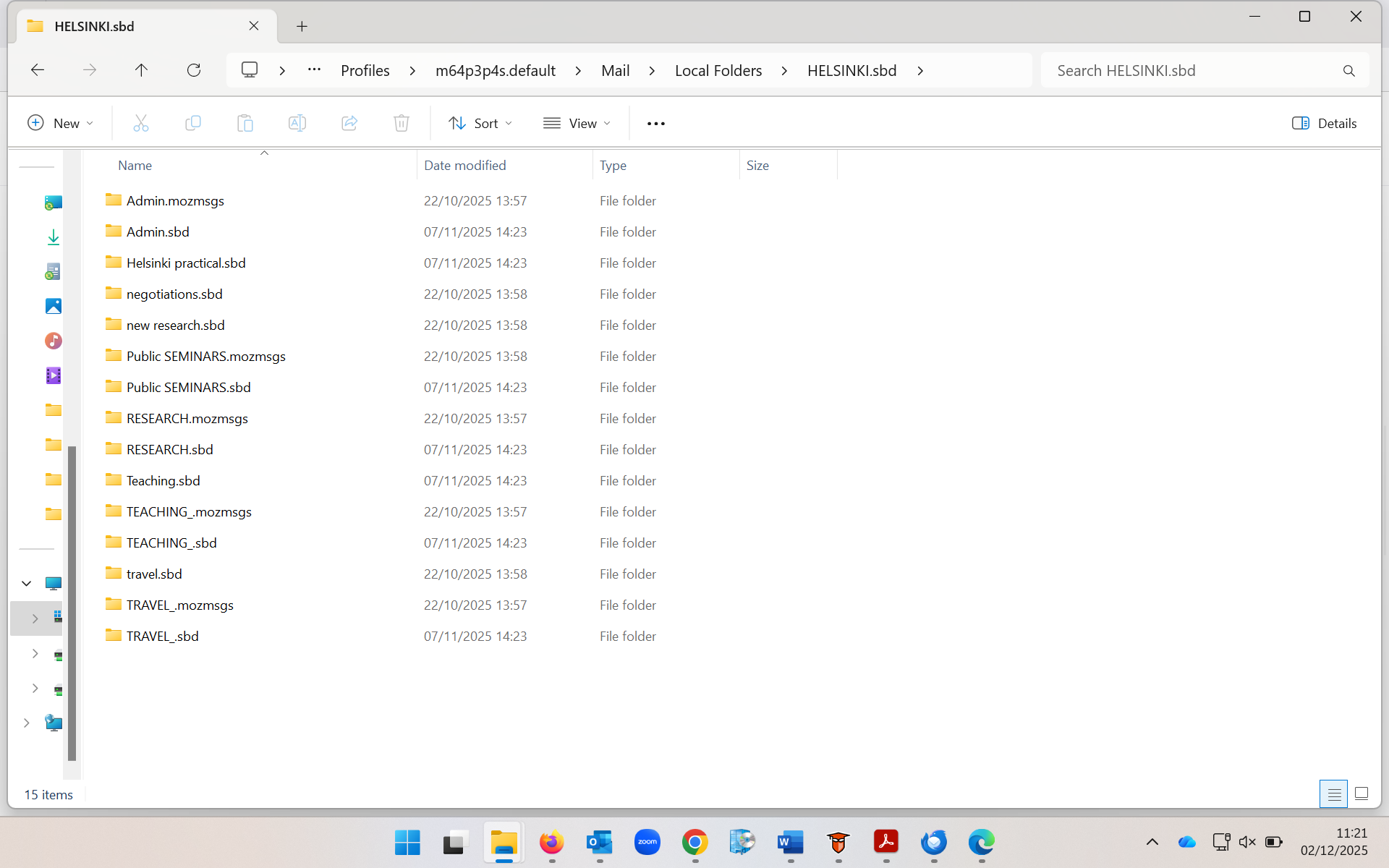
Thanks, Bodo! The "HELSINKI.sbd" folder content shown in the new image is exactly the same as in "HELSINKI.mozmsgs" and it has the same flaw. A folder XYZ in Thunderbird having sub-folders is represented in the profile by an "XYZ.sbd" file folder and an "XYZ" mailbox (or mbox) file (without extension) and an "XYZ.msf" mail summary file. We won't bother about the mail summary file since it doesn't contain messages. Each sub-folder of XYZ in Thunderbird is is represented in the profile by an mbox file (without extension) carrying the same name as the sub-folder in Thunderbird. Your sub-folders of HELSINKI are themselves parent folders for other sub-folders. That means that file folders like Admin.sbd or TRAVEL.sbd contain mbox files of the sub-sub-folders and even other .sbd folders depending of the depth of the folder hierarchy....
Your "HELSINKI.sbd" folder doesn't contain any mbox (mailbox) file which is absolutely necessary for displaying the corresponding sub-folder of HELSINKI in the folder pane. i.e. Admin.sbd should be paired with an (even empty) Admin mbox file without extension, TRAVEL.sbd should be paired with a TRAVEL mbox file , ...etc, etc
To "recover" the sub-folders (make them again visible as sub-folders of HELSINKI) you'll have to create all those missing mbox files manually in a text editor, delete the .txt extension Windows will add and move them in HELSINKI.sbd On TB restart you should find all sub-folders in HELSINKI Don't bother about .mozmsgs folders, they have been created by the Windows search.
Geändert am von Mapenzi
Alright, big thank you in advance first of all, and really, if I could get this to work, it would feel to me like a lottery win, seriously (and let me say it plainly again, this is complete new territory to me, and manually doing things in a text editor feels a bit like walking on a rope to me ;-)
Now, I am totally clear on "Your "HELSINKI.sbd" folder doesn't contain any mbox (mailbox) file which is absolutely necessary for displaying the corresponding sub-folder of HELSINKI in the folder pane'."; yet there are two 'but's'; first, this problem (Helsinki folder being empty / no mbox) is also a problem in several other folders (so fixing it manually in this Helsinki folder would only be the beginning); second, I can see some folders that are, when I open Thunderbird on the new machine, showing a partial sub-folder structure, and yet when I go into those sub-folders under PROFILES that actually show up, I still don't see any "mbox" extension files (example of a sub-folder that shows up while others don't: it is appearing with three names, "Marketing Analytics.mozmsgs" (yes, you told me to ignore), "Marketing Analytics" and "Marketing Analytics.msf".
So, your help in (a) understanding where I see those "mbox" files [thus confirming that when I see "Marketing Analytics" without any file extension it actually is the right thing, the mbox file? because you write "i.e. Admin.sbd should be paired with an (even empty) Admin mbox file without extension"] and (b) how to do things via 'one procedure' so that all folders that have this issue of not at all or partially showing sub-folders are fixed simultaneously (and not just 'Helsinki' folder).
Sorry to be so clumsy ... thanks in advance! -bodo.
and yet when I go into those sub-folders under PROFILES that actually show up, I still don't see any "mbox" extension files (example of a sub-folder that shows up while others don't: it is appearing with three names, "Marketing Analytics.mozmsgs" (yes, you told me to ignore), "Marketing Analytics" and "Marketing Analytics.msf". You misunderstood me! There are no files with the extension mbox in the profile. When using Thunderbird's standard mail store format "File per folder (mbox)" it doesn't mean that all those message files would have an extension .mbox. It's the contrary, all those mbox message files have no extension, they are just text files containing the messages of a folder in Thunderbird and having the same name as the folder. An Inbox folder with all its messages is represented in the profile by an Inbox text file, the Sent folder with its messages will be a Sent file in the profile. If you have a folder "Travel" in Thunderbird, there should be a file "Travel" in the profile. "Marketing Analytics" (without extension) also seems to be a mbox file. These are all called mbox files and mbox also is the term for this type of mail store format.
(b) how to do things via 'one procedure' so that all folders that have this issue of not at all or partially showing sub-folders are fixed simultaneously (and not just 'Helsinki' folder). Since all or most of your mbox files have disappeared you would have recreate all of them with a text editor, one after the other, maybe hundreds of them. I am no Windows user and I don't know how to automate this repetitive Sisyphus task.
I still wonder by which mechanism you could have lost all those mbox files when you transferred your profile from your old PC to the new one. You wrote that you did this transfer via copy & paste of the Thunderbird profile folder from the cloud . Maybe the mbox files were already missing in the profile in the cloud? Can you still verify this?
One explanation for the loss of mbox files with a size of 0 kB could be use of an intrusive cleaning tool or certain function of antivirus software. I have seen this several times in another forum when entire folder hierarchies were destroyed because a cleaning tool had removed all 0 kB files. Yet zero kB mbox files in combination with the .sbd folders of the same name are essential for Thunderbird to "ciment" folder hierarchies and display the contents of folders with subfolders.
Oh gee, really thanks for this clarification (once more sorry for my basic understanding) - so yes, "If you have a folder "Travel" in Thunderbird, there should be a file "Travel" in the profile." and now to your core point: "I still wonder by which mechanism you could have lost all those mbox files when you transferred your profile from your old PC to the new one. You wrote that you did this transfer via copy & paste of the Thunderbird profile folder from the cloud . Maybe the mbox files were already missing in the profile in the cloud? Can you still verify this?"
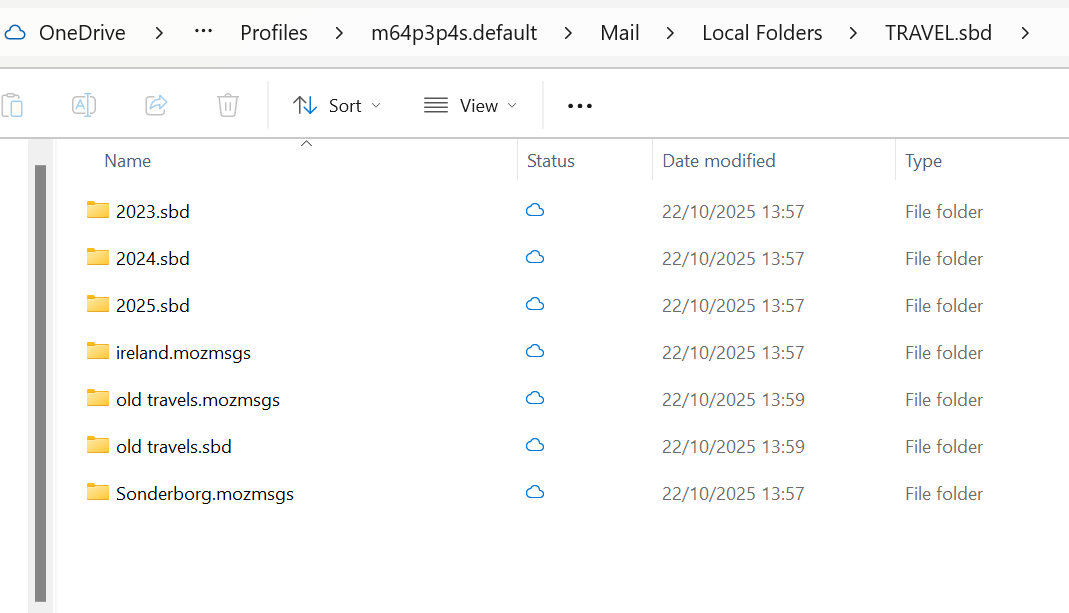
=> please look at the attachment - this is a screenshot from onedrive, i.e. this is how the folder structure looks like for "travel" after I pasted it directly from the previous Thunderbird folders --- clearly, there are sub folders that were saved, yet again (just as for HELSINKI), when I open the new Thunderbird on my new laptop, the TRAVEL folder is completely empty?
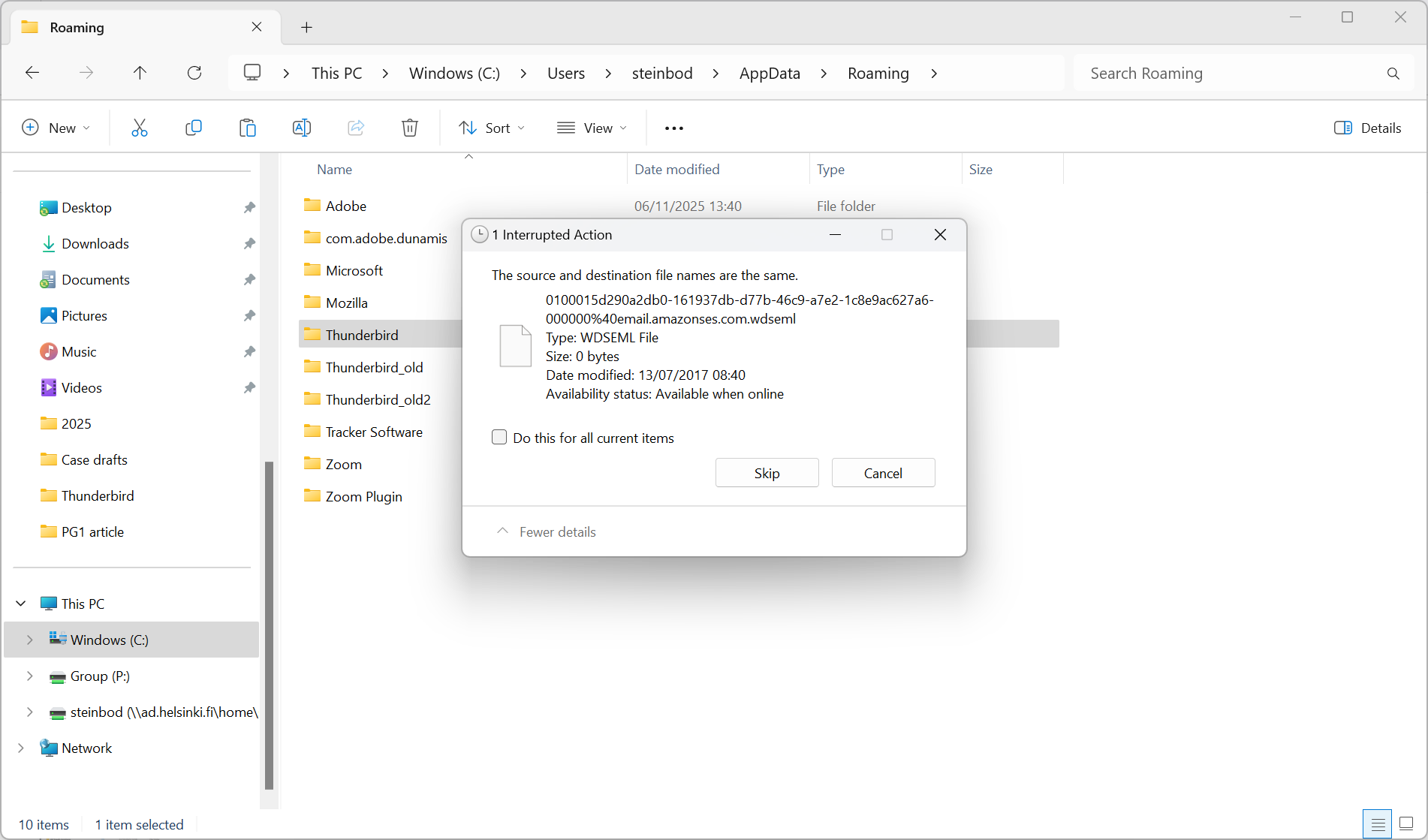
So, if mbox message files are "just text files containing the messages of a folder in Thunderbird and having the same name as the folder", then - looking at this screenshot example of TRAVEL - it seems that I actually do have text files in the folders ... yet now I remember something that happened three weeks back, now that you ask about the 'loss of mbox' files: when I tried to copy from the cloud/ my backup on OneDrive to C: on my new laptop, I consistently got this error message (consistently no matter whether I tried to transfer the Thunderbird/ profiles folder by USB or just by copy & paste --- see second attached screenshot - could that be the answer? THANKS !!!!!!!!!!!!!!!!!!!!!
Bodo said
=> please look at the attachment - this is a screenshot from onedrive, i.e. this is how the folder structure looks like for "travel" after I pasted it directly from the previous Thunderbird folders --- clearly, there are sub folders that were saved, yet again (just as for HELSINKI), when I open the new Thunderbird on my new laptop, the TRAVEL folder is completely empty?
The "file folder" TRAVEL.sbd on OneDrive shown in the left image doesn't contain any mbox (text) files such as "2023", "2024", "2025" neither "old travels", absolutely necessary for Thunderbird to be able to display the folders with the same names in Local Folders in the folder pane. This new screen shot is confusing since it shows TRAVEL as a folder in the Local Folders where as in an earlier screen shot a TRAVEL_ folder is a sub-folder of HELSINKI!
Bodo said
So, if mbox message files are "just text files containing the messages of a folder in Thunderbird and having the same name as the folder", then - looking at this screenshot example of TRAVEL - it seems that I actually do have text files in the folders ...
I don't know where you see text files in which files.... I don't see any text files in your image!
Bodo said
yet now I remember something that happened three weeks back, now that you ask about the 'loss of mbox' files: when I tried to copy from the cloud/ my backup on OneDrive to C: on my new laptop, I consistently got this error message (consistently no matter whether I tried to transfer the Thunderbird/ profiles folder by USB or just by copy & paste --- see second attached screenshot - could that be the answer? THANKS !!!!!!!!!!!!!!!!!!!!!
This is an error warning concerning copying (?) a .wdseml file of 0 kB size. All I know is that the Windows search, if activated in Thunderbird, creates a .mozmsgs folder for each indexed folder, and those .mozmsgs folders contain .wdseml files - one file for each indexed message. It is interesting that this warning concerns a file with a 0 kB size (!!) even if in this case it is not an empty mbox file. And actually I won't go so far to presume that all empty mbox files have suffered the same fate ....
Big thanks again! Let me try with more time to digest it better tomorrow - yet just on the last point: so, I just tried again (yesterday) to re-do what I did three weeks back, which was to copy the entire profiles folder from the cloud (onedrive) to an empty folder on C, and yes there is an error ("This is an error warning concerning copying (?) a .wdseml file of 0 kB size.") that would continue presumably hundreds of times if I would not tell the system 'do the same for all similar'; and so I did actually say yes, just do the same ... and that's why I presume that all empty mbox files could be a 'victim' of this copying process ... yet I simply don't know what else to do ;-) THANKS.
Ok, I am going to ask you a couple of questions, then probably disappear.
Do you search your email messages using windows search? (very few folk do because Thunderbird offers three different approaches to searching mail) If you do not, disable the setting to allow windows search for search your mail. Is is a very space wasting option that simply complicates backup needlessly. Everything in those Mozmsg folders, including the folders themselves, exists solely to support that option to allow windows search. Around a decade ago I disabled the search option and manually deleted the 100,000 odd files that Thunderbird maintained to support the option (it does not clean it's own nest when you disable the option), so Thunderbird now updates three files when I get a new mail, not update three and create one. Something with a rather high overhead for those with antivirus products monitoring and usually slowing all of those actions.
Next you are already having errors regarding wdseml files. Like the mozmsgs folders that contain them, they serve no purpose at all except to support the windows search option. The are completely unnecessary in the migration of your email from one machine to another.
I have struggled for a long time trying to explain Thunderbird offline storage, it is both simple and complex in turns. The following image using the archive folder on local folders is the closest I have come to making it clear. At least I think it is clear. Please let me know if it is clear as mud.
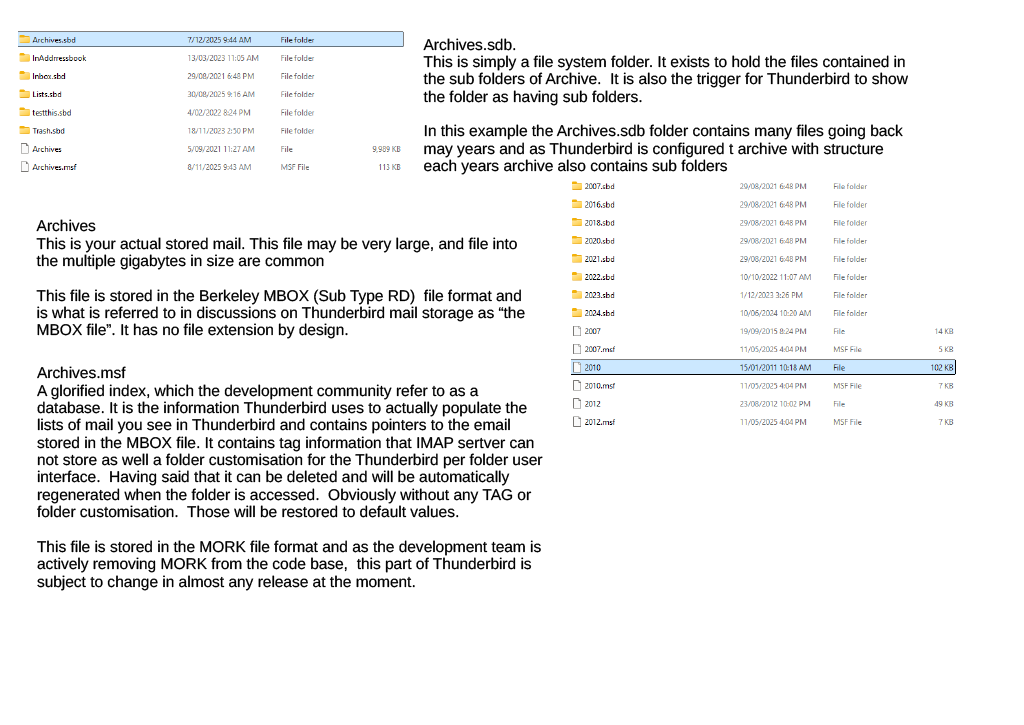
I just looked through all of the images you have posted and I saw not a single image containing the files necessary to populate a Thunderbird folder with emails. I think you are equating file system folders with Thunderbird folders. As I tried to explain earlier there is only a slight similarity and mozeml files and mozmsg folders are totally irrelevant. Thunderbird creates them for the sole purpose of supporting windows search and in the case of the mozeml file they are truncated to 40kb.... anything after that in the text layout of the transmitted email is not there, and that could cut off in the middle of the first image if the message is just a collection of images and no real text.
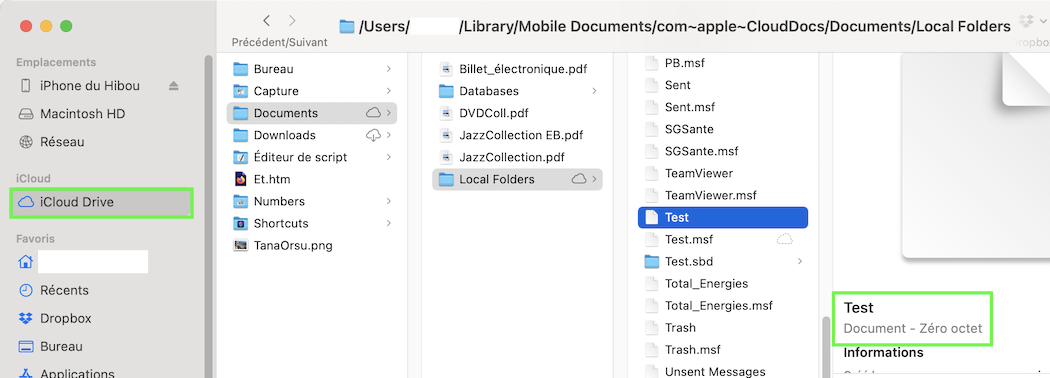
Bodo, running macOS I am not familiar with OneDrive. Can you look up whether in your Local Folders on OneDrive the zero kB files without extension are visible or not? I have stored my Local Folders in Apple's iCloud and there the empty (zero kB) mbox files are visible (see image). And when I copy the Local Folders folder from iCloud to my desktop, those empty mbox files are getting copied, too.
IMHO, unless you find an intact profile backup copy somewhere, the only way to restore your Local Folders hierarchy in order to display again all folders, sub-folders and messages in Thunderbird would be to manually recreate all those missing mbox files in a text editor such as Notepad. It would be a monster task and I don't know a way to automatise it.
I can create at least two of those empty files per minute in my text editor, or about 100 per hour. You wouldn't need to type each new file name: i.e. copy negotiations from your the negotiations.sbd folder, paste it as the name of your text file, save it, delete the suffix .txt and move the newly created mbox file in the HELSINKI.sbd folder
First, Matt, big thanks to help beginning to understand how things work under the hood:
NO, I do not search my email messages using windows search - sounds crazy with those Mozmsg folders;
.sdb folders: considering your and Mapenzi's feedback, this is now clear to me, its relevance regarding sub-folders;
on Archives.msf: I'm embarrassed to say that I just don't see this - there is nowhere such a folder - please see attached screenshot from my profiles folder (here the backup version) --- which brings me to your most shocking conclusion: "I just looked through all of the images you have posted and I saw not a single image containing the files necessary to populate a Thunderbird folder with emails. I think you are equating file system folders with Thunderbird folders."
=> so yes, when I refer to folders/ files, as in this attached screenshot these are presumably what you term file system folders, they are clearly not the folders I see in Thunderbird when I run Thunderbird.
==> are there other screenshots, from within Thunderbird or otherwise that would be helpful for you?
====> I have my old laptop (prior to the one that broke down) with an up-and-running Thunderbird (naturally with an out-of-date sub-folder structure) - is there anything from there (screenshots) that might be useful?
THANKS AGAIN - I wished I could show you live on screen via zoom or something!
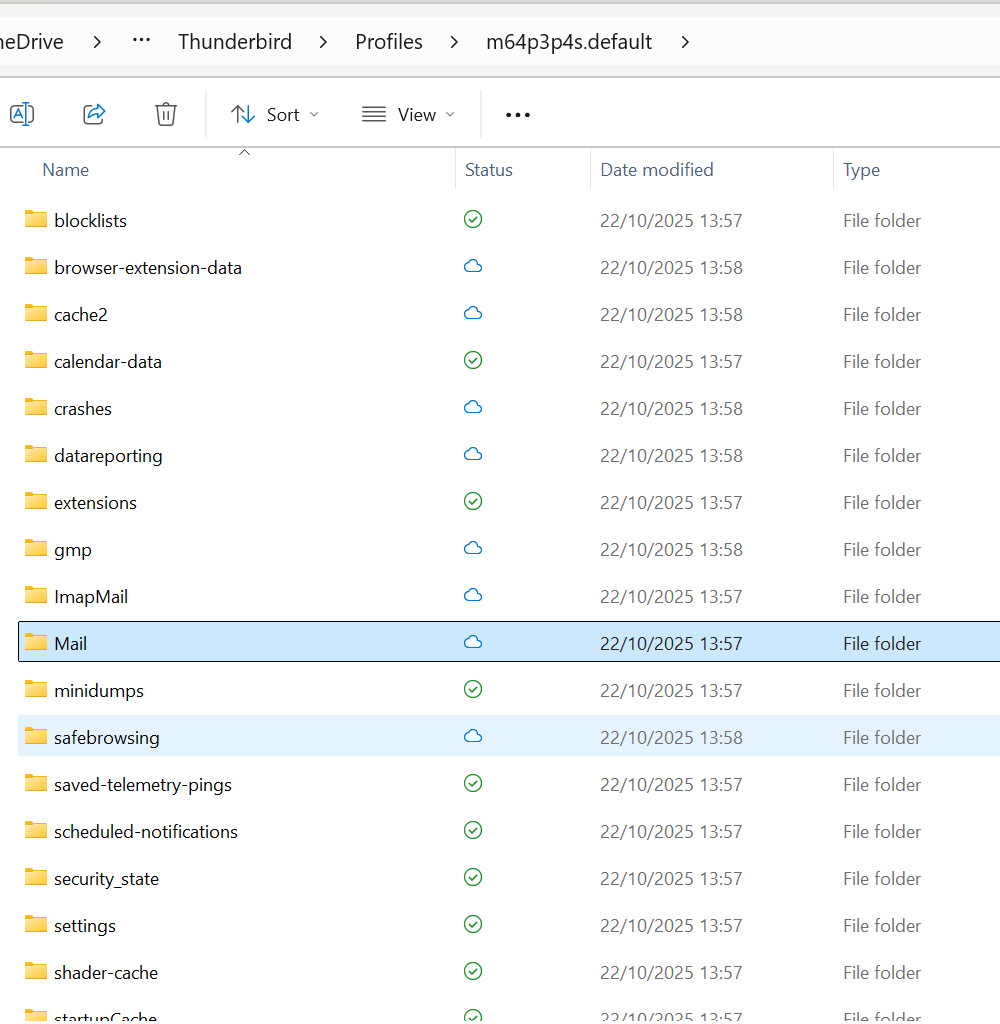
Hi Mapenzi, to answer your question: "Can you look up whether in your Local Folders on OneDrive the zero kB files without extension are visible or not?":
so, when I look on OneDrive, and I go my MAIL folder where I so far assumed to find (C:\Users\...\Thunderbird\Profiles\m64p3p4s.default), I find only a Local Folders.sbd that is basically empty (attached) => reminding me of Matt's message: "I just looked through all of the images you have posted and I saw not a single image containing the files necessary to populate a Thunderbird folder with emails."
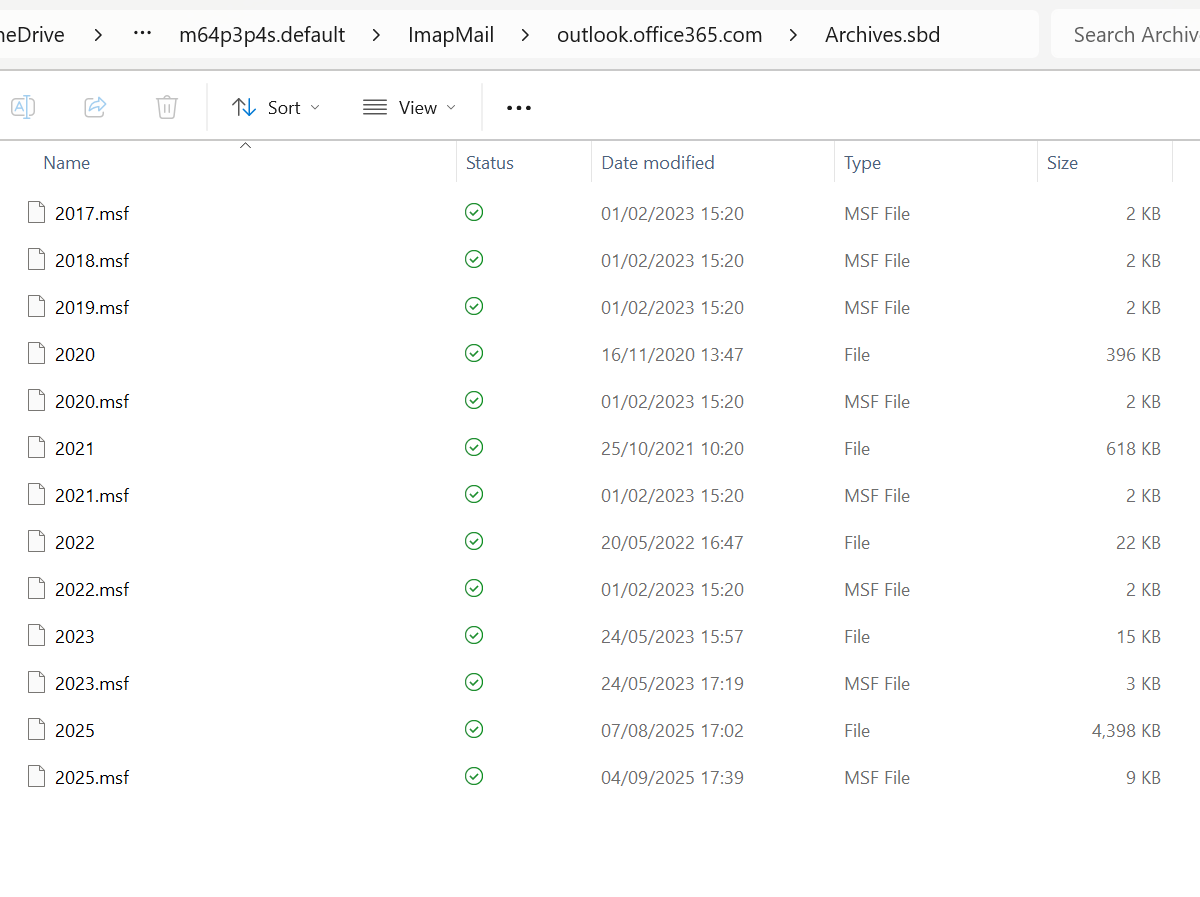
however, when I go to ImapMail (C:\Users\...\Thunderbird\Profiles\m64p3p4s.default) I just now see what Matt also pointed to, namely an Archives.sbd folder ... but it's empty!!!! see second screenshot!
so, I don't know ... "unless you find an intact profile backup copy somewhere" - the only thing coming to mind is related to what I wrote to Matt: I have an old laptop with running Thunderbird - that contains at least two thirds of my old folder structure ... should I be checking / comparing the profiles structure with what I have here on OneDrive as the presumed backup?
THANKS!
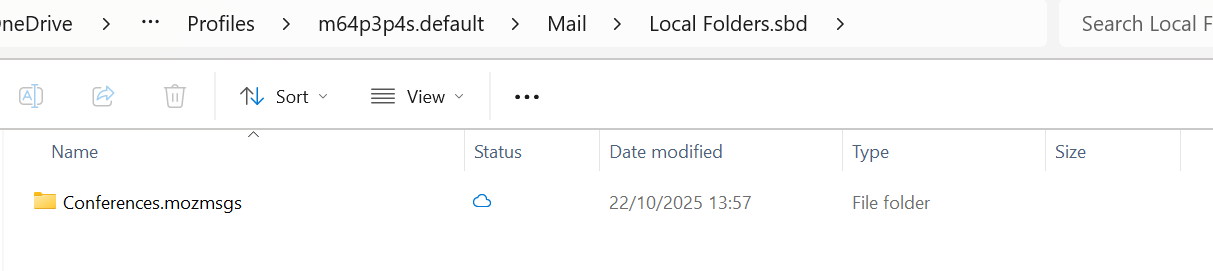
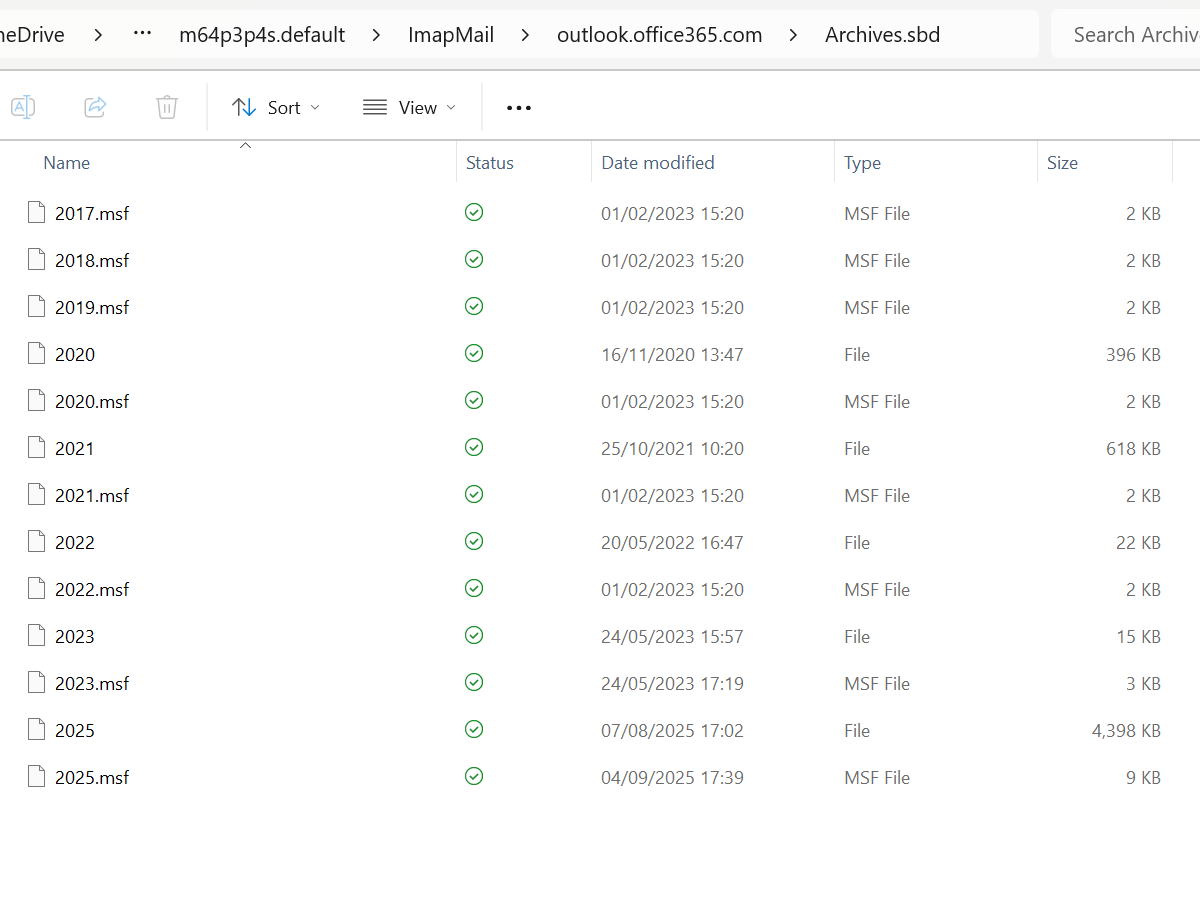
Hi Matt - just to highlight (I just found out in answering to Mapenzi )when I go to ImapMail (C:\Users\...\Thunderbird\Profiles\m64p3p4s.default) I just now see an Archives.sbd folder ... but it's empty!!!! see screenshot!
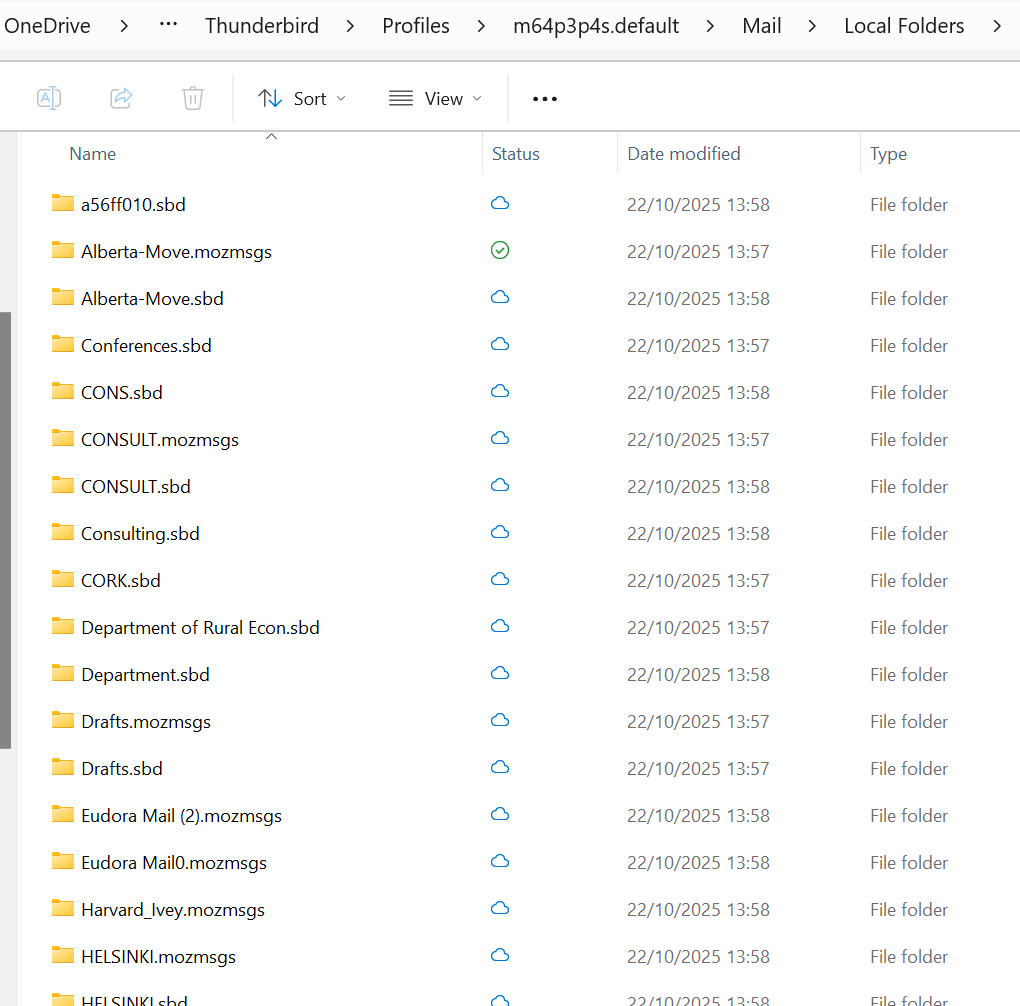
And having found that Local Folders.sdb is basically empty, I open instead Local Folders, and see lots of sub-folders (second screenshot) - with up-to-date subfolders ... but why on earth are these sub-folders here (am lost, sorry)?
THANKS AGAIN!
Bodo said
And having found that Local Folders.sdb is basically empty, I open instead Local Folders, and see lots of sub-folders (second screenshot) - with up-to-date subfolders ... but why on earth are these sub-folders here (am lost, sorry)?
Bodo, I don't quite understand why you ask this question. I think that all these *.sbd folders in Local Folders in the profile are there since in Thunderbird's Local Folders you have created many folders such as "Alberta-Move", "Conferences", "CONS", Consulting", "CORK", ... etc which do contain sub-folders. We have been discussing this since the beginning. Unfortunately there is not a single mbox file (without extension) paired with a *.sbd folder having the same, name and this is the reason why Thunderbird cannot display folders with their sub-folders in your Local Folders.