


Windows 10 reached EOS (end of support) on October 14, 2025. For more information, see this article.

Hilfe durchsuchen

Vorsicht vor Support-Betrug: Wir fordern Sie niemals auf, eine Telefonnummer anzurufen, eine SMS an eine Telefonnummer zu senden oder persönliche Daten preiszugeben. Bitte melden Sie verdächtige Aktivitäten über die Funktion „Missbrauch melden“.

Weitere Informationen

installing on Debian

  • 3 Antworten
  • 0 haben dieses Problem
  • 60 Aufrufe
  • Letzte Antwort von jonzn4SUSE

Weitere Optionen

I’m trying to install the latest version of Firefox on Debian, as described at https://support.mozilla.org/en-US/kb/install-firefox-linux#w_install-firefox-deb-package-for-debian-based-distributions. I’ve tried twice, several days apart, but both times things fail at the third step, with the fingerprint not matching. Can I do anything besides try again later? I’m using Firefox ESR, as packaged by Debian, in the meantime.

I’m trying to install the latest version of Firefox on Debian, as described at https://support.mozilla.org/en-US/kb/install-firefox-linux#w_install-firefox-deb-package-for-debian-based-distributions. I’ve tried twice, several days apart, but both times things fail at the third step, with the fingerprint not matching. Can I do anything besides try again later? I’m using Firefox ESR, as packaged by Debian, in the meantime.

Alle Antworten (3)

Weitere Optionen

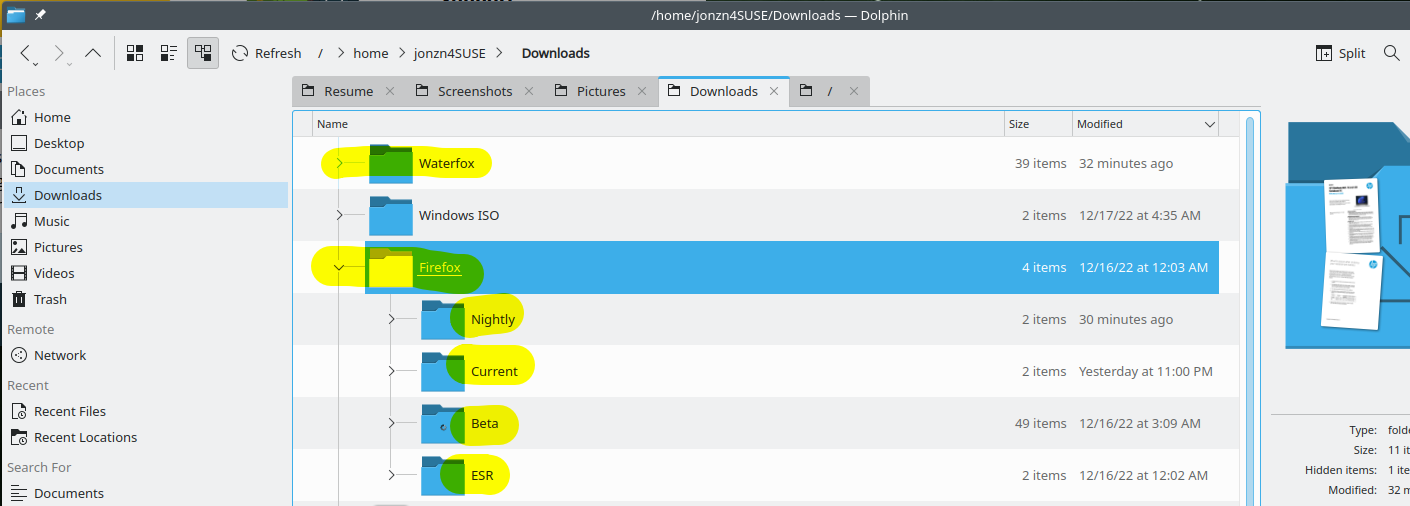
Why not just download a tarball, unzip, and just run firefox-bin? https://www.mozilla.org/en-US/firefox/all/#product-desktop-release I run all version from Mozilla from folders in my download folder. see screenshot
Weitere Optionen

Thank you. I’ve done that in the past, before Firefox began offering .deb packages. It worked, but the absence of integration into Debian’s package management system has disadvantages, which is why the method I was trying is provided and marked as recommended. Frankly, I hesitate to download anything until key fingerprints are verified.

Weitere Optionen

Gotcha. Good luck

Stellen Sie eine Frage

Sie müssen sich mit Ihrem Benutzerkonto anmelden, um auf Beiträge zu antworten. Bitte stellen Sie eine neue Frage, wenn Sie noch kein Benutzerkonto haben.