


Windows 10 reached EOS (end of support) on October 14, 2025. If you are on Windows 10, see this article.

Hilfe durchsuchen

Vorsicht vor Support-Betrug: Wir fordern Sie niemals auf, eine Telefonnummer anzurufen, eine SMS an eine Telefonnummer zu senden oder persönliche Daten preiszugeben. Bitte melden Sie verdächtige Aktivitäten über die Funktion „Missbrauch melden“.

Weitere Informationen

How do I remove an email account in Thunderbird 142.0?

  • 3 Antworten
  • 2 haben dieses Problem
  • 217 Aufrufe
  • Letzte Antwort von wrgarrett45
  • Gelöst

I have Thunderbird 142.0. I need to remove an email account. I followed the instruction: Right click on your account name. (I did) Please click on Settings. (I did) See attached image of the Settings panel Click on account actions. (Account actions does not appear) Make sure the account you want to delete is selected, then click remove account. Click on OK to delete.

The option Account Actions does not appear


If I remember correctly, the last time I had to remove an account, the option was located at the bottom of the left panel. I scroll down to the bottom of the left panel to Thunderbird Settings and there is no option listed to remove/delete an account.

Someone please help! Thanks, William
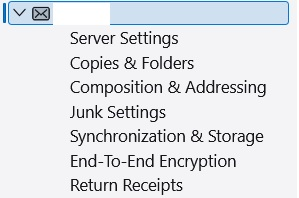
I have Thunderbird 142.0. I need to remove an email account. I followed the instruction: Right click on your account name. (I did) Please click on Settings. (I did) See attached image of the Settings panel Click on account actions. (Account actions does not appear) Make sure the account you want to delete is selected, then click remove account. Click on OK to delete. The option Account Actions does not appear If I remember correctly, the last time I had to remove an account, the option was located at the bottom of the left panel. I scroll down to the bottom of the left panel to Thunderbird Settings and there is no option listed to remove/delete an account. Someone please help! Thanks, William
Angefügte Screenshots

Ausgewählte Lösung

I don't have version 142 installed. But for older version ( 140.2 ) , the delete button is on the right side and it's Red.

Diese Antwort im Kontext lesen 👍 0

Alle Antworten (3)

Ausgewählte Lösung

I don't have version 142 installed. But for older version ( 140.2 ) , the delete button is on the right side and it's Red.

Hello

Additional information.

First screenshot Thundebird 128 Remove Account https://connect.mozilla.org/t5/ideas/remove-account-link/idc-p/87332/highlight/true#M46950 Second screenshot Thunderbird beta Remove Account, that's it same for Thunderbird 142.

Good grief! I I've gone BLIND! Thanks all!