


Windows 10 reached EOS (end of support) on October 14, 2025. For more information, see this article.

Hilfe durchsuchen

Vorsicht vor Support-Betrug: Wir fordern Sie niemals auf, eine Telefonnummer anzurufen, eine SMS an eine Telefonnummer zu senden oder persönliche Daten preiszugeben. Bitte melden Sie verdächtige Aktivitäten über die Funktion „Missbrauch melden“.

Weitere Informationen

BookMarks all have disappeared

  • 1 Antwort
  • 7 haben dieses Problem
  • 96 Aufrufe
  • Letzte Antwort von NoahSUMO

more options

My bookmarks have all disappeared, and while I have tried to follow the instructions on the help page to restore them, nothing is working as it has been indicated that it should in the help instructions. I do still have my Bookmarks tab on my tool bar. When I click on it I get a pull down menu, which does have a Manage BookMarks bar. However it is not at the bottom of my pull down menu, but at the top. When I click on the Manage BookMarks bar, instead of getting an Import and Backup Button, my pull down menu disappears, so I can not select Restore to use to get dated backups.

In the same way, I can not create new Bookmarks. When I click on Bookmark Current Tab, instead of getting the white box to enter instructions, the pull down menu disappears, just as it does when I click on Manage Bookmarks. I have never had this problem with Firefox before in all the years I have used it. I have no idea what has happened.

My bookmarks have all disappeared, and while I have tried to follow the instructions on the help page to restore them, nothing is working as it has been indicated that it should in the help instructions. I do still have my Bookmarks tab on my tool bar. When I click on it I get a pull down menu, which does have a Manage BookMarks bar. However it is not at the bottom of my pull down menu, but at the top. When I click on the Manage BookMarks bar, instead of getting an Import and Backup Button, my pull down menu disappears, so I can not select Restore to use to get dated backups. In the same way, I can not create new Bookmarks. When I click on Bookmark Current Tab, instead of getting the white box to enter instructions, the pull down menu disappears, just as it does when I click on Manage Bookmarks. I have never had this problem with Firefox before in all the years I have used it. I have no idea what has happened.

Alle Antworten (1)

more options

Please follow this link back to your question: BookMarks all have disappeared https://support.mozilla.org/questions/1523417

It could be that a new Firefox profile was created and it is being used instead of your older Firefox profile. Please go to your address bar and type in about:profiles then press Enter.

Copy and paste everything you see here. If you see more than 1 profile, it could be possible that one of the other profiles contains your missing bookmarks.

Example image:
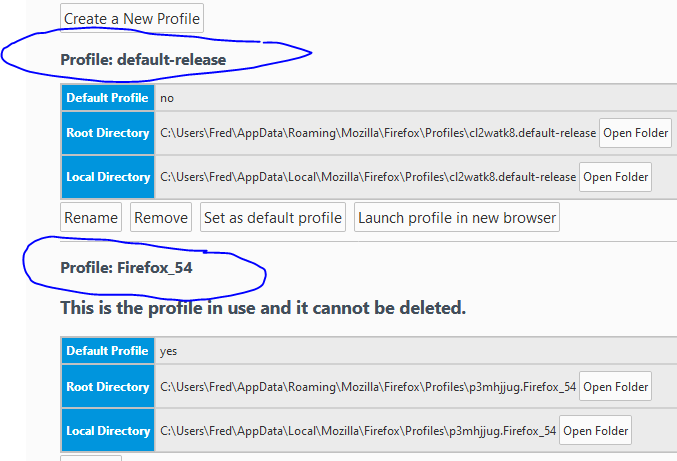
More information about multiple Profiles: https://support.mozilla.org/en-US/kb/recover-user-data-missing-after-firefox-update

Stellen Sie eine Frage

Sie müssen sich mit Ihrem Benutzerkonto anmelden, um auf Beiträge zu antworten. Bitte stellen Sie eine neue Frage, wenn Sie noch kein Benutzerkonto haben.