


Thunderbird always notifying me of my account's set birthday

Hello Thunderbird Team,
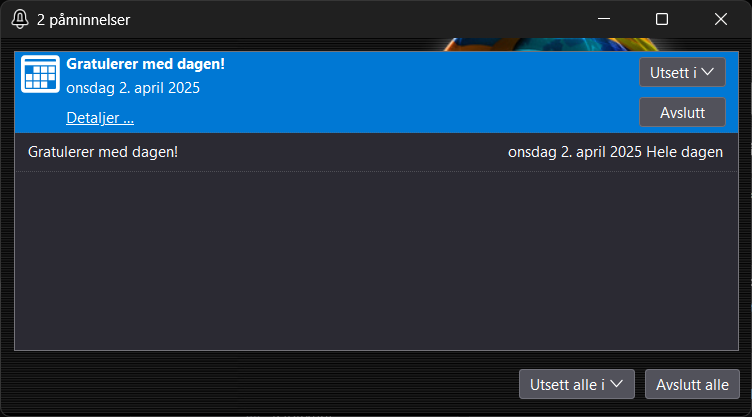
I have 2 Gmail accounts currently linked to my Thunderbird program, and every time I start the app and every few minutes the app is still running, ever since the 15th, it's been notifying me of my account's set birthday on both accounts (main & alt).
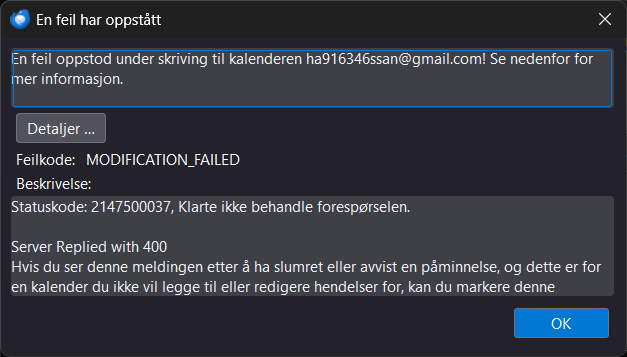
And every time I close the event window, click "Dismiss all", or "Snooze all", it throws a 300 MODIFICATION_ERROR popup.
So far, I have not been able to fix the error through Thunderbird's settings, so if you have the solution to this, just let me know!
Best regards, opera
P.S.: I'm not sure if this is the right place to be sharing this on, or if I have to reach out to Google Calendar support instead. If you know where I should be taking this, also let me know!
Alle Antworten (6)
Hello there
Oke happy birthday.
Can you try to disconnect these two account s of g -mail from the Thunderbirths account. Are these account s of gmail still having these pop up messages from that birthday?
Is time /date /location been set correctly? Be careful with data and be sure to have a back up of all data. Are you traveling with mobile devices or with pc device?can I ask ?
send me a messsge back after that.
Geändert am von Googlethunderbird.
Hello there
What account is causing the problem here ?
Hello there
Try to update the browser. Or try to read the calander settings at g-mail.
Geändert am von Googlethunderbird.
Hello there
I have some other statements on this subject, close your games with video card and or there are several commands or email data that are the same with you ,on your pc or calendar.
It s quite hot here .
I'm sorry.
Hello there
Try to use the troubleshoot mode for thunderbird and safe mode for Win or Macintosh.
To find the disturbing software or add on on that pc machine . Start up in that safe mode for windows or Mac and after that start up from there on to Thunderbird troubleshoot mode if that moment does not giving that same error again for that Birthday pop up or mod 300 or 400 errortype it s a piece of software or a mistaken bad add on.
https://support.mozilla.org/en-US/kb/troubleshoot-mode-thunderbird
Geändert am von Googlethunderbird.
Hello there
It Had got me some deeper into it , old add ons and new accounts and old account and the same or new add ons can be mistaken by the use of the actual program. And old add ons that could possible choose for the use of that new same account or otherwise the use with that old account with that new update d add on is trying to connect to that structure .
It turns out to be the exactly same error with all other email software and the use of add in s or add ons that are related to the users mail program in Thunderbird also in the use of other email software as Outlook or Google mail.
My suggestion is to update all software that is involved also for the operating system delete all outlook software and Microsoft software .it take time to solve this question.or it is just a little thing that could be fixed in a minute.
And use tools like trouble shoot mode with all the present email software that is recent there and delete the bad add ons or the use of safe mode for operating systems and do delete bothering software.
Delete and check after all your Add ons that were temporarily related to your calendar or Thunderbird software program.and try again to use Thunderbird without them , or delete windows hello.
Geändert am von Googlethunderbird.