


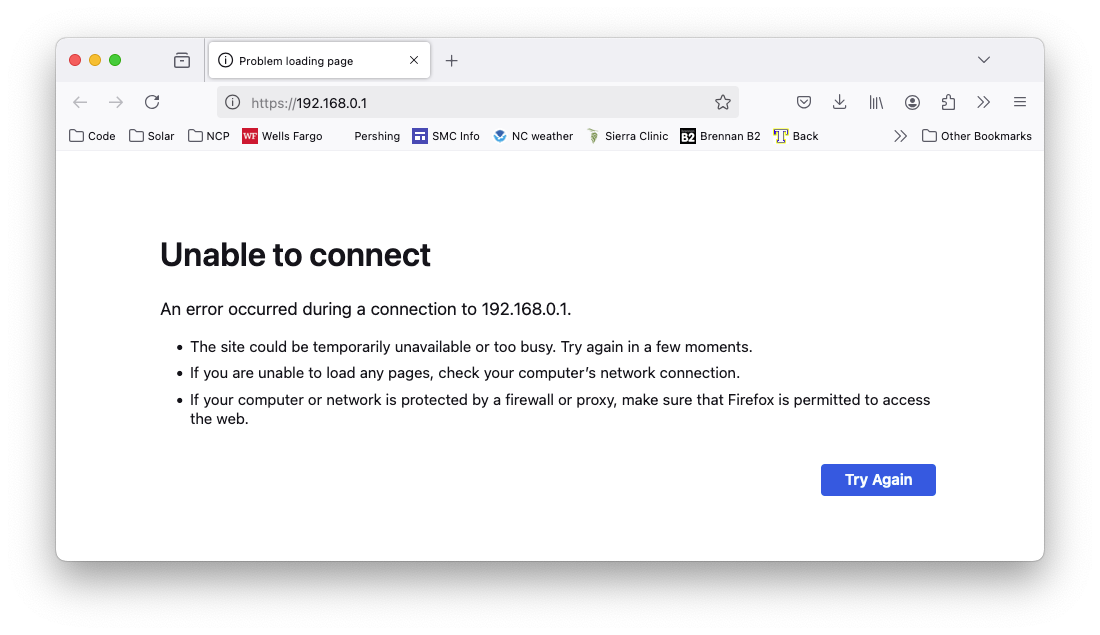
When I use Firefox133.0.3 to connect to my router at http://192.168.0.1 , I get "Unable to connect". Safari has no problem connecting.

When I use Firefox133.0.3 to connect to my router at http://192.168.0.1 , I get "Unable to connect". Safari has no problem connecting.
Alle Antworten (14)
Post a full browser screenshot of the page in both browsers.
Geändert am von jonzn4SUSE
Is Firefox trying to upgrade the connection to https:// ?
Yes, it's trying to upgrade to https.

Charlie, I've had similar problems in the past. What worked for me was to enter just the numbers part of the router's IP address into the address bar.
That is, rather than entering "http://x.x.x.x", you could try entering just "x.x.x.x".
Charlie said
Yes, it's trying to upgrade to https.
If you click in the address bar, delete just the s in https://etc. and try with http://etc. does it accept the change?
TechHorse said
Charlie, I've had similar problems in the past. What worked for me was to enter just the numbers part of the router's IP address into the address bar. That is, rather than entering "http://x.x.x.x", you could try entering just "x.x.x.x".
jscher2000 - Support Volunteer said
Charlie said
Yes, it's trying to upgrade to https.If you click in the address bar, delete just the s in https://etc. and try with http://etc. does it accept the change?
jscher2000 - Support Volunteer said
Charlie said
Yes, it's trying to upgrade to https.If you click in the address bar, delete just the s in https://etc. and try with http://etc. does it accept the change?
Of course that doesn't work. That enters the same address I started with.
Charlie said
TechHorse said
Charlie, I've had similar problems in the past. What worked for me was to enter just the numbers part of the router's IP address into the address bar. That is, rather than entering "http://x.x.x.x", you could try entering just "x.x.x.x".That does not work. It still changes it to https://x.x.x.x
Are you using HTTPS-Only Mode as in that case you should be able to create an exception?
cor-el said
Are you using HTTPS-Only Mode as in that case you should be able to create an exception?
I checked, and I have "Don’t enable HTTPS-Only Mode" selected. Plus, the error screen I get is "Unable to connect", NOT "Secure Site Not Available".
When you compare Safari, does the working page have a port number in the address? For example:
http://10.10.10.10:8080/
Did you try to enable HTTPS-Only Mode as that might give you more options to bypass upgrading to HTTPS?
I enabled HTTPS-Only Mode and created an exception for the site 192.168.0.1, and still get "Unable to Connect". Thanks for everyone's help, but this is clearly a Firefox bug. I'll do my best to help diagnose it, ,but I'm not interested in a workaround. My workaround is to use Safari.
You mentioned this was a very recent change, but just in case:
In Firefox 132, "Kyber" was turned on by default. Kyber is an updated SSL handshake intended to make SSL safe in the forthcoming era of quantum computing. However, older web server software may choke on the updated handshake.
To test whether this is an issue for using HTTPS with your router, you can roll back to the Firefox 131 "off" setting this way:
(1) In a new tab, type or paste about:config in the address bar and press Enter/Return. Click the button accepting the risk.
More info on about:config: Configuration Editor for Firefox. The moderators would like us to remind you that changes made through this back door aren't fully supported and aren't guaranteed to continue working in the future.
(2) In the search box in the page, type or paste kyber and pause while the list is filtered
(3) Double-click the security.tls.enable_kyber preference to switch the value from true to false
That probably won't take effect until the next time you quit/restart Firefox. This preference was mentioned in the following thread: https://support.mozilla.org/questions/1480312
I get "Unable to Connect", and it changes http to https, regardless of whether kyber is true or false. I don't go to the site regularly, so I can't really estimate the version of Firefox in which this behavior started.