


After having to upgrade to SuperNova now I have no column labels in mail - can sort/widen/customize as there are none?

The upgrade to SuperNova has messed up everything. After having to upgrade to SuperNova now I have no column labels in mail - can sort/widen/customize as there are none? How do I get column labels back on in the email. THanks for the help. ML

Alle Antworten (6)
that is CANNOT sort/widen/customize columns as there are no column labels? How do I get column labels back? Thanks
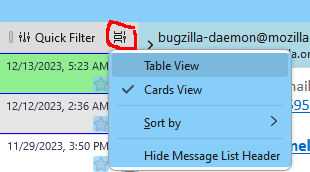
Click the icon next to the Quick Filter button and select Table View.

It would be nice if you had a picture of the Quick filter button or a description where it is. I have looked for it for 10 minutes and not found it. Version 115.6.0 (64-bit)
emaclean said
It would be nice if you had a picture of the Quick filter button or a description where it is. I have looked for it for 10 minutes and not found it. Version 115.6.0 (64-bit)
Enable View/Layout/Message List Header, click the icon circled in the picture.

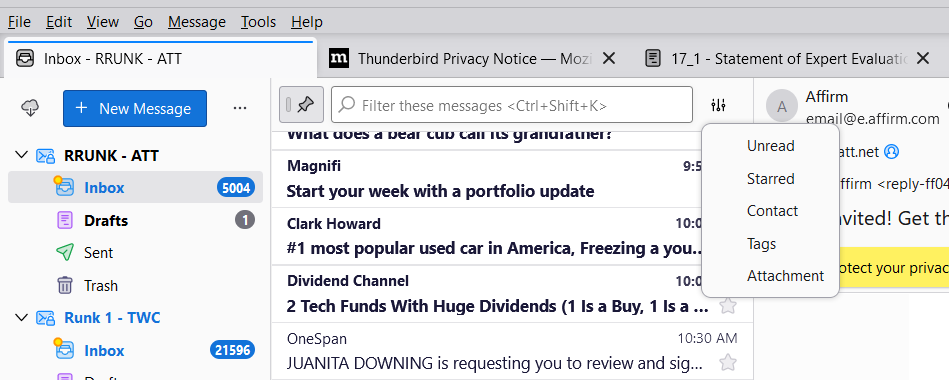
I do not have the above on my Thunderbird:
Mine looks like this (see image)
Where can I find the Table View?
Thanks!
Actually, please disregard the last message. Somehow (don't ask how) I found the message list display options icon.