


Hide / Disable saved logins Dropdown
Hey guys,
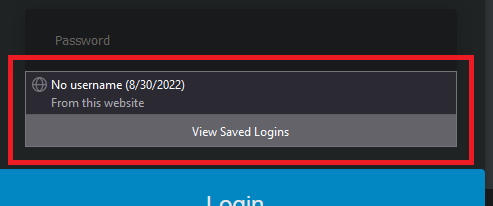
is it possible to disable the "saved logins" dropdown, whenever a password/email field gets focus? (see image)
I've already disabled "Autofill logins and passwords", but that just disables not directly autofilling the field.
I want to disable this field, since I can still use saved logins via right click "use saved password", which i prefer.
Its no form field, i've already checked that + it occurs on all login pages.
The only options i've found where: "signon.showAutoCompleteOrigins" - hides from which website
and "signon.showAutoCompleteFooter", which hides the lower part with "view saved logins"
Is there a way to disable this Dropdown completly, without loosing the auto save/ask to save new passwords?
Kind Regards
Firefox 104.0.1 (64-bit) - Fresh install (just imported logins)
Ausgewählte Lösung
If you want to use code in userChrome.css then use this code as your code isn't specific and affects all #PopupAutoComplete cases and there are more.
#PopupAutoComplete[resultstyles~="insecureWarning"] {
 display:none !important;
}
Diese Antwort im Kontext lesen
👍 1
Alle Antworten (3)
The only way I know to disable that drop-down list and use "Use Saved Login/Password" is to disable the Password Manager and use "Create New Login" to save a new password.
- Settings -> Privacy & Security -> Logins and Passwords -> [] "Ask to save Logins and Passwords for websites"
Note that if you use the Primary Password then you need to unlock the logins via about:logins or via the Device Manager (Certificates -> Security Devices -> Software Security Device).
Okey could hide it via userChrome.css
"hashtag"PopupAutoComplete {
display: none;
}
did the trick
ps: "hashtag" = # (couldn't write it, since it interprets it as list then)
Geändert am von Dschogo
Ausgewählte Lösung
If you want to use code in userChrome.css then use this code as your code isn't specific and affects all #PopupAutoComplete cases and there are more.
#PopupAutoComplete[resultstyles~="insecureWarning"] {
 display:none !important;
}