


Windows 10 reached EOS (end of support) on October 14, 2025. For more information, see this article.

Hilfe durchsuchen

Vorsicht vor Support-Betrug: Wir fordern Sie niemals auf, eine Telefonnummer anzurufen, eine SMS an eine Telefonnummer zu senden oder persönliche Daten preiszugeben. Bitte melden Sie verdächtige Aktivitäten über die Funktion „Missbrauch melden“.

Weitere Informationen

Firefox UI is not displaying websites correctly

  • 1 Antwort
  • 2 haben dieses Problem
  • 15 Aufrufe
  • Letzte Antwort von KEST

Weitere Optionen

Hey everyone,

For some reason, Firefox has been functioning strangely the last two days (it seems like since the latest software update was released). The display settings on the browser look really wonky for same reason. I've attached a screenshot of a website viewed on Firefox. Visit on your browser to compare how it looks (the address is: hoopshype.com).

Is anyone else experiencing this? And if so, is there a fix? I tried reinstalling Firefox but that didn't work.
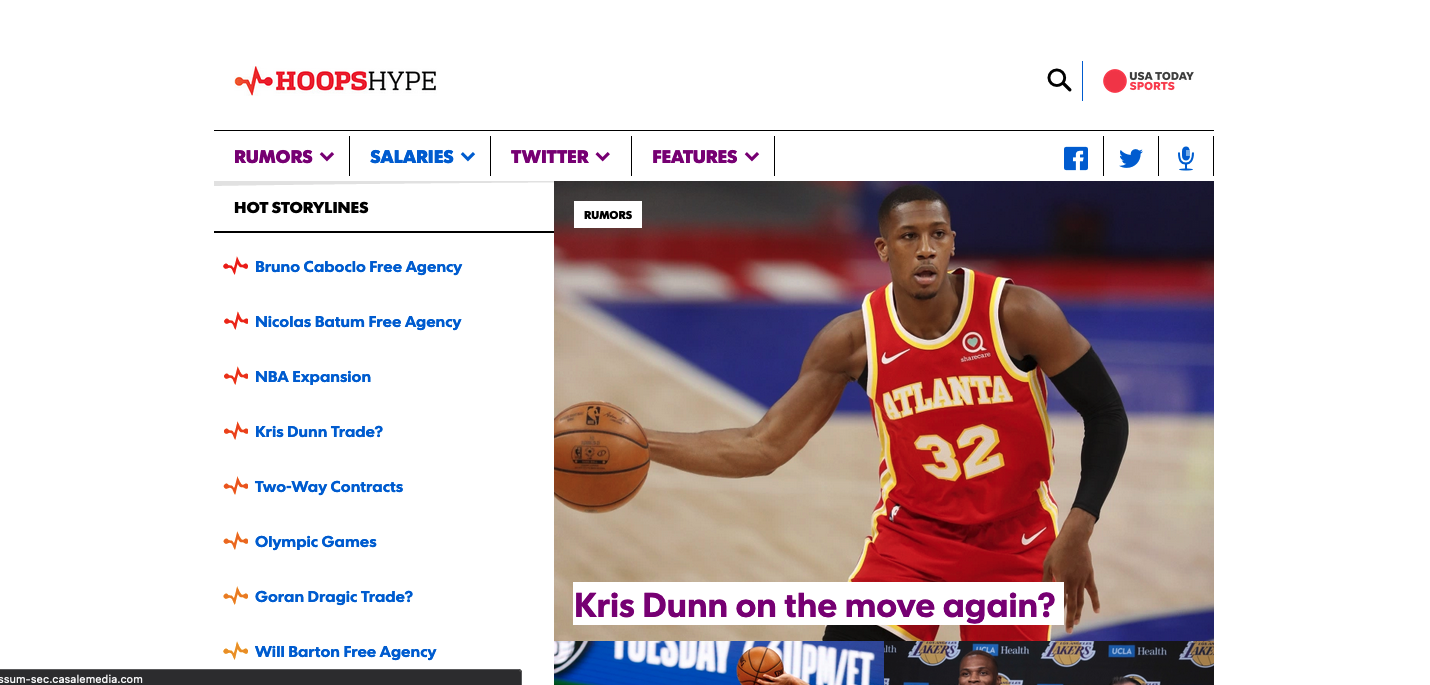
Hey everyone, For some reason, Firefox has been functioning strangely the last two days (it seems like since the latest software update was released). The display settings on the browser look really wonky for same reason. I've attached a screenshot of a website viewed on Firefox. Visit on your browser to compare how it looks (the address is: hoopshype.com). Is anyone else experiencing this? And if so, is there a fix? I tried reinstalling Firefox but that didn't work.
Angefügte Screenshots

Alle Antworten (1)

Weitere Optionen

I was having a similar issue (https://support.mozilla.org/en-US/questions/1346865) and it turned out to be related to using High Contrast Mode in my system settings.

I went to:

Firefox Menu > Preferences > Languages and Appearance/Fonts and Colors > Colors...

and then set "Override the colors specified by the page with your selections above" to "Never" which resolved the issue.