


Tabs crashing continuously

I'm absolutely furious about behaviour of tabs in the latest firefox update. I haven't change anything and I cannot play youtube videos and I've been able to do it normally until this last, bloody update! I've tried to disable media.wmfv9 or some other crap and it didn't work. I've tried anything in terms of mozilla support and it didn't FKN worked!!! I cannot stand another "oops, your tab has crashed" or "oops, firefox just eat ur ram and doesn't give a damn about them features, please restart it". You have like 2 weeks to fix it or I'm migrating to comodo dragon. FK U EOT. Just fix it.
Alle Antworten (2)
We're sorry to hear that Firefox is crashing. In order to assist you better, please follow the steps below to provide us crash IDs to help us learn more about your crash.
The crash report is several pages of data. We need the report numbers to see the whole report.
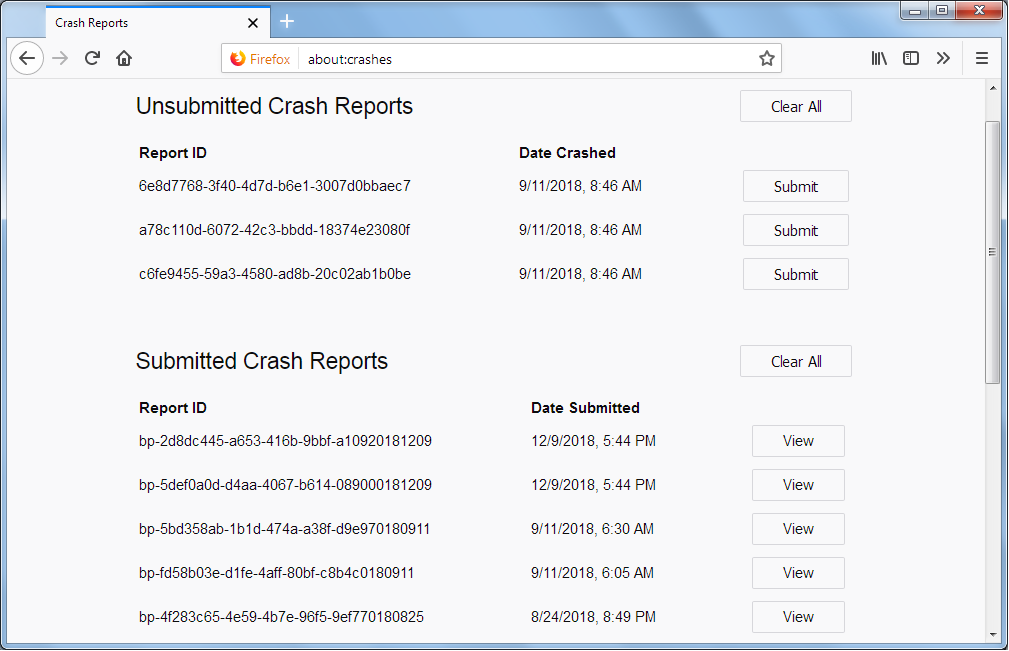
- Enter about:crashes in the Firefox address bar and press Enter. A list of Submitted/Unsubmitted Crash Reports will appear, similar to the one shown below.
- Copy the 5 most recent Submitted Report IDs that start with bp- and then go back to your forum question and paste those IDs into the "Post a Reply" box.
Note: If a recent Report ID does not start with bp- click on it to submit the report.
(Please don't take a screenshot of your crashes, just copy and paste the IDs. The below image is just an example of what your Firefox screen should look like.)
Thank you for your help!
More information and further troubleshooting steps can be found in the Troubleshoot Firefox crashes (closing or quitting unexpectedly) article.
This question has been locked because the original author has deleted their account. While you can no longer post new replies, the existing content remains available for reference.