Filters

I tried to filter spam now all my emails have gone. Can I get them back. Please
Alle Antworten (1)
Sounds like you created a Message Filter and then ran it on the account with drastic results.
Please post an image(s) of that Message Filter.
Do not compact any folders. Do not exit Thunderbird until you have changed any account setting you may have set up that auto compact (expunge) folders eg: Inbox or auto empty folders like Junk or Trash. You do not want any auto compacting ot auto deleting at this point.
Are you talking about a POP or IMAP mail account ?
Did those deleted emails go to your Trash folder or your Junk folder ? If they went to 'Junk', click on Junk folder and start to selected each as 'Not junk' to return them to the Inbox.
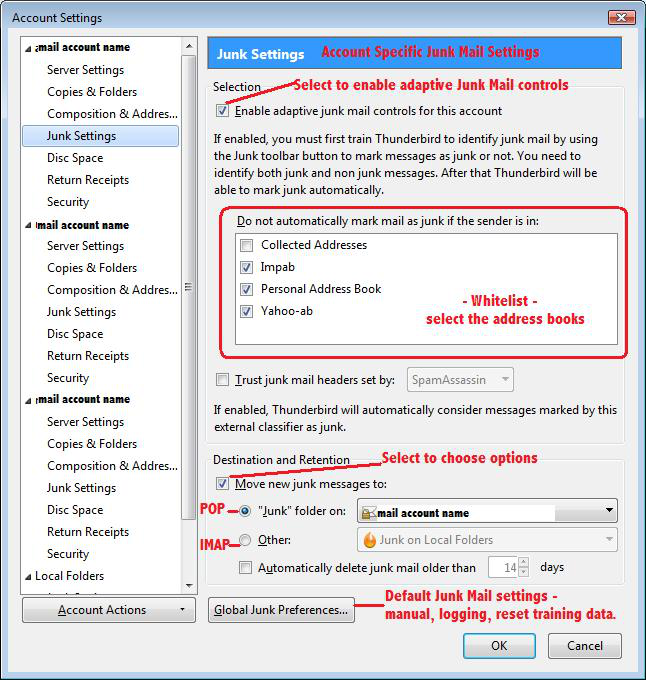
I'm not sure why you are using Message Filters to handle spam because Thunderbird has a built in Junk Controls which should be enabled and then trained to get full benefits. Message Filters are best used to move good wanted emails into already created folders for organising and storage. Using Message Filters to perform the same a bayesian filter could end up with you spending a good deal of your life creating the hundreds/thousands of permutations that are required to deal with spam.
Have you set up the Junk Controls ? https://support.mozilla.org/en-US/kb/thunderbird-and-junk-spam-messages Example image below.