


Join us to show up for other Firefox users 🦊. Earn fun badges and Mozilla swag vouchers! Find out more: https://mzl.la/askafox150

Windows 10 reached EOS (end of support) on October 14, 2025. If you are on Windows 10, see this article.

Hilfe durchsuchen

Vorsicht vor Support-Betrug: Wir fordern Sie niemals auf, eine Telefonnummer anzurufen, eine SMS an eine Telefonnummer zu senden oder persönliche Daten preiszugeben. Bitte melden Sie verdächtige Aktivitäten über die Funktion „Missbrauch melden“.

Weitere Informationen

How do I put text into a new "draft"?

  • 2 Antworten
  • 2 haben dieses Problem
  • 279 Aufrufe
  • Letzte Antwort von Pirate007
  • Gelöst

Newbie here. Exactly how to I drop text into a new (my first) draft? I created a sub-folder under drafts.. (see attached) and now that the folder is open.. how do I put text into it? I copied the text I needed from another program.. tried to copy it there and .. nothing.. I see no options...

When I right click I get no paste option.. when I click on "edit" in the top tool bar I get no option... When I click into the message field I get no cursor... What am I missing?
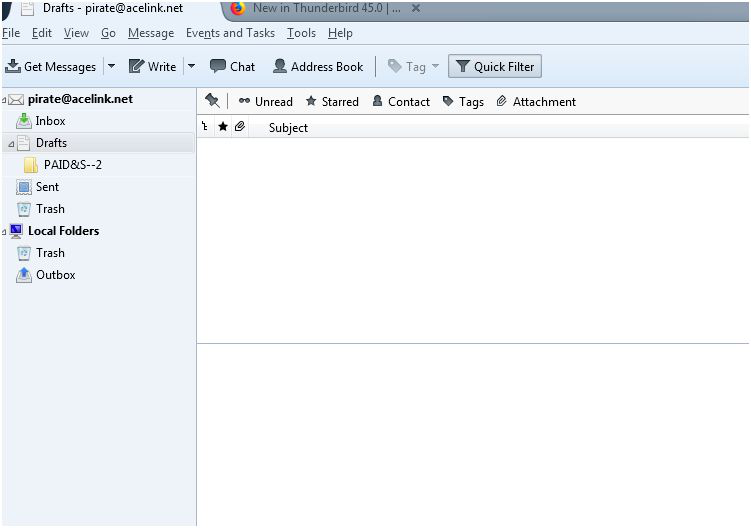
Newbie here. Exactly how to I drop text into a new (my first) draft? I created a sub-folder under drafts.. (see attached) and now that the folder is open.. how do I put text into it? I copied the text I needed from another program.. tried to copy it there and .. nothing.. I see no options... When I right click I get no paste option.. when I click on "edit" in the top tool bar I get no option... When I click into the message field I get no cursor... What am I missing?
Angefügte Screenshots

Ausgewählte Lösung

You double click the draft message to open it in a composition (Write) window. You cannot edit messages in the draft folder. Then either send it or save it as a draft again.

Diese Antwort im Kontext lesen 👍 1

Alle Antworten (2)

Ausgewählte Lösung

You double click the draft message to open it in a composition (Write) window. You cannot edit messages in the draft folder. Then either send it or save it as a draft again.

Thank you.. Got it.. Didn't realize the draft had to be an email .. I thought I could just type in their like a new word document then save as a draft...