


Windows 10 reached EOS (end of support) on October 14, 2025. If you are on Windows 10, see this article.

Hilfe durchsuchen

Vorsicht vor Support-Betrug: Wir fordern Sie niemals auf, eine Telefonnummer anzurufen, eine SMS an eine Telefonnummer zu senden oder persönliche Daten preiszugeben. Bitte melden Sie verdächtige Aktivitäten über die Funktion „Missbrauch melden“.

Weitere Informationen
Gelöst Archiviert

Cannot connect to smtp.gmail.com - worked a few days ago

Mel.Kos beantwortet
user1452612

I'm having trouble sending emails from my gmail accounts. It gets stuck on "Connecting to smtp.gmail.com...", after a few seconds an error message appears: "Sending of the message failed. The message could not be sent because the connection to Outgoing server (SMTP) smtp.gmail.com timed out. Try again."

I've confirmed that the settings are being used correctly https://prod-cdn.sumo.mozilla.net/uploads/images/2018-01-18-12-43-59-44a50f.png

And on the smtp settings https://prod-cdn.sumo.mozilla.net/uploads/images/2018-01-18-12-44-02-3ead30.png (username is my email) ... after Google's info: https://support.google.com/a/answer/176600?hl=en

The only thing I'm unsure of is authentication method. Thunderbird's default is 0Auth2, but while browsing the internet the preferred method seems to be Encrypted password. I have, of course, tried both - same problem.

Thunderbird version: 52.5.2 Windows 10 (x64) Incoming email works and SMTP works for another provider (yandex)

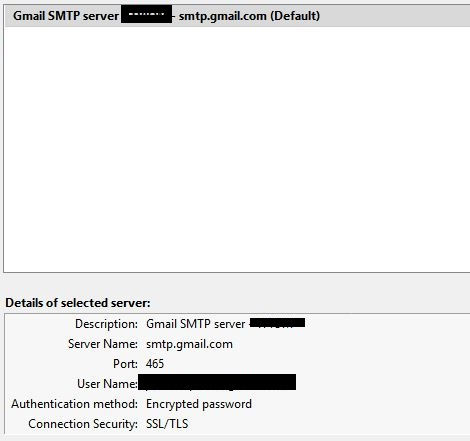
I'm having trouble sending emails from my gmail accounts. It gets stuck on "Connecting to smtp.gmail.com...", after a few seconds an error message appears: "Sending of the message failed. The message could not be sent because the connection to Outgoing server (SMTP) smtp.gmail.com timed out. Try again." I've confirmed that the settings are being used correctly https://prod-cdn.sumo.mozilla.net/uploads/images/2018-01-18-12-43-59-44a50f.png And on the smtp settings https://prod-cdn.sumo.mozilla.net/uploads/images/2018-01-18-12-44-02-3ead30.png (username is my email) ... after Google's info: https://support.google.com/a/answer/176600?hl=en The only thing I'm unsure of is authentication method. Thunderbird's default is 0Auth2, but while browsing the internet the preferred method seems to be Encrypted password. I have, of course, tried both - same problem. Thunderbird version: 52.5.2 Windows 10 (x64) Incoming email works and SMTP works for another provider (yandex)
Angefügte Screenshots

Geändert am von user1452612

Alle Antworten (2)

Ausgewählte Lösung

Turns out it was a firewall issue.

I'm using a VPN and solved it by adding a general rule to Iptables: iptables -A OUTPUT -p tcp --dport 465 -j ACCEPT (Google seems be picky or something)

Geändert am von user1452612

I added the rule and it seems to work. Of course 1 email isn't conclusive. I do hope that this is it though. Thank you.