


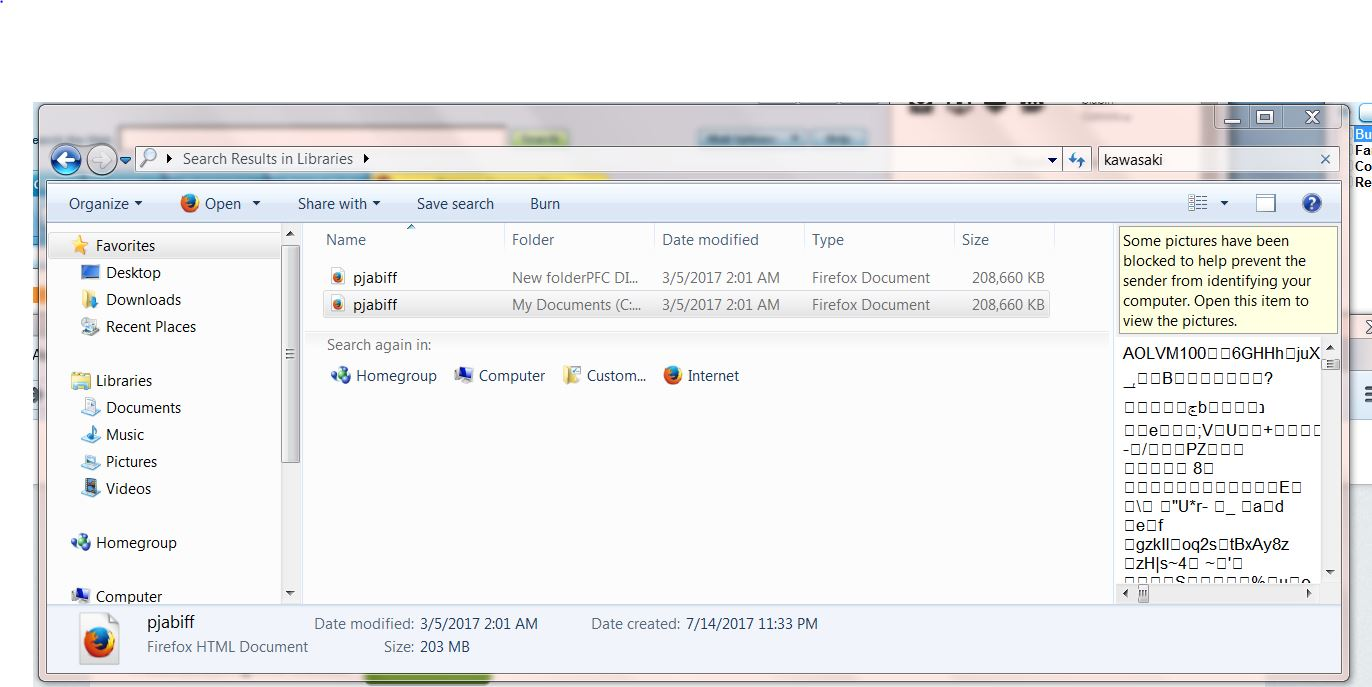
I don't want "some pictures have been blocked" for any reason.

The picture blocking notice appears when I open some files that are already on my hard drive. How to eliminate the blocking process?
Alle Antworten (9)

Are you talking about web pages or your hard drive?
Start Firefox in Safe Mode {web link} by holding down the <Shift> (Mac=Options) key, and then starting Firefox.
A small dialog should appear. Click Start In Safe Mode (not Refresh). Is the problem still there?
Hi, Fred, Thanks for the reply and suggestion. Unfortunately the problem is still extant. Since it's only a minor issue, and I'm not good at following even simple instructions, I won't waste anyone's time with this. Thanks again, Perry
That is up to you. We are here to help.
Hi Perry, Windows does this in the Windows Explorer preview pane with images from the internet for the same reason that images from untrusted senders are blocked in email messages: because the request to retrieve the image can be logged and used to determine that you viewed the page/message.
I don't know where this behavior is managed in Windows; when I search for threads about this online I mostly see a workaround, which is to switch from saving the Web page as HTML only, and instead use HTML complete, which creates a folder next to the .html file with the images used in the page (although it's called complete, often it's not completely complete).
I would assume that this data is attached to the file as a ADS (Alternate Data Stream).
jscher2000 said
Hi Perry, Windows does this in the Windows Explorer preview pane with images from the internet for the same reason that images from untrusted senders are blocked in email messages: because the request to retrieve the image can be logged and used to determine that you viewed the page/message. I don't know where this behavior is managed in Windows; when I search for threads about this online I mostly see a workaround, which is to switch from saving the Web page as HTML only, and instead use HTML complete, which creates a folder next to the .html file with the images used in the page (although it's called complete, often it's not completely complete).
HI J, Thanks for taking the time. The workaround of HTML complete sounds pretty interesting. I'll pursue it. It's pretty much how I've lived my life. Although, in retrospect, "wanderaround" might be more accurate. Thanks again, Perry
cor-el said
I would assume that this data is attached to the file as a ADS (Alternate Data Stream).
Hi, cor-el, Thank you for the suggestion to try nirsoft. I've had some luck in the past with them. I'll cross my fingers and give it a shot tomorrow. Appreciate the help, Perry.