Windows 10 reached EOS (end of support) on October 14, 2025. For more information, see this article.

Hilfe durchsuchen

Vorsicht vor Support-Betrug: Wir fordern Sie niemals auf, eine Telefonnummer anzurufen, eine SMS an eine Telefonnummer zu senden oder persönliche Daten preiszugeben. Bitte melden Sie verdächtige Aktivitäten über die Funktion „Missbrauch melden“.

Weitere Informationen

Calendar error after Lightning update

  • 4 Antworten
  • 3 haben dieses Problem
  • 21 Aufrufe
  • Letzte Antwort von YReginster

Weitere Optionen

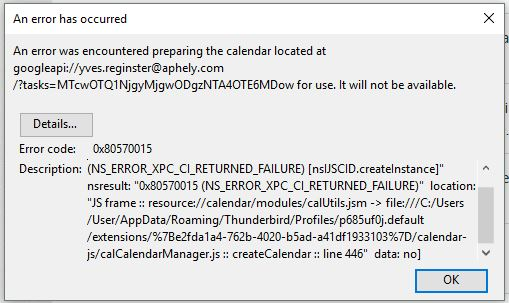
TB 54.1.1 on Linux after last update (22 May 17?) An error was encountered preparing the calendar located at googleapi://xxxx@gmail.com/?calendar=yyyygmail.com for use. It will not be available. [Exception... "Component returned failure code: 0x80570015 (NS_ERROR_XPC_CI_RETURNED_FAILURE) [nsIJSCID.createInstance]" nsresult: "0x80570015 (NS_ERROR_XPC_CI_RETURNED_FAILURE)" location: "JS frame :: resource://calendar/modules/calUtils.jsm -> file:///zzzz.default/extensions/%7Be2fda1a4-762b-4020-b5ad-a41df1933103%7D/calendar-js/calCalendarManager.js :: calCalendarManager.prototype.createCalendar :: line 446" data: no] Any ideas?

TB 54.1.1 on Linux after last update (22 May 17?) An error was encountered preparing the calendar located at googleapi://xxxx@gmail.com/?calendar=yyyygmail.com for use. It will not be available. [Exception... "Component returned failure code: 0x80570015 (NS_ERROR_XPC_CI_RETURNED_FAILURE) [nsIJSCID.createInstance]" nsresult: "0x80570015 (NS_ERROR_XPC_CI_RETURNED_FAILURE)" location: "JS frame :: resource://calendar/modules/calUtils.jsm -> file:///zzzz.default/extensions/%7Be2fda1a4-762b-4020-b5ad-a41df1933103%7D/calendar-js/calCalendarManager.js :: calCalendarManager.prototype.createCalendar :: line 446" data: no] Any ideas?

Alle Antworten (4)

Weitere Optionen

Edit Lightning 5.4 update 24 May 17

Weitere Optionen

I have the problem too.

Weitere Optionen

I did solve it but I cannot be sure how. I think it was as simple as updating gContactSync in Extensions.

Weitere Optionen

I simply went back to previous version of Thunderbird. de-install Thunderbird, re-install and install again Provider for Google Calendar.

My issue is now solved.