


Windows 10 reached EOS (end of support) on October 14, 2025. For more information, see this article.

Hilfe durchsuchen

Vorsicht vor Support-Betrug: Wir fordern Sie niemals auf, eine Telefonnummer anzurufen, eine SMS an eine Telefonnummer zu senden oder persönliche Daten preiszugeben. Bitte melden Sie verdächtige Aktivitäten über die Funktion „Missbrauch melden“.

Weitere Informationen

Download Files are not dragging to desktop properly

  • 5 Antworten
  • 4 haben dieses Problem
  • 50 Aufrufe
  • Letzte Antwort von svermill

Weitere Optionen

I am no longer able to drag and drop my downloaded files from Firefox directly to my desktop (ex: downloading a .pdf and dragging it to desktop). When I do that the file shows up as "file internet location" with the @ and the word "file" underneath it.

I've re-installed Firefox, reset download settings, etc. Nothing is working. Please help!

I've provided a screen shot of what the file looks like when dragged from my download file to the desktop.
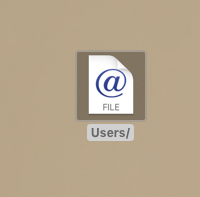
I am no longer able to drag and drop my downloaded files from Firefox directly to my desktop (ex: downloading a .pdf and dragging it to desktop). When I do that the file shows up as "file internet location" with the @ and the word "file" underneath it. I've re-installed Firefox, reset download settings, etc. Nothing is working. Please help! I've provided a screen shot of what the file looks like when dragged from my download file to the desktop.
Angefügte Screenshots

Alle Antworten (5)

Weitere Optionen

I believe that the computer or browser thinks you want to place the link on the desktop. Not the file itself.

Weitere Optionen

Thanks, Fred. How do I fix this if that's the case? Thanks!

Weitere Optionen

Download the file, then place it where you want.

Weitere Optionen

Could be his bug:

  • bug 1358075 - Fx53 no longer assigns user-friendly names to .webloc files on OS X

Please do not comment in bug reports
https://bugzilla.mozilla.org/page.cgi?id=etiquette.html

Weitere Optionen

Thank you! It looks like it might be...how do I fix it?