


How to disable automatic updates in Thunderbird Version 45.2.0?

Automatic updates are enabled by default in Thunderbird Version 45.2.0 and I would like to disable this option and configure the software for manual updates.
I'd appreciate if someone could provide an answer.
Regards - Elena
Ausgewählte Lösung
As most people use Windows OS, all info is always stated for Windows OS unless the person states otherwise.
There is a menu difference on a Mac. Options = Preferences via Menu Bar: Thunderbird > Preferences > Advanced' > Update' tab Or via Mail Toolbar: 'Menu icon > Preferences > Preferences > Advanced' > Update' tab
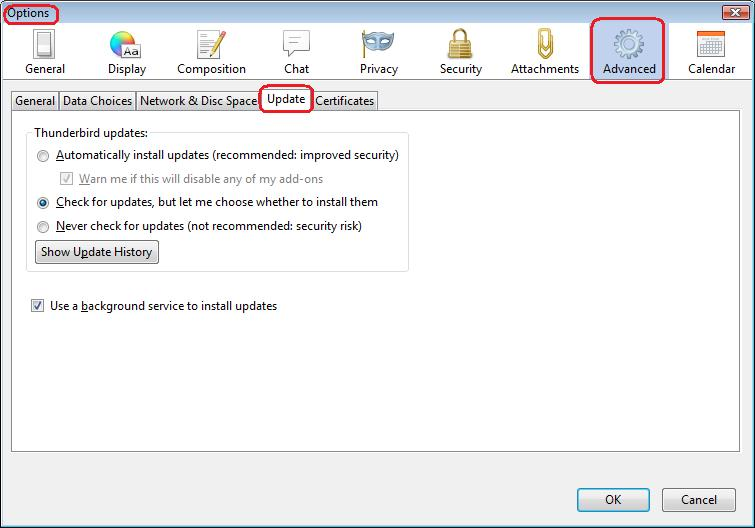
Geändert am von Toad-Hall
Alle Antworten (4)
via Menu Bar: 'Tools' > 'Options' > Advanced' > Update' tab OR via Mail Toolbar: 'Menu icon' > 'Options' > 'Options' > Advanced' > Update' tab
Suggest you select: 'check for updates, but let me choose whether to install them' click on OK
This is what I use. then I get the pop up remeinder that a new version is available, but I can choose the pop up 'Ask later' option to install it at a later time when it is more convenient.
Hi Toad-Hall,
Thanks for your response but my version of Thunderbird does not have an "Options" choice neither in "Tools" nor in "Menu icon"
I am attaching both screen-shots of the "Tools" and "Menu icon" showing there is nothing call "Options in them.
For clarification, I am running Thunderbird in a Mac.
Regards - Elena


Ausgewählte Lösung
As most people use Windows OS, all info is always stated for Windows OS unless the person states otherwise.
There is a menu difference on a Mac. Options = Preferences via Menu Bar: Thunderbird > Preferences > Advanced' > Update' tab Or via Mail Toolbar: 'Menu icon > Preferences > Preferences > Advanced' > Update' tab
Geändert am von Toad-Hall
Spot on! Your answer solved my question. Thank you for the help - Elena