


Creating a short cut: icon in address bar has disappeared.

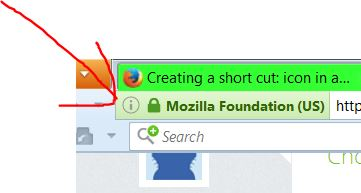
The icon used to click and drag for short cuts no longer appears. An "i" does appear (where the icon used to). How can I correct this problem please?
The icon used to click and drag for short cuts no longer appears. An "i" does appear (where the icon used to). How can I correct this problem please?
Ausgewählte Lösung
Hold down the left button on the icon, and drag it to the desktop.
deskCut {web link} This extension adds desktop shortcut creation to the context-menu for Windows, Linux and Mac.
Diese Antwort im Kontext lesen 👍 0Alle Antworten (6)

Ausgewählte Lösung
Hold down the left button on the icon, and drag it to the desktop.
deskCut {web link} This extension adds desktop shortcut creation to the context-menu for Windows, Linux and Mac.
Thanks. 'Hold down the left button on the icon, and drag it to the desktop' The icon is not there for me to click. It has gone. DeskCut has not resolved issue for me.
The i is the icon.
Yes! Thank you.
Glad to help. Safe Surfing.