


Pop Ups and Redirects Blocked When I Want To Allow Them

I visit some sites several times a day for research. EVERY time the allow pops up. I cant find a way to stop it. This is fairly recent, never happened before the newer updates. It has become an enormous wast of my time to have to keep clicking on the tab constantly.

Alle Antworten (6)

Hi, go to Options (cog wheel) - in the 3-bar menu unless you've moved it, > Advanced tab, then General tab (Accessibility), and make sure that 'Warn me when websites try to redirect or reload the page' is unticked/unchecked.
Hope that works for you.
Nothing is helping. Mozilla - MIND YOUR OWN BUSINESS AND STAY OUT OF MINE!!!! I do not need or want your help with websites I visit!

Hi,
The people who answer questions here, for the most part, are other Firefox users volunteering their time (like me), not Mozilla employees or Firefox developers.
If you want to leave feedback for Firefox developers, you can go to the Firefox Help menu and select Submit Feedback... or use this link. Your feedback gets collected at http://input.mozilla.org/, where a team of people read it and gather data about the most common issues.
Did you follow the directions you were given? Is the option off?
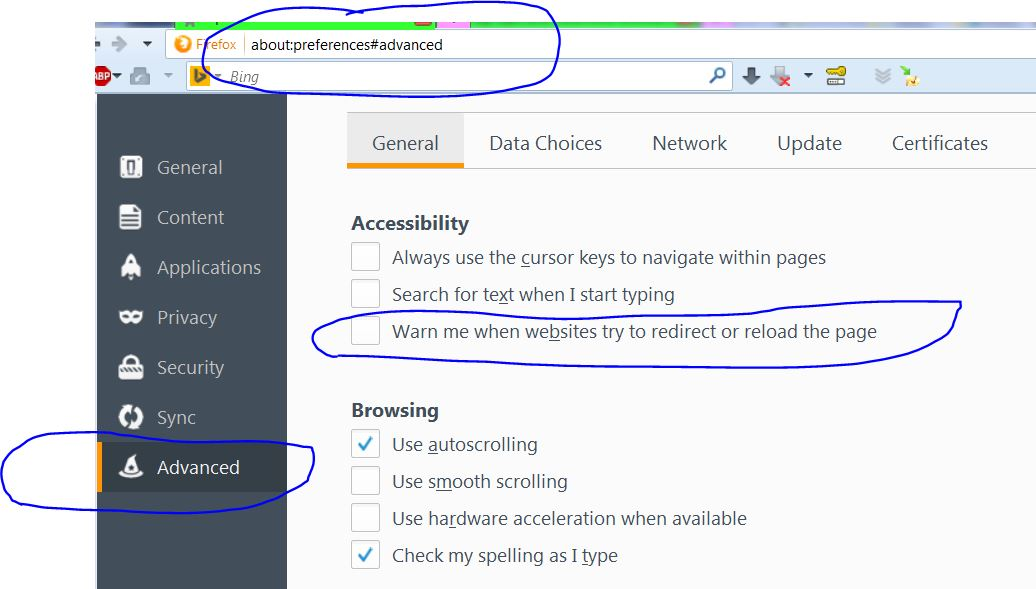
It has always been OFF!
Make sure it is still off. Some bad programs are known to change settings.
Start Firefox in Safe Mode {web Link} by holding down the <Shift>
(Mac Options) key, and then starting Firefox. Is the problem still there?