


Firefox's customized toolbar goes to the default settings after restart.

Firefox's customized toolbar, right below the URL tabs, goes to the default settings after restart. When I restart Firefox the Ghostery, Lastpass button move all the way to the right of the toolbar past the Google Search. The WOT button, Thumbnail Zoom Button and X-notifier, go away completely and all have to be put back where I had them, every restart, after right clicking the toolbar and opening "Customize."
Ændret af saneman den
Valgt løsning
This may help you . Please reply and tell us whether this helped you!
Alle svar (7)
Heard about Tab Groups? They organize your tabs, eliminating clutter. Try it http://mzl.la/d21MyY
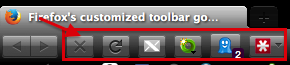
Firefox's customized toolbar, right below the URL tabs, goes to the default settings after restart. When I restart Firefox the Ghostery, Lastpass button move all the way to the right of the toolbar past the Google Search. The WOT button, Thumbnail Zoom Button and X-notifier, go away completely and all have to be put back where I had them, every restart, after right clicking the toolbar and opening "Customize." This photo may give you a more clear idea.
Ændret af saneman den
Valgt løsning
This may help you . Please reply and tell us whether this helped you!
Resolved!
Ændret af saneman den
I wish there was an easier way then having to reset Firefox everytime something like this happens, although a minor inconvenience, it seems to of really happened a lot more since the update schedule started to keep up with Google's.
You can check for problems caused by a corrupted localstore.rdf file if it happens again.
You can also check for issues caused by an extension that isn't working properly.
I have already reset it, but now I have made a copy of the localstore.rdf file in case it happens again.