


Phish attempt

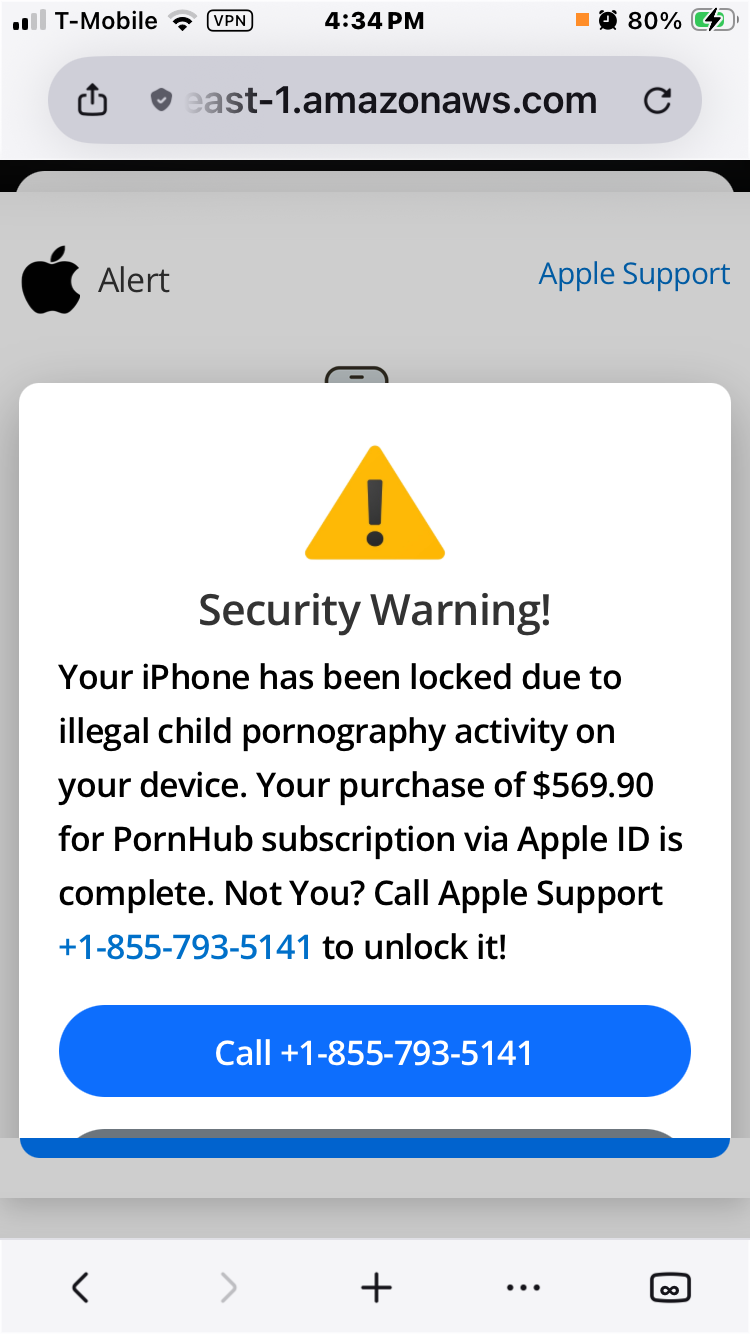
Going to the FF browser on my iPhone gets me only to a phish attempt. I have not clicked or interacted with it but I also can’t figure out how to dismiss it from FF though I have other browsers. Screenshot attached. I have not called the number.
I can use the others browsers (Chrome and DDG).
Alle svar (2)
Hello,
Firstly, make sure you keep not interacting with this scam. Next, force close the browser (just close it normally). then, clear browser history if it keeps popping up. Lastly, if it is frozen, restart your phone.
After this, you are back to normal, and you have not leaked any data, as you have not given them any info by not interacting.
It appears the dialog is not blocking the browser — you can just tap the back button to navigate away, tap the "tabs" [∞] icon to get a tab overview where you can close the tab, or just tap the address bar and type some new location to go elsewhere.
In case the dialogs were blocking the UI it would be different e.g. support.mozilla.org/questions/1605729 but it doesn't seem to be such case and you can just close it…