


Pinned sites disappear after rebooting on Mac

Hello community,
I've been moved to MacOS at work and since then, Firefox will not always restore my pinned sites when I start it the next day.
Here is what I do:
- Right click a tab, select "Pin Tab"
- Go about my day
- At the end of the day, I close Firefox by using command Q and shutdown my Mac
- The next day, I start Firefox and most of the time, my pins are gone
I did not have this issue on Windows Firefox. I am using MacOS 26.5.2 and Firefox 152.0.4 Firefox says "Your browser is being managed by your organization" in settings. It is a link that can be clicked and the only active policy showing there is "DisableAppUpdate" which I assume is because we have our own tool to manage software updates.
Any idea what could cause my pinned tabs to disappear? I did not really customize the settings so far, I do NOT clear browsing data when exiting FF and the startup option "Open previous windows and tabs" is NOT selected. I have Ecosia and 1Password as plugins.
Any help appreciated, thank you.
Alle svar (7)
Update on this.
It seems there is a pattern where closing FF either with command+Q or the red X will not bring back pinned tabs.
If I leave FF open and just shutdown my Mac, next time I start up and open FF, the pinned tab will be there.
I'm starting to wonder if this could be another quirk of MacOS but will do more thorough testing.
Valgt løsning
At least the red "X" definitely is a destructive action, in a way to close out the window (even if it's a last one, the app will still be running empty, but every window is closed — so next time all you get restored is… nothing).
As for CMD+Q that might depend on the global macOS system settings, do you see any difference if you flip this switch one way or another: (attached) ?
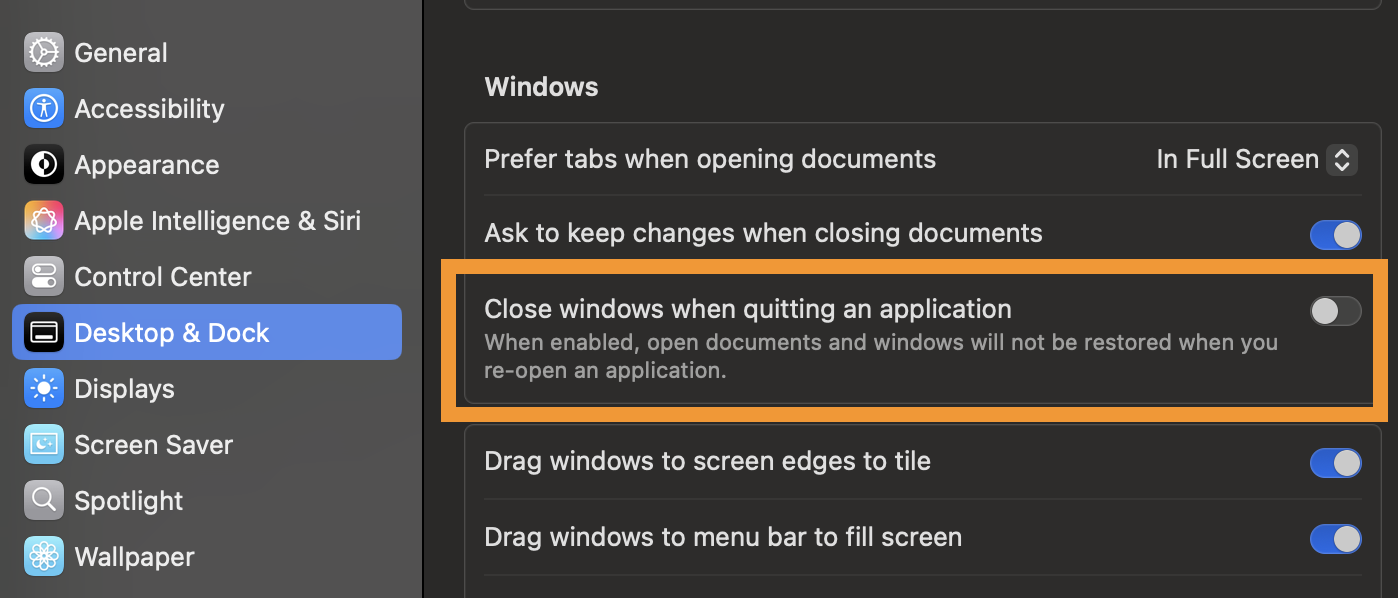
Thanks for the suggestion. It was enabled in my settings, I've disabled it to see if it helps.
What puzzles me is I thought pinned tabs should always come back, no matter how you close the window/app. Does this work differently on Mac?
With the "x" close button, Windows close the app if you're on its last window (and quit the actual app, not closing the actual window) . Mac does not and only closes the window, not the app, so the app runs with zero windows and nothing to save next time. Therefore on Windows you're restoring your last content, on Mac you're opening just an empty state.
And the system preference I shared above basically does the same on quitting, it first closes all individual windows so there's blank slate when the app is restarted next time. I always disable mine, as I find it confusing, so chances are once you try with this disabled, and not closing the browser windows individually by the "x" semaphore button but rather the whole app from Firefox menu or its dock icon by "Quit" item, the restoring might work more comparable to what you're used to from Windows.
I see, thanks for sharing this, it sounds like an important behaviour to know about MacOS. Armed with that knowledge, I'll conduct more testing and report back. I think I'll test the "Open previous windows and tabs" as well since I didn't want to enable this in the first place but thought that might have prevented the pinned tab from staying.
Hi,
As a moderator, I'm going to mark jbr's first reply as a solution to highlight it for other users. If you disagree, you can click the Undo solution button.
PS Jan's already shared a great explanation (and I also had no idea about this Mac difference), but just wanted to emphasize that pinned tabs belong to a window, not browser as a whole. Therefore if you have several windows, each of them has its own pinned tabs (or no pinned tabs).
Sounds good, I'll update with anything else I find on top of that.