


Windows 10 reached EOS (end of support) on October 14, 2025. If you are on Windows 10, see this article.

Søg i Support

Avoid support scams. We will never ask you to call or text a phone number or share personal information. Please report suspicious activity using the “Report Abuse” option.

Læs mere
Løst

raspberry pi open search in new tab does not work even after "Open links in tabs instead of new windows" is checked and "browser.search.openintab" is set to true

jimtkeigher replied
jimtkeigher

I have a Raspberry Pi 4b with a 64bit 4 core Arm CPU and 8GB ram. It is currently using Debian Trixie with the Xfce4 desktop.

I installed Firefox, and went through the setup. I made sure that in settings -> general the "Open links in tabs instead of new windows" is checked. I also set the about:config "browser.search.openintab" is set to true. My default search engine is DuckDuckGo.

Firefox will not open any search in a new tab. It opens them in the search results tab only. I have an x86-64 notebook and an x86-64 desktop running Xubuntu that are using the same settings, and they function properly.

Am I missing something? Is this a peculiarity to the arm version of Firefox? Is there another setting specific the Raspberry Pi or arm Firefox that I have to change?

Cheers!

I have a Raspberry Pi 4b with a 64bit 4 core Arm CPU and 8GB ram. It is currently using Debian Trixie with the Xfce4 desktop. I installed Firefox, and went through the setup. I made sure that in settings -> general the "Open links in tabs instead of new windows" is checked. I also set the about:config "browser.search.openintab" is set to true. My default search engine is DuckDuckGo. Firefox will not open any search in a new tab. It opens them in the search results tab only. I have an x86-64 notebook and an x86-64 desktop running Xubuntu that are using the same settings, and they function properly. Am I missing something? Is this a peculiarity to the arm version of Firefox? Is there another setting specific the Raspberry Pi or arm Firefox that I have to change? Cheers!

Alle svar (2)

Valgt løsning

Please see attached img.
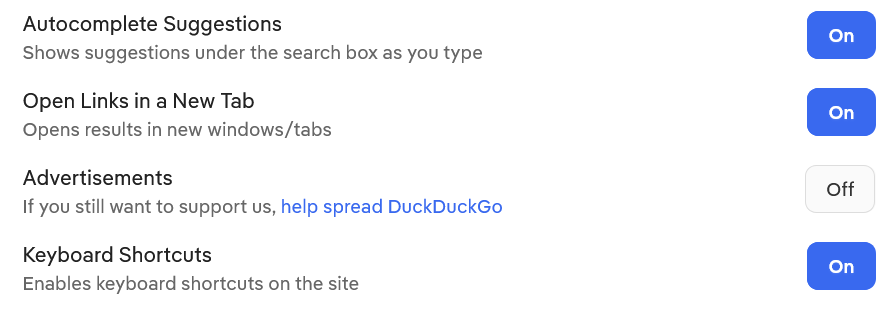
Thank you.

It took a while for me to find the switch. I use Firefox as my home page. It finally clicked in to go to the DuckDuckGo web site.

The odd thing is that I do not remember setting it on my notebook or desktop. Old age is creeping up on me, I guess!

Cheers!

Stil et spørgsmål

Du skal logge ind på din konto for at svare på et indlæg. Start et nyt spørgsmål, hvis du ikke har en konto endnu.