


Windows 10 reached EOS (end of support) on October 14, 2025. If you are on Windows 10, see this article.

Søg i Support

Avoid support scams. We will never ask you to call or text a phone number or share personal information. Please report suspicious activity using the “Report Abuse” option.

Læs mere

Toolbar is not working correctly on main display (Ubuntu)

  • Ingen svar
  • 0 har dette problem
  • Åben

Hi,

Recently I have a problem with toolbar and in the Firefox browser. Usually I have 3 display (display from laptop and two monitors). When I use Firefox browser on the main display the toolbar very often is not working correctly.

Mainly the problem is with the folders inside the toolbar, so when I hover any folder, the bookmarks saved in that folder don't appear or appear for just one/two sec, then they disappear.

The second problem is when I have the firefox open on the second display (or on the laptop display) and I moved any tab (only the tab, not entire Firefox application), then my toolbar shows only the first bookmark that is saved on my list.

In attachments I added two ss (one is with my normal view on toolbar, and the second one is with the only first bookmark)
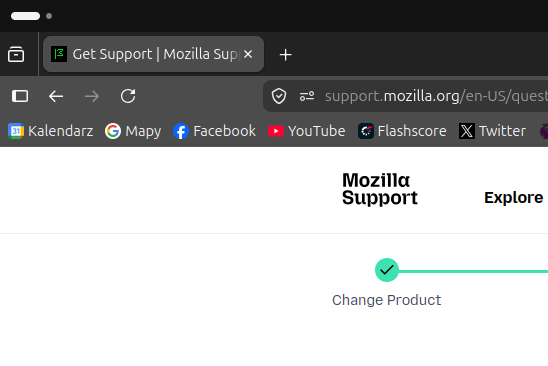
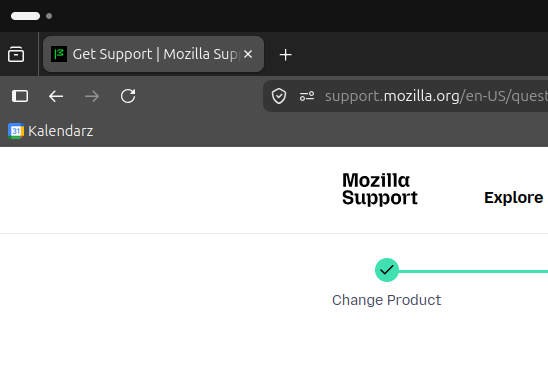
Hi, Recently I have a problem with toolbar and in the Firefox browser. Usually I have 3 display (display from laptop and two monitors). When I use Firefox browser on the main display the toolbar very often is not working correctly. Mainly the problem is with the folders inside the toolbar, so when I hover any folder, the bookmarks saved in that folder don't appear or appear for just one/two sec, then they disappear. The second problem is when I have the firefox open on the second display (or on the laptop display) and I moved any tab (only the tab, not entire Firefox application), then my toolbar shows only the first bookmark that is saved on my list. In attachments I added two ss (one is with my normal view on toolbar, and the second one is with the only first bookmark)
Vedhæftede skærmbilleder

Du skal logge ind på din konto for at svare på et indlæg. Start et nyt spørgsmål, hvis du ikke har en konto endnu.