


Firefox is not re-directing to a site when I "click here" (see below)

When I click on a link to BC Auctions in an email from them I get ;
If this page does not automatically re-direct you to BC Auction®, please click here.
The "click here" doesn't redirect.
Works okay in Safari
When I click on a link to BC Auctions in an email from them
I get ;
If this page does not automatically re-direct you to BC Auction®,
please click here.
The "click here" doesn't redirect.
Works okay in Safari
Alle svar (1)
Enhanced Tracking Protection is a collection of Firefox features that protects your privacy by blocking trackers that follow you online to collect information about your browsing habits and interests. It also includes protection against harmful scripts.
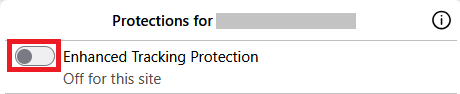
If a site seems broken, you can try turning off Enhanced Tracking Protection for that website:
- Click the shield
 icon at the left of the address bar.
- At the top of the panel, toggle off the Enhanced Tracking Protection switch
 . The site will be added to your Enhanced Tracking Protection exception list, allowing trackers on it, and the page will reload automatically.
-
This will allow trackers to load on that website while keeping you protected on other sites. To learn more, see Enhanced Tracking Protection in Firefox for desktop.