


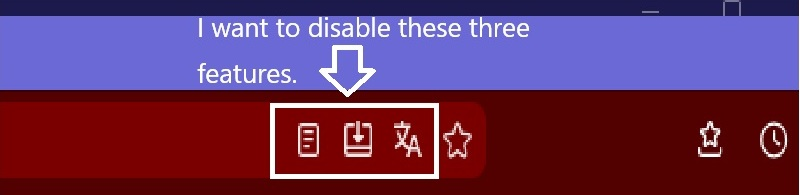
Hello. I would like to hide the three types of icons that appear in the Firefox address bar.
Hello. I would like to hide the three types of icons that appear in the Firefox address bar. I don't use this feature at all, so I want to hide it.
Valgt løsning
Hello
About, Firefox Reader View for clutter-free web pages. https://support.mozilla.org/en-US/kb/firefox-reader-view-clutter-free-web-pages
About, icon. You can try an code userChrome.css
#reader-mode-button-icon{display:none!important;}
Tip: If a page is available in Reader View, you can also access Reader View from the Menu bar when the Menu bar is enabled, by clicking View then Enter Reader View. Alternatively, you can press the key F9 to toggle Reader View.
Læs dette svar i sammenhæng 👍 0Alle svar (4)
Hello
About, Firefox Translations. https://support.mozilla.org/en-US/kb/website-translation
1 - Go to configuration editor for Firefox https://support.mozilla.org/en-US/kb/about-config-editor-firefox 2 - Enter a search term browser.translations.enable the preference, set to true, by defaut.
About, use web apps in Firefox for Windows. https://support.mozilla.org/en-US/kb/web-apps-firefox-windows
1 - Go to configuration editor for Firefox. 2 - Enter a search term browser.taskbarTabs.enabled the preference, set to true, by defaut.
About, Firefox Reader View for clutter-free web pages. https://support.mozilla.org/en-US/kb/firefox-reader-view-clutter-free-web-pages
1 - Go to configuration editor for Firefox. 2 - Enter a search term reader.parse-on-load.enabled the preference, set to true, by defaut.
About, Firefox Translations. https://support.mozilla.org/en-US/kb/website-translation
When you visit a webpage in a supported language, the translation panel will open automatically. If it does not open, click the translation icon in the toolbar or select Translate page from the Hamburguer menu.
About, icon in the toolbar. You can try an code userChrome.css
#translations-button{display:none!important;}
Hello. Thank you for the detailed information. I'm glad I got it sorted. I really appreciate your cooperation. Thank you very much.
Valgt løsning
Hello
About, Firefox Reader View for clutter-free web pages. https://support.mozilla.org/en-US/kb/firefox-reader-view-clutter-free-web-pages
About, icon. You can try an code userChrome.css
#reader-mode-button-icon{display:none!important;}
Tip: If a page is available in Reader View, you can also access Reader View from the Menu bar when the Menu bar is enabled, by clicking View then Enter Reader View. Alternatively, you can press the key F9 to toggle Reader View.
Ændret af Agent virtuel den