


Windows 10 reached EOS (end of support) on October 14, 2025. If you are on Windows 10, see this article.

Søg i Support

Avoid support scams. We will never ask you to call or text a phone number or share personal information. Please report suspicious activity using the “Report Abuse” option.

Læs mere

Made Account recovery key - Now I have to sign in on the browser.. But have to make new profile every time

  • 1 svar
  • 1 har dette problem
  • 186 visninger
  • Seneste svar af Nico
  • Løst

I just wanted create Account recovery key to keep my account more secure. So I did that + updated my password.

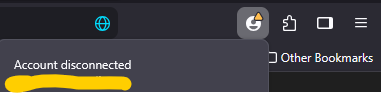
Now when I open the browser, it says account disconnected and that I need to create a new profile. I did that, but it started syncing from old chrome account with old extensions, bookmarks etc. Plus bookmarks from my phone.

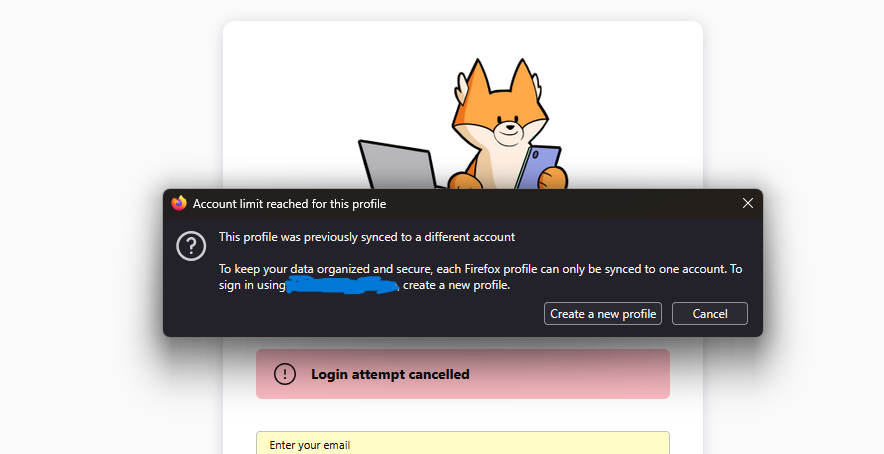
I try to sign in and create new profile with the original profile settings that I want. But it keeps saying "This profile was previously synced to a different account". And now that I saved the bookmarks and made a third, fourth profile. Those don't work as it wants me to sign in. Only the 2nd profile that Firefox made me create which has the old extensions, bookmarks etc. It is missing a lot. So now I am just stuck in create profile loop. And cant use the one I want because I wanted more security? Do I need to uninstall and install again, would that help? I wish there was someone to talk to help me. I just want to use my original profile that I used earlier today to update the security settings.

I just wanted create Account recovery key to keep my account more secure. So I did that + updated my password. Now when I open the browser, it says account disconnected and that I need to create a new profile. I did that, but it started syncing from old chrome account with old extensions, bookmarks etc. Plus bookmarks from my phone. I try to sign in and create new profile with the original profile settings that I want. But it keeps saying "This profile was previously synced to a different account". And now that I saved the bookmarks and made a third, fourth profile. Those don't work as it wants me to sign in. Only the 2nd profile that Firefox made me create which has the old extensions, bookmarks etc. It is missing a lot. So now I am just stuck in create profile loop. And cant use the one I want because I wanted more security? Do I need to uninstall and install again, would that help? I wish there was someone to talk to help me. I just want to use my original profile that I used earlier today to update the security settings.

Valgt løsning

Here are two images of what Firefox browser keeps saying

Læs dette svar i sammenhæng 👍 0
Alle svar (1)

Valgt løsning

Here are two images of what Firefox browser keeps saying

Stil et spørgsmål

Du skal logge ind på din konto for at svare på et indlæg. Start et nyt spørgsmål, hvis du ikke har en konto endnu.